Hotspot
What it is
A hotspot is a small pulsing marker anchored to an element. It does not interrupt anyone. When the user presses it, it opens a short card with a title, a body and optional buttons.
When to use it
Use a hotspot for something new or easily missed: a setting that was added last week, a button that moved. It draws the eye without taking over the screen. For something the user must read, use an announcement. For a sequence, use a walkthrough.
The example: Assignment emails hotspot
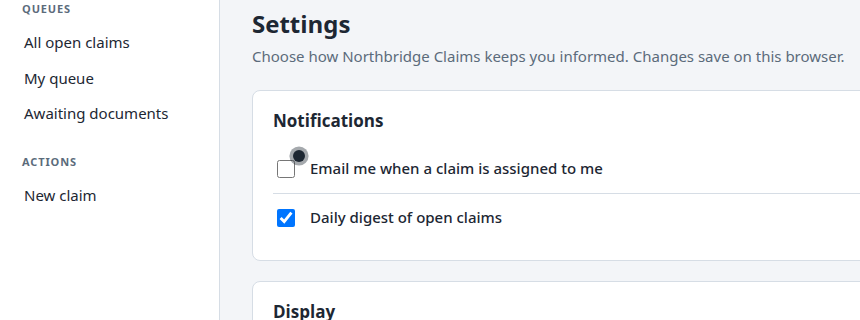
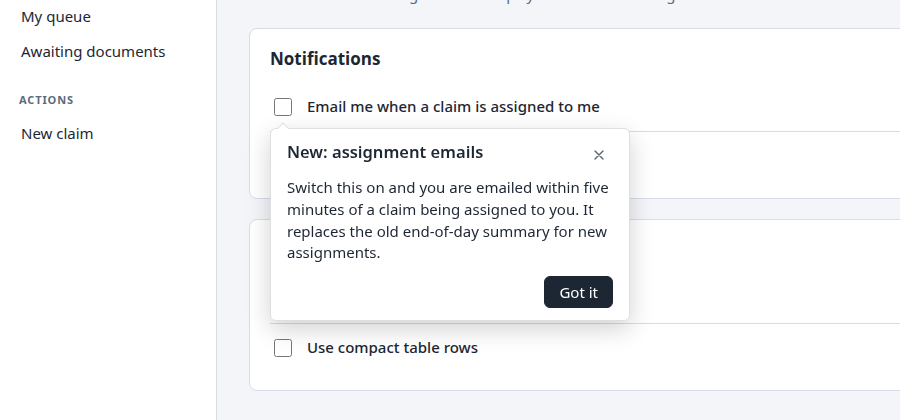
On the Settings page, a marker sits beside Email me when a claim is assigned to me. The card says New: assignment emails, explains what it does, and has one button, Got it.
Build it in the studio
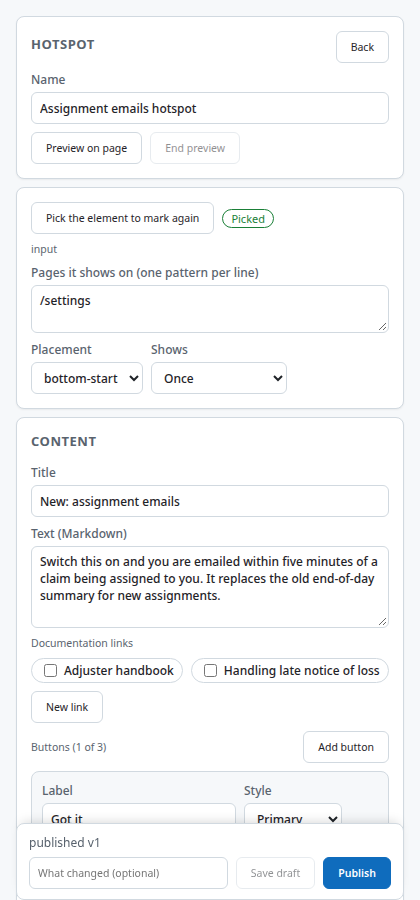
- New content, Kind Hotspot, Create. Name it Assignment emails hotspot. Set the page to
/settings. - Press Pick element and click the checkbox in the page.
- Choose where the card opens relative to the marker. Write a title and a body of two or three sentences.
- Add a button: label Got it, style primary, action dismiss.
- Set Frequency to once, so the marker goes away after the user has seen it.
- Preview all, then Publish.
How it behaves for the user
The marker pulses until pressed. Pressing it opens the card. Pressing Got it closes the card and, with frequency set to once, the marker does not return on later visits. With motion reduced in the operating system, the marker does not pulse.
Settings that matter
| Setting | Values |
|---|---|
| Anchor | The element the marker sits on |
| Placement | Side of the marker the card opens on |
| Content | Title, body, optional image, link to documents |
| Buttons | Up to the standard action set: dismiss, start content, open a resource, open a URL |
| Frequency | Once, once per version, every visit, until completed, manual only |
Gotchas
- Once per version brings the marker back whenever you publish a new version. Use it for content you edit often, and once for content that should never return.
- The marker is anchored to the element, not to a screen position. If the element moves, the marker moves with it.
- A hotspot on an element hidden inside a collapsed section is not drawn until the section opens.
Images on this page
| File | What it shows |
|---|---|
hotspot-marker.png |
The marker on the Settings page |
hotspot-open.png |
The open card |
studio-hotspot-editor.png |
The hotspot editor |