Simplifying Database Queries with AI & SQL Automation
A REST API that converts natural language into SQL queries using OpenAI, letting non-technical users query a database without SQL knowledge.
Business users kept asking my team for one-off data pulls: how many orders above $150 in December, which products are low on stock, that sort of thing. Every request meant a developer dropping their work to write a throwaway SQL query. So I built a REST API that does the translation instead. It feeds the database schema to an LLM, gets back a SQL query, runs it, and returns JSON. One codebase, four interchangeable providers (OpenAI, Azure OpenAI, Claude, and Gemini), switched by a single environment variable.
One warning before the code. The generate-and-execute endpoint runs model-generated SQL directly against the database. That is acceptable for a demo with seed data; it is not acceptable in production. Treat a read-only connection and SQL injection prevention as prerequisites, not future enhancements.
Technology Stack
-
Programming Language: .NET 9.0
-
API Framework: ASP.NET Core
-
Database Access: Dapper (lightweight ORM)
-
AI Integration:
- OpenAI GPT-4o
- Azure OpenAI
- Anthropic Claude
- Google Gemini
-
Container Management: Docker with multi-container orchestration
-
Configuration Management:
appsettings.jsonand environment variables -
Logging: Microsoft.Extensions.Logging
Architecture Overview
The system is composed of the following key components:
-
User Input: Users provide queries in natural language.
-
Service Factory: Dynamically selects the appropriate AI service provider based on configuration.
-
AI Service: Translates the input into SQL using schema and relationship context.
-
Database Service: Executes the SQL query and retrieves the results.
-
REST API: Provides endpoints for generating SQL, executing queries, and combining both functionalities.
-
JSON Output: Returns results and generated SQL in a structured format.
The flow, end to end:
- Client request: the web client posts a natural-language query (“Show all products with stock below 50”) to
SqlController. - Provider selection:
SqlAiServiceFactorypicks the configured AI service from environment variables orappsettings.json. - Schema context: the database service pulls tables, columns, data types, and foreign-key relationships from SQL Server and adds them to the prompt. This step is what lets the model use real table names instead of guessing.
- Query generation: the selected service returns
SELECT * FROM Products WHERE Stock \< 50, grounded in the actual schema. - Execution: the API runs the generated SQL against SQL Server.
- Response: results and the generated query go back together as JSON, so the client can always show its work.
Key Components
1. Database Service
The DatabaseService retrieves schema details and relationships while also executing SQL queries.
Schema Extraction:
public string GetSchemaAndRelationships(){ var schemaQuery = """ SELECT TABLE_SCHEMA AS SchemaName, TABLE_NAME AS TableName, COLUMN_NAME AS ColumnName, DATA_TYPE AS DataType FROM INFORMATION_SCHEMA.COLUMNS WHERE TABLE_SCHEMA != 'sys' ORDER BY TABLE_SCHEMA, TABLE_NAME; """; var relationshipsQuery = """ SELECT fk.name AS ForeignKeyName, tp.name AS ParentTable, tr.name AS ReferencedTable FROM sys.foreign_keys AS fk INNER JOIN sys.tables AS tp ON fk.parent_object_id = tp.object_id INNER JOIN sys.tables AS tr ON fk.referenced_object_id = tr.object_id; """; using var connection = new SqlConnection(_connectionString); connection.Open(); var schemaDetails = connection.Query<dynamic>(schemaQuery); var relationships = connection.Query<dynamic>(relationshipsQuery); return FormatSchemaAndRelationships(schemaDetails, relationships);}Query Execution:
public async Task<IEnumerable<dynamic>> ExecuteQueryAsync(string sqlQuery){ using var connection = new SqlConnection(_connectionString); await connection.OpenAsync(); return await connection.QueryAsync(sqlQuery);}Explanation:
-
Retrieves schema and foreign key relationships for context.
-
Executes SQL queries using Dapper.
2. AI Service Factory
The SqlAiServiceFactory dynamically selects the appropriate AI service based on configuration:
public enum ProviderType{    OpenAI,    AzureOpenAI,    Claude,    Gemini}
public static ISqlAiService CreateService( ProviderType providerType, AiServiceConfiguration config, ILogger logger){ return providerType switch { ProviderType.OpenAI => new OpenAiService(config.ApiKey ?? "", logger as ILogger<OpenAiService> ?? CreateLogger<OpenAiService>()), ProviderType.AzureOpenAI => new AzureOpenAiService( config.ApiKey ?? "", config.Endpoint ?? "", config.DeploymentName ?? "", logger as ILogger<AzureOpenAiService> ?? CreateLogger<AzureOpenAiService>()), ProviderType.Claude => new ClaudeService(config.ApiKey ?? "", logger as ILogger<ClaudeService> ?? CreateLogger<ClaudeService>()), ProviderType.Gemini => new GeminiService(config.ApiKey ?? "", logger as ILogger<GeminiService> ?? CreateLogger<GeminiService>()), _ => throw new ArgumentException($"Unsupported provider type: {providerType}") };}Explanation:
- Uses a factory pattern to create the appropriate service based on the provider type.
- Handles configuration for each provider type with appropriate fallbacks.
- Wires a typed logger into each service.
3. AI Service Implementations
Common Interface:
public interface ISqlAiService{ Task<string> GenerateSqlQueryAsync(string userPrompt, string schemaContext);}OpenAI Service:
public class OpenAiService : ISqlAiService{    private readonly ChatClient _client;    private readonly ILogger<OpenAiService> _logger;
    public OpenAiService(string apiKey, ILogger<OpenAiService> logger)    {        _client = new ChatClient(model: "gpt-4o", apiKey: apiKey);        _logger = logger;    }
    public async Task<string> GenerateSqlQueryAsync(string userPrompt, string schemaContext)    {        // Build the list of ChatMessages        List<ChatMessage> messages = new()        {            new SystemChatMessage("You are a SQL assistant. Generate SQL queries based on the given schema and relationships."),            new SystemChatMessage($"Schema and Relationships:\n{schemaContext}"),            new UserChatMessage(userPrompt)        };
        // Define a JSON schema to force structured output        ChatCompletionOptions options = new()        {            ResponseFormat = ChatResponseFormat.CreateJsonSchemaFormat(                jsonSchemaFormatName: "sql_query_generation",                jsonSchema: BinaryData.FromBytes("""                    {                      "type": "object",                      "properties": {                        "query": {                          "type": "string",                          "description": "A fully-formed SQL query that satisfies the user request."                        }                      },                      "required": ["query"],                      "additionalProperties": false                    }                    """u8.ToArray()),                jsonSchemaIsStrict: true            )        };
        // Send the chat request        ChatCompletion completion = await _client.CompleteChatAsync(messages, options);
        // Parse the JSON and extract the query        string responseJson = completion.Content[0].Text;        using JsonDocument structuredJson = JsonDocument.Parse(responseJson);        return structuredJson.RootElement.GetProperty("query").GetString() ?? "";    }}
Azure OpenAI Service:
public class AzureOpenAiService : ISqlAiService{    private readonly AzureOpenAIClient _azureClient;    private readonly string _modelName;    private readonly ILogger<AzureOpenAiService> _logger;
    public AzureOpenAiService(string apiKey, string endpoint, string modelName, ILogger<AzureOpenAiService> logger)    {        _azureClient = new AzureOpenAIClient(new Uri(endpoint), new Azure.AzureKeyCredential(apiKey));        _modelName = modelName;        _logger = logger;    }
    public async Task<string> GenerateSqlQueryAsync(string userPrompt, string schemaContext)    {        try        {            ChatClient chatClient = _azureClient.GetChatClient(_modelName);
            // Use the same prompt structure as OpenAI            List<ChatMessage> messages = new()            {                new SystemChatMessage("You are a SQL assistant. Generate SQL queries based on the given schema and relationships."),                new SystemChatMessage($"Schema and Relationships:\n{schemaContext}"),                new UserChatMessage(userPrompt)            };
            // Use the same JSON schema for consistent responses            ChatCompletionOptions options = new()            {                ResponseFormat = ChatResponseFormat.CreateJsonSchemaFormat(                    jsonSchemaFormatName: "sql_query_generation",                    jsonSchema: BinaryData.FromBytes("""                        {                          "type": "object",                          "properties": {                            "query": {                              "type": "string",                              "description": "A fully-formed SQL query that satisfies the user request."                            }                          },                          "required": ["query"],                          "additionalProperties": false                        }                        """u8.ToArray()),                    jsonSchemaIsStrict: true                )            };
            // Send the chat request and parse the response            ChatCompletion completion = await chatClient.CompleteChatAsync(messages, options);            string responseJson = completion.Content[0].Text;            using JsonDocument structuredJson = JsonDocument.Parse(responseJson);
            // Return the SQL query            return structuredJson.RootElement.GetProperty("query").GetString() ?? "";        }        catch (Exception ex)        {            _logger.LogError(ex, "Error generating SQL query with Azure OpenAI");            throw;        }    }}
Claude Service:
Claude uses direct HTTP calls to Anthropic’s API and includes JSON extraction logic:
public class ClaudeService : ISqlAiService{    private readonly HttpClient _httpClient;    private readonly string _apiKey;    private readonly ILogger<ClaudeService> _logger;    private const string API_URL = "https://api.anthropic.com/v1/messages";    private const string MODEL = "claude-3-sonnet-20240229";
    public ClaudeService(string apiKey, ILogger<ClaudeService> logger)    {        _httpClient = new HttpClient();        _httpClient.DefaultRequestHeaders.Add("x-api-key", apiKey);        _httpClient.DefaultRequestHeaders.Add("anthropic-version", "2023-06-01");        _apiKey = apiKey;        _logger = logger;    }
    public async Task<string> GenerateSqlQueryAsync(string userPrompt, string schemaContext)    {        try        {            // Create the message request using direct HTTP            var request = new            {                model = MODEL,                max_tokens = 1000,                system = "You are a SQL assistant. Generate SQL queries based on the given schema and relationships." +                         $"\n\nSchema and Relationships:\n{schemaContext}" +                         "\n\nYou must respond with a valid JSON object that contains only a 'query' property with your SQL query as a string.",                messages = new[]                {                    new { role = "user", content = userPrompt }                }            };
            // Send the request and parse the response            var content = new StringContent(                System.Text.Json.JsonSerializer.Serialize(request),                Encoding.UTF8,                "application/json");
            var response = await _httpClient.PostAsync(API_URL, content);            response.EnsureSuccessStatusCode();
            var jsonResponse = await response.Content.ReadFromJsonAsync<ClaudeResponse>();            var responseText = jsonResponse?.Content?.FirstOrDefault()?.Text;
            if (string.IsNullOrEmpty(responseText))            {                throw new Exception("Claude returned an empty response");            }
            // Parse the response to extract the SQL query            using JsonDocument structuredJson = JsonDocument.Parse(responseText);            return structuredJson.RootElement.GetProperty("query").GetString() ?? "";        }        catch (Exception ex)        {            _logger.LogError(ex, "Error generating SQL query with Claude");            throw;        }    }}
Gemini Service:
public class GeminiService : ISqlAiService{    private readonly HttpClient _httpClient;    private readonly string _apiKey;    private readonly ILogger<GeminiService> _logger;    private const string API_URL = "https://generativelanguage.googleapis.com/v1beta/models/gemini-pro:generateContent";
    public GeminiService(string apiKey, ILogger<GeminiService> logger)    {        _httpClient = new HttpClient();        _apiKey = apiKey;        _logger = logger;    }
    public async Task<string> GenerateSqlQueryAsync(string userPrompt, string schemaContext)    {        try        {            // Create the request URL with API key            string requestUrl = $"{API_URL}?key={_apiKey}";
            // Create the request body with a consistent prompt structure            var request = new            {                contents = new[]                {                    new                    {                        role = "user",                        parts = new[]                        {                            new                            {                                text = $"You are a SQL assistant. Generate a SQL query based on the given schema and relationships. " +                                      $"Schema and Relationships:\n{schemaContext}\n\n" +                                      $"User request: {userPrompt}\n\n" +                                      $"Return ONLY a JSON object with a single 'query' field containing your SQL query as a string, nothing else."                            }                        }                    }                },                generationConfig = new                {                    temperature = 0.0,                    topP = 0.95,                    maxOutputTokens = 1000                }            };
            // Send the request and parse the response            var response = await _httpClient.PostAsJsonAsync(requestUrl, request);            response.EnsureSuccessStatusCode();
            var jsonResponse = await response.Content.ReadFromJsonAsync<GeminiResponse>();            var responseText = jsonResponse?.Candidates?.FirstOrDefault()?.Content?.Parts?.FirstOrDefault()?.Text;
            if (string.IsNullOrEmpty(responseText))            {                throw new Exception("Gemini returned an empty response");            }
            // Parse the response to extract the SQL query            using JsonDocument structuredJson = JsonDocument.Parse(responseText);            return structuredJson.RootElement.GetProperty("query").GetString() ?? "";        }        catch (Exception ex)        {            _logger.LogError(ex, "Error generating SQL query with Gemini");            throw;        }    }}
4. REST API Controller
The SqlController exposes endpoints for interacting with the system:
[ApiController][Route("api/[controller]")]public class SqlController : ControllerBase{    private readonly ISqlAiService _sqlAiService;    private readonly DatabaseService _databaseService;    private readonly ILogger<SqlController> _logger;
    public SqlController(ISqlAiService sqlAiService, DatabaseService databaseService, ILogger<SqlController> logger)    {        _sqlAiService = sqlAiService;        _databaseService = databaseService;        _logger = logger;    }
    [HttpPost("generate")]    public async Task<IActionResult> GenerateSqlQuery([FromBody] string userPrompt)    {        try        {            string schemaContext = _databaseService.GetSchemaAndRelationships();            string sqlQuery = await _sqlAiService.GenerateSqlQueryAsync(userPrompt, schemaContext);            return Ok(new { Query = sqlQuery });        }        catch (System.Exception ex)        {            return BadRequest(new { Error = ex.Message });        }    }
    [HttpPost("generate-and-execute")]    public async Task<IActionResult> GenerateAndExecuteSql([FromBody] string userPrompt)    {        try        {            _logger.LogInformation("Generating SQL query for user prompt: {UserPrompt}", userPrompt);            string schemaContext = _databaseService.GetSchemaAndRelationships();            string sqlQuery = await _sqlAiService.GenerateSqlQueryAsync(userPrompt, schemaContext);            IEnumerable<dynamic> results = await _databaseService.ExecuteQueryAsync(sqlQuery);            return Ok(new { Query = sqlQuery, Results = results });        }        catch (Exception ex)        {            return BadRequest(new { Error = ex.Message });        }    }}
Configuration
The system supports both appsettings.json and environment variables for configuration. Environment variables take precedence over settings in the configuration files.
appsettings.json
{ "ConnectionStrings": { "DefaultConnection": "Server=mssql;Database=DemoDB;User ID=sa;Password=YourStrong@Passw0rd;Trusted_Connection=False;Encrypt=False;" }, "AI": { "ProviderType": "OpenAI", "OpenAI": { "ApiKey": "your-openai-api-key", "Model": "gpt-4o" }, "AzureOpenAI": { "ApiKey": "your-azure-openai-api-key", "Endpoint": "your-azure-openai-endpoint", "DeploymentName": "your-deployment-name", "Model": "gpt-4" }, "Claude": { "ApiKey": "your-claude-api-key", "Model": "claude-3-sonnet-20240229" }, "Gemini": { "ApiKey": "your-gemini-api-key", "Model": "gemini-pro" } }}Environment Variables
Use environment variables for deployments and to override configuration:
AI_PROVIDER_TYPE=OpenAI|AzureOpenAI|Claude|Gemini
# OpenAIOPENAI_API_KEY=your-openai-api-keyOPENAI_MODEL=gpt-4o
# Azure OpenAIAZURE_OPENAI_API_KEY=your-azure-openai-api-keyAZURE_OPENAI_ENDPOINT=your-azure-openai-endpointAZURE_OPENAI_DEPLOYMENT_NAME=your-azure-deployment-nameAZURE_OPENAI_MODEL=gpt-4
# ClaudeCLAUDE_API_KEY=your-claude-api-keyCLAUDE_MODEL=claude-3-sonnet-20240229
# GeminiGEMINI_API_KEY=your-gemini-api-keyGEMINI_MODEL=gemini-pro
Service Registration
In the Program.cs file, we register the appropriate service based on configuration:
// Configure the AI service based on appsettings and environment variablesvar aiConfig = builder.Configuration.GetSection("AI");
// Check environment variables for provider type first, then fallback to appsettingsvar providerTypeStr = Environment.GetEnvironmentVariable("AI_PROVIDER_TYPE") ?? aiConfig["ProviderType"];
if (!Enum.TryParse<ProviderType>(providerTypeStr, out var providerType)){    providerType = ProviderType.OpenAI; // Default to OpenAI if not specified or invalid}
// Register the AI service factory and configurationbuilder.Services.AddSingleton<ISqlAiService>(sp =>{    var logger = sp.GetRequiredService<ILogger<SqlAiServiceFactory>>();
    // Create the appropriate configuration based on provider type    var aiServiceConfig = new AiServiceConfiguration();
    switch (providerType)    {        case ProviderType.OpenAI:            aiServiceConfig.ApiKey = Environment.GetEnvironmentVariable("OPENAI_API_KEY") ?? aiConfig["OpenAI:ApiKey"];            aiServiceConfig.Model = Environment.GetEnvironmentVariable("OPENAI_MODEL") ?? aiConfig["OpenAI:Model"];            break;        case ProviderType.AzureOpenAI:            aiServiceConfig.ApiKey = Environment.GetEnvironmentVariable("AZURE_OPENAI_API_KEY") ?? aiConfig["AzureOpenAI:ApiKey"];            aiServiceConfig.Endpoint = Environment.GetEnvironmentVariable("AZURE_OPENAI_ENDPOINT") ?? aiConfig["AzureOpenAI:Endpoint"];            aiServiceConfig.DeploymentName = Environment.GetEnvironmentVariable("AZURE_OPENAI_DEPLOYMENT_NAME") ?? aiConfig["AzureOpenAI:DeploymentName"];            aiServiceConfig.Model = Environment.GetEnvironmentVariable("AZURE_OPENAI_MODEL") ?? aiConfig["AzureOpenAI:Model"];            break;        case ProviderType.Claude:            aiServiceConfig.ApiKey = Environment.GetEnvironmentVariable("CLAUDE_API_KEY") ?? aiConfig["Claude:ApiKey"];            aiServiceConfig.Model = Environment.GetEnvironmentVariable("CLAUDE_MODEL") ?? aiConfig["Claude:Model"];            break;        case ProviderType.Gemini:            aiServiceConfig.ApiKey = Environment.GetEnvironmentVariable("GEMINI_API_KEY") ?? aiConfig["Gemini:ApiKey"];            aiServiceConfig.Model = Environment.GetEnvironmentVariable("GEMINI_MODEL") ?? aiConfig["Gemini:Model"];            break;    }
    // Get the appropriate logger type based on provider    var serviceLogger = sp.GetService<ILogger<ISqlAiService>>() ?? logger;
    // Create and return the service    return SqlAiServiceFactory.CreateService(providerType, aiServiceConfig, serviceLogger);});
Docker Setup
The application is containerized using Docker, with a multi-container setup for the API and database:
services:  api:    build:      context: ./api      dockerfile: Dockerfile      args:        - configuration=Release    ports:      - 8000:8000    environment:      - ASPNETCORE__ENVIRONMENT=${ENVIRONMENT}      - DEFAULT_CONNECTION=Server=${SQL_SERVER};Database=${SQL_DATABASE};User ID=${SQL_USER};Password=${SQL_PASSWORD};Trusted_Connection=False;Encrypt=False;      # AI Provider Configuration      - AI_PROVIDER_TYPE=${AI_PROVIDER_TYPE}      # OpenAI Configuration      - OPENAI_API_KEY=${OPENAI_API_KEY}      - OPENAI_MODEL=${OPENAI_MODEL}      # Azure OpenAI Configuration      - AZURE_OPENAI_API_KEY=${AZURE_OPENAI_API_KEY}      - AZURE_OPENAI_ENDPOINT=${AZURE_OPENAI_ENDPOINT}      - AZURE_OPENAI_DEPLOYMENT_NAME=${AZURE_OPENAI_DEPLOYMENT_NAME}      - AZURE_OPENAI_MODEL=${AZURE_OPENAI_MODEL}      # Claude Configuration      - CLAUDE_API_KEY=${CLAUDE_API_KEY}      - CLAUDE_MODEL=${CLAUDE_MODEL}      # Gemini Configuration      - GEMINI_API_KEY=${GEMINI_API_KEY}      - GEMINI_MODEL=${GEMINI_MODEL}    depends_on:      db-init:        condition: service_completed_successfully    networks:      - mssql_network
  mssql:    image: mcr.microsoft.com/mssql/server:2022-latest    container_name: sqlserver_express    environment:      - ACCEPT_EULA=Y      - MSSQL_PID=Express      - SA_PASSWORD=${SQL_PASSWORD}    ports:      - "1433:1433"    volumes:      - mssql_data:/var/opt/mssql      - ./scripts:/scripts    healthcheck:      test: /opt/mssql-tools/bin/sqlcmd -S localhost -U sa -P "${SQL_PASSWORD}" -Q "SELECT 1" -b      interval: 10s      timeout: 5s      retries: 5      start_period: 20s    command: /opt/mssql/bin/sqlservr    networks:      - mssql_network
  db-init:    image: mcr.microsoft.com/mssql-tools    restart: on-failure    depends_on:      mssql:        condition: service_healthy    volumes:      - ./scripts:/scripts    command: /opt/mssql-tools/bin/sqlcmd -S mssql -U sa -P "${SQL_PASSWORD}" -d master -i /scripts/seed-data.sql    networks:      - mssql_network
volumes:  mssql_data: # Named volume to persist data
networks:  mssql_network:    driver: bridge
Example Usage
Using Different AI Providers
You can switch between different AI providers by updating the environment variable or configuration:
Environment Variable:
# Switch to Azure OpenAIexport AI_PROVIDER_TYPE=AzureOpenAI
# Switch to Claudeexport AI_PROVIDER_TYPE=Claude
# Switch to Geminiexport AI_PROVIDER_TYPE=Gemini
Docker Compose:
environment: - AI_PROVIDER_TYPE=AzureOpenAIGenerating SQL Query with Claude
Request:
# Set environment variable firstexport AI_PROVIDER_TYPE=Claude
POST {{OpenAISQLApi_HostAddress}}/api/sql/generateContent-Type: application/json"List all customers who placed orders in December 2023 with total amount greater than $150"
Response:
{ "query": "SELECT c.CustomerID, c.CustomerName, c.Email, c.Phone, o.OrderID, o.OrderDate, o.TotalAmount FROM Customer c JOIN [Order] o ON c.CustomerID = o.CustomerID WHERE o.OrderDate BETWEEN '2023-12-01' AND '2023-12-31' AND o.TotalAmount > 150 ORDER BY o.TotalAmount DESC;"}Example in Bruno REST Client:
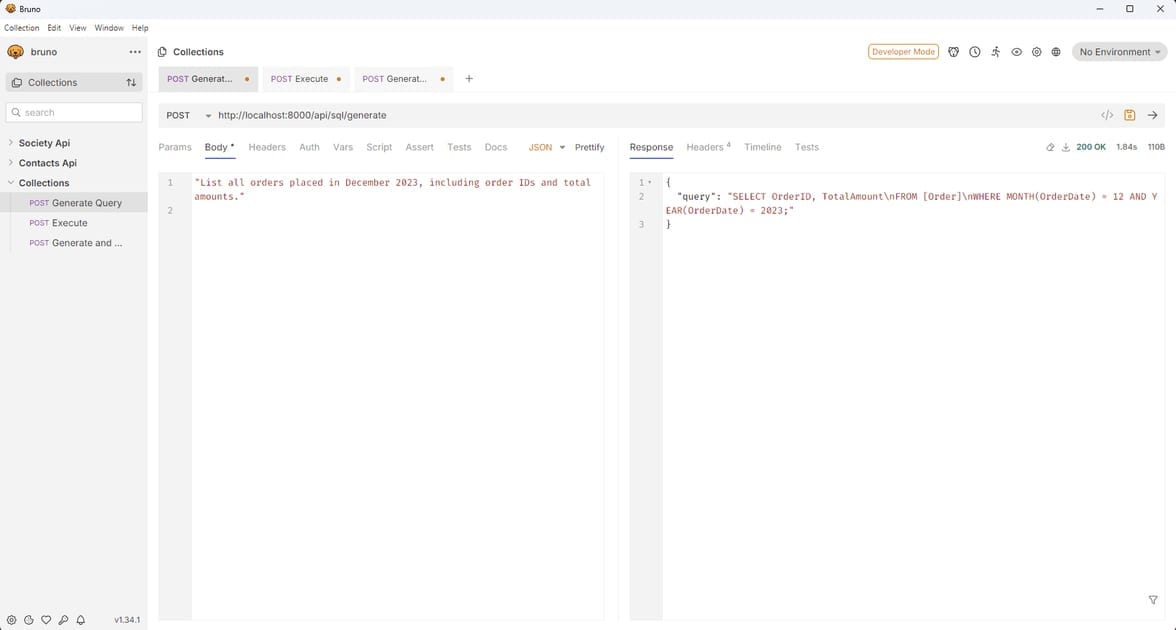
Generating and Executing SQL Query with Gemini
Request:
# Set environment variable firstexport AI_PROVIDER_TYPE=Gemini
POST {{OpenAISQLApi_HostAddress}}/api/sql/generate-and-executeContent-Type: application/json"List all products that were ordered more than 2 times"
Response:
{ "query": "SELECT od.ProductName, COUNT(od.OrderDetailID) as TimesOrdered FROM OrderDetails od GROUP BY od.ProductName HAVING COUNT(od.OrderDetailID) > 2;", "results": [ { "ProductName": "Widget A", "TimesOrdered": 4 } ]}Example in Bruno REST Client:
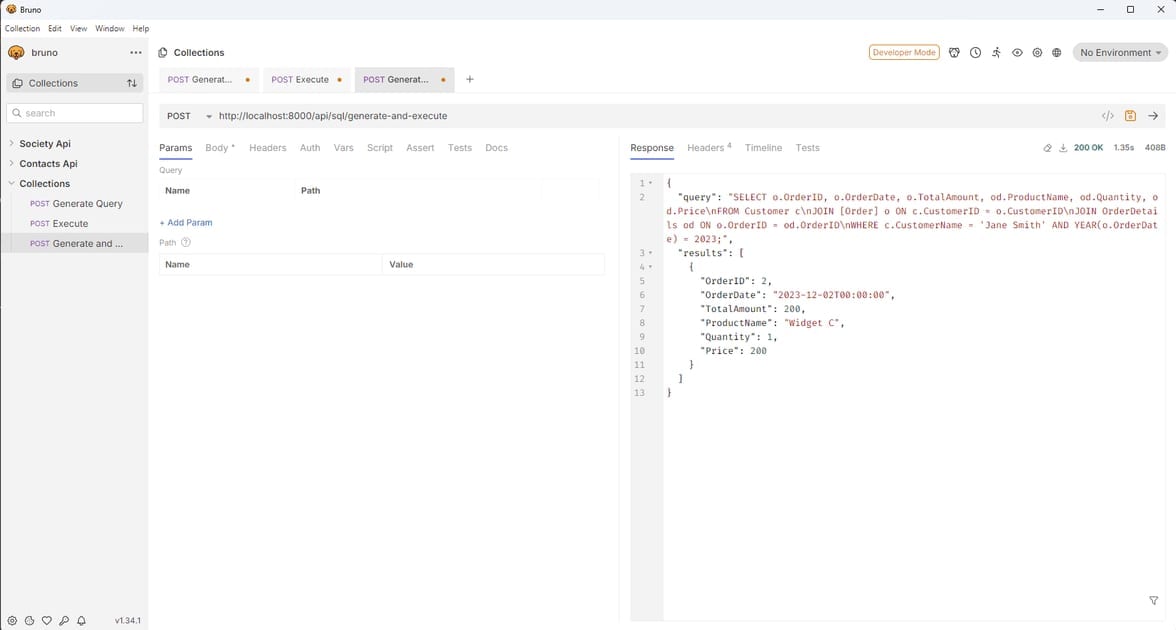
Future Enhancements
Generative UI
- Extend the API to return UI components like tables and forms that front-end frameworks can render directly.
Security (do this first)
- Use a read-only database connection and allow-list
SELECTstatements. - Add user authentication and authorization.
AI Provider Optimizations
- Add automatic fallback between providers if one fails.
- Implement caching for similar queries.
- Add streaming responses for large result sets.
Performance Improvements
- Add result caching for frequently requested queries.
- Implement parallel database schema retrieval and AI query generation.
- Add metrics collection for performance analysis.
Where to start
Clone the reference implementation, point it at a non-production database, and run the same prompt through two providers. Comparing the generated SQL side by side is the fastest way to pick a model for this workload. If you extend it, start with the security items above, then add provider fallback and query caching.
Comments
Comments are GitHub discussions. Sign in with GitHub to post; reactions need no account.