Simplify Git Workflows Across Multiple Repositories with Git Submodules and Meta-Repositories
Managing multiple Git repos in a microservices project gets unwieldy fast — how a meta-repository built on Git submodules coordinates them without merging.
Six repositories, one system, too many clone commands
On a typical microservices project I have five or six repositories open at once: a couple of APIs, a frontend, shared infrastructure scripts, sometimes a docs repo. Onboarding a new developer meant a wiki page full of clone commands, and “which commit of the API works with this frontend?” was answered by asking whoever was online.
Collapsing everything into one repository would fix the juggling, but it would also kill the independent versioning and deployment that made us split the services in the first place.
The middle path is a meta-repository: a thin Git repository that tracks the other repositories as submodules. It duplicates nothing. It stores a pinned commit reference for each repo, so cloning one repository gives you the whole system at known-good versions.
The meta-repository itself contains only:
- a
.gitmodulesfile, which tracks the URL and path of each submodule, - a reference to a specific commit of each submodule,
- optionally, files that describe the system as a whole (documentation, compose files, scripts).
Why choose a meta-repository?
Picture a microservices application where each service lives in its own repository. That setup gives you modularity and independent deployment, and it also gives every developer a repository-juggling problem. A meta-repository keeps the autonomy and removes the juggling. Concretely, it buys you:
- Central management: group related repositories in one place, with one workflow for fetching, updating, and deploying them together.
- Independence: each submodule stays a normal standalone repository, usable in other projects; work in a submodule doesn’t touch the meta-repository until you say so.
- Version consistency: the meta-repo pins a specific commit per submodule, so the whole team builds against the same versions. This matters most in systems with interdependent components.
- One-step cloning:
git clone --recurse-submodulespulls the meta-repo and every submodule in a single command. - Modularity: each submodule can be versioned, tested, or swapped on its own.
- No duplication: the meta-repo tracks references, not copies, so it stays tiny no matter how large the submodules get.
How to create a meta-repository
Initialize an empty repository to act as the hub:
git init meta-repocd meta-repoAdd each existing repository as a submodule, then point the meta-repo at its own remote:
git submodule add <repository1_url>git submodule add <repository2_url># Repeat for all repositoriesgit remote add origin <meta-repo-remote-url>Commit the submodule configuration and push:
git add .gitmodulesgit add .git commit -m "Initial commit with submodules"git push -u origin mainOnce it is pushed, the meta-repository shows each submodule as a link to its own repository:
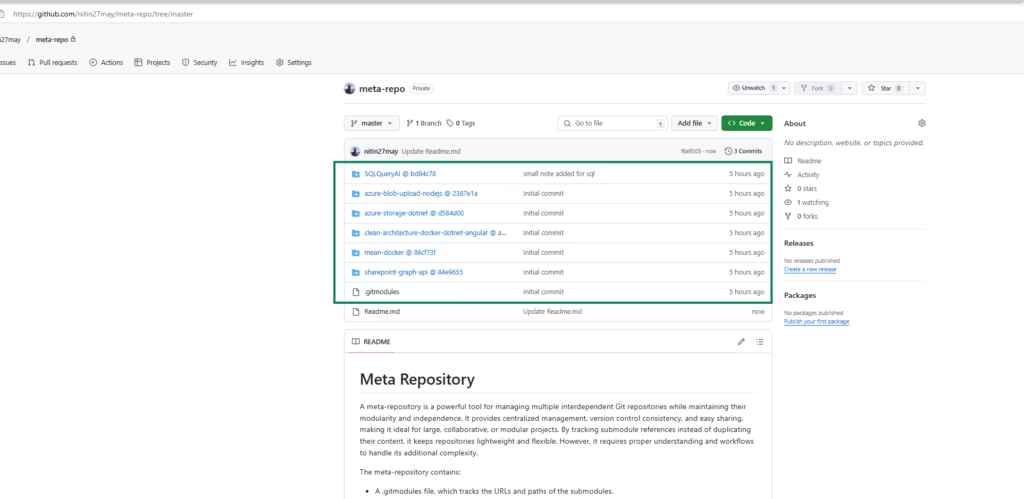
A plain git pull works on the meta-repo itself. To clone the meta-repo and all linked repositories in one step:
git clone --recurse-submodules https://github.com/nitin27may/meta-repo.gitIf you cloned without that flag and the submodule folders are empty, initialize them:
git submodule update --init --recursiveTo fetch the latest changes for all submodules that are already initialized:
git submodule update --remote --recursive--remote: pulls the latest changes from the tracked branch of each submodule.--recursive: also updates nested submodules, if any exist.
The push workflow: submodule first, pointer second
This is the part teams get wrong. Changes flow in two commits: one inside the submodule, one in the meta-repository that moves the pointer.
Step 1: commit and push inside the submodule. Enter the submodule directory (it is a normal standalone repo), make your changes, then:
cd <submodule_folder>git add .git commit -m "Your changes in the submodule"git pushStep 2: update the meta-repository. The meta-repo tracks a specific commit of the submodule, so after the submodule moves, its reference is stale. Go back to the meta-repo root, stage the new reference, and push:
cd ..git add <submodule_folder>git commit -m "Updated submodule <submodule_name> to latest commit"git pushCollaborators and cloning the updated meta-repository
Clone with submodules:
git clone --recurse-submodules <meta-repo_url>Update submodules in an existing clone:
git submodule update --remote --recursiveWhen submodule changes aren’t tracked by the meta-repository
The failure mode follows from the two-commit workflow above: a developer commits and pushes in a submodule but never updates the meta-repository. The meta-repo keeps referencing the older commit, and collaborators silently miss the latest changes unless they update the submodule by hand. Four ways to deal with it, roughly in order of effort:
1. Establish a workflow rule
Make the two-step flow explicit: commit in the submodule, push to the submodule’s remote, then immediately update the meta-repository:
git add <submodule_folder>git commit -m "Update submodule reference to latest commit"git push2. Automate meta-repository updates
Use scripts or Git hooks to detect and update stale references.
Script example:
#!/bin/bashfor submodule in $(git submodule--helper list | cut -d' ' -f4); do (cd $submodule && git fetch --all && git status -uno | grep -q "Your branch is behind") && \ echo "Submodule $submodule has new commits!" git add $submoduledonegit commit -m "Update submodule references"git pushPre-push hook:
git submodule update --remotegit diff --exit-code || (echo "Submodules are out of sync. Commit their changes!" && exit 1)3. Use CI/CD pipelines
Configure the pipeline to run a script that:
- pulls the latest submodule changes,
- checks whether the meta-repository references the latest submodule commits,
- fails the build if the meta-repository is out of sync.
A failing build is a louder signal than a stale pointer nobody notices.
4. Manual check for outdated submodules
Inspect submodule status:
git submodule statusUpdate the meta-repository if needed:
git submodule update --remotegit add <submodule_folder>git commit -m "Update submodule reference to latest commit"git pushPreventing issues
- Team training: walk developers through the submodule workflow once, and keep the two-step push rule written down where they’ll find it.
- Git hooks or CI validation: pre-push hooks and CI checks catch out-of-sync submodules before they reach collaborators.
- Regular synchronization: assign someone (or a scheduled job) to periodically check that submodule references match reality. Cron jobs or CI schedules work fine for this.
Where I’d start
Create a meta-repo for one system you already run, add its two or three most coupled repositories as submodules, and time how long onboarding takes with a single --recurse-submodules clone versus your current wiki page of commands. Add the CI sync check before you invite the rest of the team; the stale-pointer confusion shows up in the first week otherwise.
In upcoming articles I’ll dig into other multi-repository headaches and the workflows that fix them.
Comments
Comments are GitHub discussions. Sign in with GitHub to post; reactions need no account.