Building Dictum — a macOS Dictation App with Tauri 2 (Rust + React) & Azure OpenAI
Build Dictum, a macOS dictation app in Tauri 2 (Rust + React): hold-to-talk capture, Whisper transcription via Azure OpenAI, clipboard injection.
macOS has had built-in dictation since Monterey. It is fine: press and hold a key, speak, done. But it requires Apple’s servers (unless you download the enhanced on-device model), only works in some apps, and you have zero control over punctuation, formatting, or hotkeys.
I wanted something different: a hold-to-talk shortcut that works in every app (terminals, Slack, VS Code, anything), with clean transcription (proper punctuation, correct capitalization, filler words removed) injected at the cursor as if I had typed it. No menu bar click, no window focus switch.
This is Dictum, built with Tauri 2, cpal for audio capture, OpenAI/Azure OpenAI Whisper for transcription, and an optional GPT rephrase pass triggered by “Smart Keywords” (say “rephrase as professional email” and the output is rewritten before injection). The full pipeline runs in Rust; the React frontend is just a thin overlay. The interesting problems: audio capture on macOS, accessibility permissions, injecting text into arbitrary apps, and packaging for distribution.
Why Tauri Instead of Electron
The obvious comparison. Electron bundles Chromium (~150MB) and a full Node.js runtime. Tauri uses the system WebView (WKWebView on macOS) and a Rust backend. The result: a 4–8MB app binary instead of 150–300MB, startup in under 200ms, and meaningfully lower memory usage.
The trade-off is that WKWebView has some quirks compared to a pinned Chromium version, and Rust has a steeper learning curve than Node.js. For a tool that runs all day in the background, the resource profile matters enough to justify it.
Architecture
Rust owns the entire hot path, from keypress to text injection. The React frontend is just an overlay that listens for state events and shows animations. Two windows are served from the same index.html via hash routing: #overlay (transparent, always-on-top, click-through) and #settings (standard decorated window, opened from the tray icon).
Global Hotkey with tauri-plugin-global-shortcut
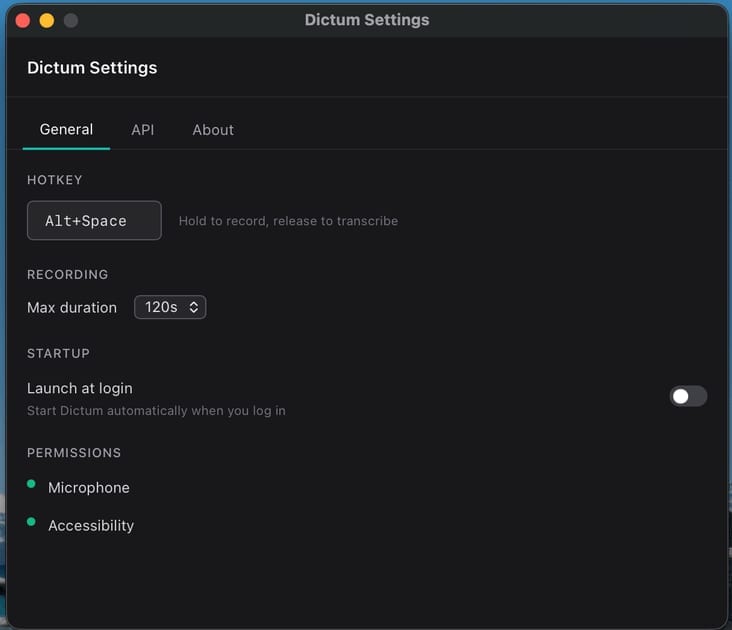
macOS requires global shortcuts to be registered on the main thread. Tauri’s global-shortcut plugin handles this correctly:
[dependencies]tauri = { version = "2", features = ["macos-private-api", "tray-icon"] }tauri-plugin-global-shortcut = "2"use anyhow::{anyhow, Result};use tauri::{AppHandle, Manager};use tauri_plugin_global_shortcut::{GlobalShortcutExt, Shortcut, ShortcutState};
pub fn register_hotkey(app: &AppHandle, shortcut_str: &str) -> Result<()> { let shortcut: Shortcut = shortcut_str .parse() .map_err(|_| anyhow!("Invalid shortcut string: {}", shortcut_str))?;
app.global_shortcut() .on_shortcut(shortcut, move |app_handle, _shortcut, event| { let app = app_handle.clone(); let state = app_handle.state::<crate::AppState>();
match event.state() { ShortcutState::Pressed => { tauri::async_runtime::spawn( crate::flow::on_press(app, state.inner().clone()) ); } ShortcutState::Released => { tauri::async_runtime::spawn( crate::flow::on_release(app, state.inner().clone()) ); } } }) .map_err(|e| anyhow!("Failed to register shortcut '{}': {}", shortcut_str, e))?;
Ok(())}Alt+Space is the default hotkey. It doesn’t conflict with most macOS workflows and is ergonomic for hold-to-talk. The key insight: on_press doesn’t immediately start recording. It waits 200ms first. If you release before that threshold, the keypress is replayed back to the frontmost app, so normal typing of Alt+Space isn’t swallowed. This is critical for single-key shortcuts. Only if you hold past 200ms does the microphone start capturing.
The state machine:
IDLE → [hold ≥200ms] → RECORDING → [release] → PROCESSING → SUCCESS/ERROR → IDLE [\< 200ms tap] → key replayed → IDLEAudio Capture with cpal
cpal wraps CoreAudio on macOS. We capture at 16kHz mono: small enough for fast API upload, enough quality for speech recognition. The interesting bit is the input stream callback:
/// cpal::Stream is not Send on macOS (CoreAudio manages thread affinity)./// Exclusive Mutex access makes this safe.struct SendStream(Stream);unsafe impl Send for SendStream {}
// Inside AudioCapture::start()let stream = device.build_input_stream(    &config,    move |data: &[f32], _: &cpal::InputCallbackInfo| {        if let Ok(mut buf) = buffer.lock() {            buf.extend_from_slice(data);        }        // Emit RMS level for waveform visualizer        let rms = (data.iter().map(|s| s * s).sum::<f32>()            / data.len() as f32).sqrt();        let _ = app_for_level.emit("audio-level", rms);    },    |err| log::error!("Audio capture error: {}", err),    None,)?;
The SendStream wrapper is the price of using cpal on macOS: CoreAudio’s streams aren’t Send, but our exclusive Mutex access makes it safe. The audio-level events on each callback drive the waveform visualizer in the overlay; the frontend never polls, it just listens. A silence detector fires audio-silence-detected after 2 seconds of near-zero RMS so the UI can warn “mic may be muted” before the user wastes a full recording.
Transcription: The Rust Hot Path
Transcription doesn’t happen in JavaScript. It happens in Rust. The full pipeline (record → encode → POST to API → inject text) runs in flow.rs. The React overlay never calls the Whisper API; it just shows state.
The app supports OpenAI and Azure OpenAI, configurable in settings. Audio samples from cpal are encoded to WAV via hound (trivially small, handles all the header edge cases) and sent as a multipart form upload:
// src-tauri/src/flow.rs (simplified)async fn transcribe_openai(wav_bytes: Vec<u8>, config: &Value) -> Result<String> {    let api_key = config["openai"]["apiKey"].as_str()        .ok_or_else(|| anyhow!("OpenAI API key not configured"))?;    let model = config["openai"]["whisperModel"].as_str()        .unwrap_or("whisper-1");    let base_url = config["openai"]["baseUrl"].as_str()        .unwrap_or("https://api.openai.com");
    let form = reqwest::multipart::Form::new()        .part("file", reqwest::multipart::Part::bytes(wav_bytes)            .file_name("audio.wav")            .mime_str("audio/wav")?)        .text("model", model.to_string())        .text("response_format", "json");
    let resp = reqwest::Client::builder()        .timeout(Duration::from_secs(30))        .build()?        .post(format!("{}/v1/audio/transcriptions", base_url.trim_end_matches('/')))        .bearer_auth(api_key)        .multipart(form)        .send().await?;
    let body: Value = resp.json().await?;    body["text"].as_str()        .map(|s| s.to_string())        .ok_or_else(|| anyhow!("No text in response"))}
Azure path is identical except it uses an api-key header instead of Bearer auth. A typical 10-second dictation round-trips in under a second.
A TypeScript transcription service exists in src/services/transcription.ts, a pure fetch() implementation for browser compatibility and future Tauri Mobile support. But the production hot path is all Rust.
Smart Keywords: Voice-Triggered Formatting
This is where things get interesting. Instead of a simple “rephrase on/off” toggle, Dictum detects trigger phrases anywhere in the transcription. Say “send an email to Ryan about the project timeline, rephrase as professional email” and the trigger is detected, stripped, and the clean content goes to GPT with format-specific instructions.
// src-tauri/src/keywords.rs (simplified)const TRIGGER_VERBS: &[(&str, &str)] = &[    ("rephrase this as", "rephrase"),   // longest-first for greedy matching    ("rewrite this as", "rephrase"),    ("format this as", "rephrase"),    ("rephrase as", "rephrase"),    ("rephrase", "rephrase"),];
const KNOWN_FORMATS: &[&str] = &[    "professional email", "formal email", "casual message",    "slack message", "bullet points", "code comment",    "email", "message", "summary",];
When enabled and a trigger is detected, the system prompt is dynamically built: emails get greeting/body/sign-off structure, bullet points get - prefixes, Slack messages get concise workplace tone. The rephrase adds ~300–500ms but the output quality for longer dictations is noticeably better. The keyword system means you only pay the GPT cost when you explicitly ask for it.
The Recording Flow: Rust Owns Everything
The full lifecycle lives in flow.rs. Earlier prototypes had JavaScript orchestrating the pipeline (listen for hotkey → invoke start_recording → wait → invoke stop_recording → POST to Whisper → invoke inject_text), but the async IPC coordination was fragile: race conditions in the overlay’s hidden WebView, missed events on fast key presses, stale state after errors.
Moving everything into Rust eliminated all of that. The overlay just listens for lightweight state events:
recording-started → recording-tick (each second) → processing-started → processing-gpt → recording-success → recording-errorOn press: wait 200ms (tap-through if released early), start mic, emit recording events. On release: stop mic → encode WAV → transcribe → optionally detect keyword and rephrase → inject text → emit success. A 60-second hard cap (~3.8MB at 16kHz f32) prevents runaway recordings with a countdown in the last 10 seconds.
Configuration
Settings use Zustand with Tauri store persistence, Zod as the schema source of truth:
export const ApiConfigSchema = z.object({ provider: z.enum(["openai", "azure"]).default("openai"), openai: z.object({ apiKey: z.string().optional(), whisperModel: z.string().default("whisper-1"), gptModel: z.string().default("gpt-4o-mini"), baseUrl: z.string().optional(), }).default({}), azure: z.object({ endpoint: z.string().optional(), apiKey: z.string().optional(), whisperDeployment: z.string().default("whisper"), gptDeployment: z.string().default("gpt-4o-mini"), apiVersion: z.string().default("2024-02-01"), }).default({}), smartKeywords: z.object({ enabled: z.boolean().default(false), }).default({}),});Config is pushed to Rust on startup and every settings change via set_api_config, so the Rust hot path never calls back into JavaScript.
Injecting Text into Arbitrary Apps
This is the hard part, and the solution is deliberately low-tech. After evaluating three approaches, clipboard + paste won:
| Approach | Works in Electron? | Works in Terminal? | Reliable? |
|---|---|---|---|
| AXUIElement (Accessibility API) | No | Partial | Flaky |
| CGEvent (keystroke simulation) | No | Yes but slow | Character-by-character |
| Clipboard + Cmd+V | Yes | Yes | Yes |
Electron apps (VS Code, Slack, Discord) don’t respond to AXUIElement writes at all. CGEvent works but injects one character at a time, painfully slow for anything beyond a sentence. Clipboard paste is universal and instant.
pub async fn inject_text(text: &str) -> Result<()> {    // 1. Backspace — removes the non-breaking space that Option+Space types    //    when the hotkey fires (macOS passive event monitor doesn't consume it)    delete_preceding_char();
    // 2. Brief pause so the backspace processes before the paste    tokio::time::sleep(tokio::time::Duration::from_millis(60)).await;
    // 3. Set clipboard and paste    set_clipboard(text)?;    send_paste()?;
    Ok(())}
fn set_clipboard(text: &str) -> Result<()> {    let mut child = Command::new("pbcopy")        .stdin(Stdio::piped())        .spawn()?;    child.stdin.as_mut().unwrap().write_all(text.as_bytes())?;    child.wait()?;    Ok(())}
fn send_paste() -> Result<()> {    let script = r#"tell application "System Events" to keystroke "v" using command down"#;    Command::new("osascript").arg("-e").arg(script).status()?;    Ok(())}
The delete_preceding_char() step is subtle but critical. When using Alt+Space as the hotkey, macOS types a non-breaking space character in the frontmost app before the global shortcut handler fires (passive NSEvent monitors don’t consume events). The backspace erases it before the paste happens.
The trade-off: for a brief moment (~60ms), the clipboard contains the transcription. Clipboard managers like Alfred or Paste will see it. I intentionally don’t save/restore the clipboard: that triggers clipboard managers to fire a second paste, which is worse.
Requires Accessibility permission for the osascript System Events commands.
The Overlay Window
The overlay is a glassmorphic pill floating above all windows during recording: always-on-top, transparent, click-through. Two windows are served from the same index.html via hash routing: #overlay (420×90, no decorations, shadow: false, focus: false) and #settings (600×520, centered, decorated, opened from tray icon).
The React component uses Framer Motion, driven entirely by Tauri events from Rust:
// src/components/Overlay/Overlay.tsx (simplified)export function Overlay() {  const { phase } = useRecordingFlow();  // listens to Rust events  const { audioLevel, durationSecs, error } = useRecordingStore();
  return (    <div className="flex items-end justify-center w-full h-full pointer-events-none">      <AnimatePresence>        {phase !== "IDLE" && (          <motion.div            key="pill"            initial={{ opacity: 0, y: 12, scale: 0.94 }}            animate={{ opacity: 1, y: 0, scale: 1 }}            exit={{ opacity: 0, y: 6, scale: 0.97 }}            style={{ background: "rgba(14, 14, 16, 0.93)", backdropFilter: "blur(20px)" }}          >            {phase === "RECORDING" && <><PulsingDot /> <WaveformVisualizer level={audioLevel} /></>}            {phase === "PROCESSING" && <ProcessingIndicator />}            {phase === "SUCCESS" && <SuccessFlash />}            {phase === "ERROR" && <ErrorIndicator message={error} />}          </motion.div>        )}      </AnimatePresence>    </div>  );}
set_ignore_cursor_events(true) is called in Rust during setup. Without it, the always-on-top window blocks all mouse events system-wide. The app hides from the Dock via setActivationPolicy: 1 (unsafe ObjC in lib.rs). No Dock icon, no Cmd+Tab entry, just a tray icon.
macOS Permission Flow
Two permissions required:
- Microphone: auto-requested by macOS on first input device access (
NSMicrophoneUsageDescriptioninInfo.plist). - Accessibility: needed for
osascriptto send paste keystrokes. Must be manually granted. Detected by a benign System Events test:
pub fn check_accessibility_permission() -> bool { let output = Command::new("osascript") .arg("-e") .arg(r#"tell application "System Events" to get name of first process"#) .output(); match output { Ok(o) => o.status.success(), Err(_) => false, }}If the check fails, the settings UI opens System Preferences directly to the Accessibility pane. Pragmatic approach: no accessibility_sys crate, just a lightweight osascript test.
Building for Distribution
# Developmentnpm run tauri dev
# Production build (creates .dmg + .app)npm run tauri build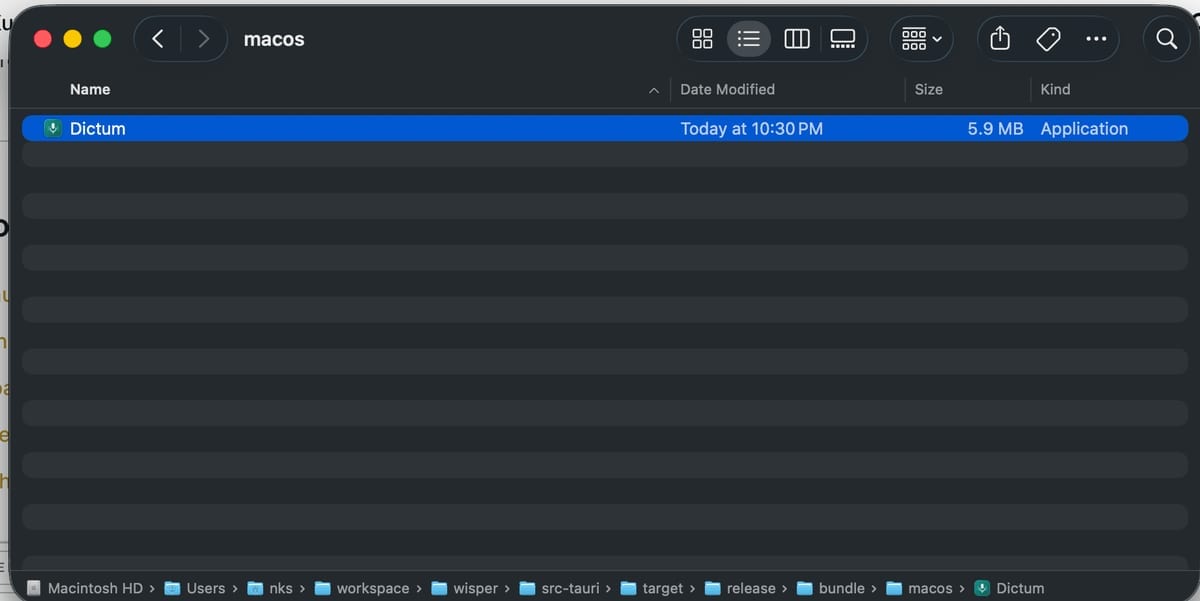
For notarisation (required to run on other Macs without a security warning):
# Set in environment or tauri.conf.jsonAPPLE_CERTIFICATE=...APPLE_CERTIFICATE_PASSWORD=...APPLE_SIGNING_IDENTITY=...APPLE_ID=...APPLE_PASSWORD=...  # app-specific password
npm run tauri build -- --target universal-apple-darwin
The universal-apple-darwin target produces a fat binary that runs natively on both Intel and Apple Silicon.
Gotchas
Alt+Space non-breaking space. macOS inserts a non-breaking space before the global shortcut fires. The delete_preceding_char() backspace in injection erases it. Different hotkey (e.g., Ctrl+Shift+D) = no backspace needed.
Clipboard managers see the transcription. For ~60ms the clipboard holds the text. Intentionally not saving/restoring, since that triggers clipboard managers to paste twice, which is worse.
API key storage. tauri-plugin-store writes JSON to disk. For production, consider macOS Keychain via security-framework or Managed Identity for server-proxied scenarios.
Electron apps (VS Code, Slack, Discord). Clipboard + Cmd+V is the only injection that works. AXUIElement writes are silently ignored; CGEvent is too slow character-by-character. This was the deciding factor.
Resources
- Tauri 2 documentation1
- Azure OpenAI Audio API2
- OpenAI Audio API3
- Azure OpenAI Chat Completions API
- cpal audio library
- tauri-plugin-global-shortcut4
- hound WAV crate
- Framer Motion5
References
-
Tauri 2 documentation — v2.tauri.app ↩
-
Azure OpenAI Audio API — learn.microsoft.com ↩
-
OpenAI Audio API — platform.openai.com ↩
-
tauri-plugin-global-shortcut — v2.tauri.app ↩
-
Framer Motion — framer.com ↩
Comments
Comments are GitHub discussions. Sign in with GitHub to post; reactions need no account.