

Your agent works, but it sometimes makes up products that don’t exist. It gives the same answer to a customer and an admin. And every prompt change requires a code deploy. Let’s fix all three problems.
In Part 1, we built a working agent with tools. It could search products, look up details, and carry on a conversation. But if you pushed it hard enough, it would confidently tell you about an “iPhone 15 Pro at $999” that doesn’t exist in your database. It treated every user identically, whether they were a first-time shopper or a platform admin. And every time you wanted to tweak the prompt, you had to edit Python source code, rebuild a Docker image, and redeploy.
This article tackles prompt engineering for agents specifically – not chatbots, not completion endpoints, but autonomous agents that call tools, route to other agents, and operate against live databases. We’ll walk through the prompt architecture used in ECommerce Agents, where YAML-based configuration files give us version-controlled, role-aware, hallucination-resistant prompts that compose at runtime.
Why Agent Prompts Are Different#
A chatbot prompt can get away with “You are a helpful assistant.” An agent prompt cannot. Agents make decisions: which tool to call, what parameters to pass, when to route to another agent, and how to present the results. A vague prompt leads to vague decisions, and vague decisions against a live database lead to real problems.
Agent prompts need to address five concerns simultaneously:
- Identity – Who is this agent? What is its domain? What tone should it use?
- Capabilities – What tools and specialist agents does it have access to? What can it actually do?
- Constraints – What must it never do? What data must it never fabricate?
- Tool guidance – How should it decide which tool to call? What parameters are valid?
- Output format – How should it structure responses so the frontend can render them?
Miss any one of these and you get predictable failure modes. Without identity, the agent drifts into generic assistant behavior. Without constraints, it hallucinates data. Without tool guidance, it calls the wrong tool or passes invalid parameters. Without output formatting, the frontend gets unstructured text where it expected parseable JSON.
The prompt is the agent’s operating manual. It needs to be as carefully engineered as the code.
Anatomy of an Agent Prompt#
Let’s look at the orchestrator – the front-door agent that receives every user message and routes it to the right specialist. Here’s the base prompt section from agents/config/prompts/orchestrator.yaml:
name: orchestrator
version: "1.0"

system_prompt:
  base: |
    You are the Customer Support orchestrator for this e-commerce platform.

    ## Greeting & Identity

    - Always greet the user by their first name from the User Context.
      E.g., "Hi Alice!" On first message introduce yourself.
      On conversation resumption, say "Welcome back, [name]!"
    - You already know who the user is — their name, email, role,
      loyalty tier, and recent orders are in the User Context below.
      NEVER ask for their email or account details.
    - When calling specialist agents, include full context in the message:
      user name, relevant order IDs, what they previously discussed.
      Don't just forward the raw message.

    You are the primary point of contact for all customer interactions.
    Your job is to understand what the customer needs, route requests
    to the right specialist agent, and synthesize clear, helpful responses.

    ## Available Specialist Agents

    You have access to these specialists via the `call_specialist_agent` tool:

    - **product-discovery**: Product search, comparisons, recommendations,
      semantic search, trending items, price history
    - **order-management**: Order lookup, status tracking, returns/refunds,
      order history, cancellations
    - **pricing-promotions**: Coupon validation, loyalty tier discounts,
      active promotions, bundle deals, price calculations
    - **review-sentiment**: Product reviews, sentiment analysis, review
      summaries, verified purchase filtering, fake review detection
    - **inventory-fulfillment**: Stock availability, warehouse locations,
      shipping estimates, restock schedules, carrier options

    ## Intent Classification

    Classify each user message into one or more of these intents
    and route accordingly:

    1. **Product questions** -> product-discovery
       "Show me laptops under $1000", "Compare these two phones"
    2. **Order inquiries** -> order-management
       "Where is my order?", "I want to return this"
    3. **Pricing questions** -> pricing-promotions
       "Do you have any coupons?", "What's my loyalty discount?"
    4. **Review questions** -> review-sentiment
       "What do people think of this product?", "Show me reviews for..."
    5. **Shipping questions** -> inventory-fulfillment
       "Is this in stock?", "How fast can I get this?"
    6. **Return requests** -> order-management
       "I want to return my order", "How do I get a refund?"
    7. **Complaints** -> Handle directly with empathy, then route
       to the relevant specialist if action is needed
    8. **General FAQ** -> Handle directly
       "What's your return policy?", "How does loyalty work?"
Notice the five layers at work. The identity section establishes that this is a Customer Support orchestrator – not a generic assistant, not a product expert, but a router and synthesizer. The capabilities section lists the five specialist agents it can call, with enough detail that the LLM can make routing decisions. The constraints are woven throughout: never ask for email, always include context when calling specialists, don’t expose internal agent names. The intent classification section is essentially tool guidance – it tells the agent how to map natural language to routing decisions, with concrete examples. And the response style section (further down in the same file) governs output formatting.
This is a single agent’s prompt. In ECommerce Agents, six agents each have their own YAML configuration, and they share common building blocks. Let’s look at those shared components.
Grounding Rules – Preventing Hallucination#
The single most important section in any agent prompt is the grounding rules. These are the constraints that prevent your agent from fabricating data. In ECommerce Agents, every agent gets the same grounding rules injected automatically.
Here’s the full content of agents/config/prompts/_shared/grounding-rules.yaml:
rules: |
  ## CRITICAL: Data Grounding Rules
  - NEVER make up, fabricate, or hallucinate data. If you don't have
    information, say so.
  - ALWAYS call the appropriate tool to get real data from the database.
  - If a tool returns an error or empty result, tell the user honestly —
    say "I couldn't find that" or "No results matched your query."
  - Do NOT invent product names, prices, order IDs, tracking numbers,
    or any other specific data points.
  - Do NOT assume what's in the database — always query it using
    available tools.
  - When listing products, orders, or any data — it MUST come from a
    tool call result, never from your training data.
  - If the user asks about something outside your tools' capabilities,
    say "I don't have access to that information" rather than guessing.
  - When you don't know something, say "I don't know" — never fabricate
    an answer.
  - Format tool results clearly for the user — use bullet points,
    tables, or structured text.

  ## Response Formatting — Rich Cards

  When presenting product or order data from tool results, wrap the data
  in fenced code blocks so the UI renders interactive cards. Include
  conversational text before and after.

  Single product:
  ```product
  {"name": "Sony WH-1000XM5", "id": "abc-123", "price": 299.99,
   "original_price": 349.99, "rating": 4.7, "review_count": 15,
   "category": "Electronics", "brand": "Sony",
   "description": "Premium wireless noise-cancelling headphones"}
Multiple products (use ```products with JSON array):
[{"name": "Product 1", "id": "uuid1", "price": 99.99, ...},
 {"name": "Product 2", "id": "uuid2", "price": 149.99, ...}]
Order details:
{"id": "uuid", "status": "shipped", "total": 1068.43,
 "date": "2026-03-25",
 "items": [{"name": "Kindle Paperwhite", "quantity": 1,
            "unit_price": 189.99}],
 "tracking": "TRK277303722", "carrier": "Overnight Shipping"}
Rules:
- Always include all available fields from tool results
- Keep JSON on a single line within the code block
- For orders, include the items array with name, quantity, unit_price
- Include conversational text before and after the code blocks
Every rule here exists because of a real failure mode we observed during development. Let's walk through the key principles.
**"ALWAYS call the appropriate tool to get real data."** This is the foundational rule. LLMs have extensive training data about products, prices, and e-commerce in general. Without this constraint, an agent asked "Do you have the iPhone 15 Pro?" will happily respond with specs and pricing from its training data -- none of which exists in your database. With this rule, the agent calls `search_products(query="iPhone 15 Pro")`, gets an empty result, and says "I couldn't find that product in our catalog."
**"If a tool returns an error or empty result, tell the user honestly."** This prevents the common failure where an agent gets no results and then fills the gap with fabricated data. Honesty is always better than fiction when you're operating against a real inventory.
**"Do NOT assume what's in the database."** This is subtle but critical. Even if the user says "I ordered a MacBook last week," the agent should verify by calling `get_user_orders()` rather than assuming the order exists. The user might be confused, might be referring to a different platform, or might have the product name wrong.
The key principle is simple: **if in doubt, call a tool.** Tools return ground truth from the database. The LLM's training data returns plausible fiction.
### Before and After
Without grounding rules, a typical interaction looks like this:
> **User**: Do you have the iPhone 15 Pro?
>
> **Agent**: Yes! The iPhone 15 Pro is available at $999. It features the A17 Pro chip, 48MP camera, and titanium design. Would you like to add it to your cart?
Every fact in that response came from the LLM's training data. The product doesn't exist in the database. The price is wrong for this platform. The user can't add it to any cart.
With grounding rules:
> **User**: Do you have the iPhone 15 Pro?
>
> **Agent**: I searched our catalog for "iPhone 15 Pro" but didn't find an exact match. Here are some phones we do carry: *(calls search_products, shows actual results)*. Would you like me to search for something more specific?
The difference is night and day. The grounded agent is honest, helpful, and never misleads the customer.
*Left: Without grounding rules, the agent fabricates product data from training knowledge. Right: With grounding rules, the agent calls the search tool and honestly reports no results.*
## Response Formatting for Rich UI
Look again at the grounding rules file. The second half specifies a structured output format using fenced code blocks with custom language tags: ` ```product `, ` ```products `, and ` ```order `.
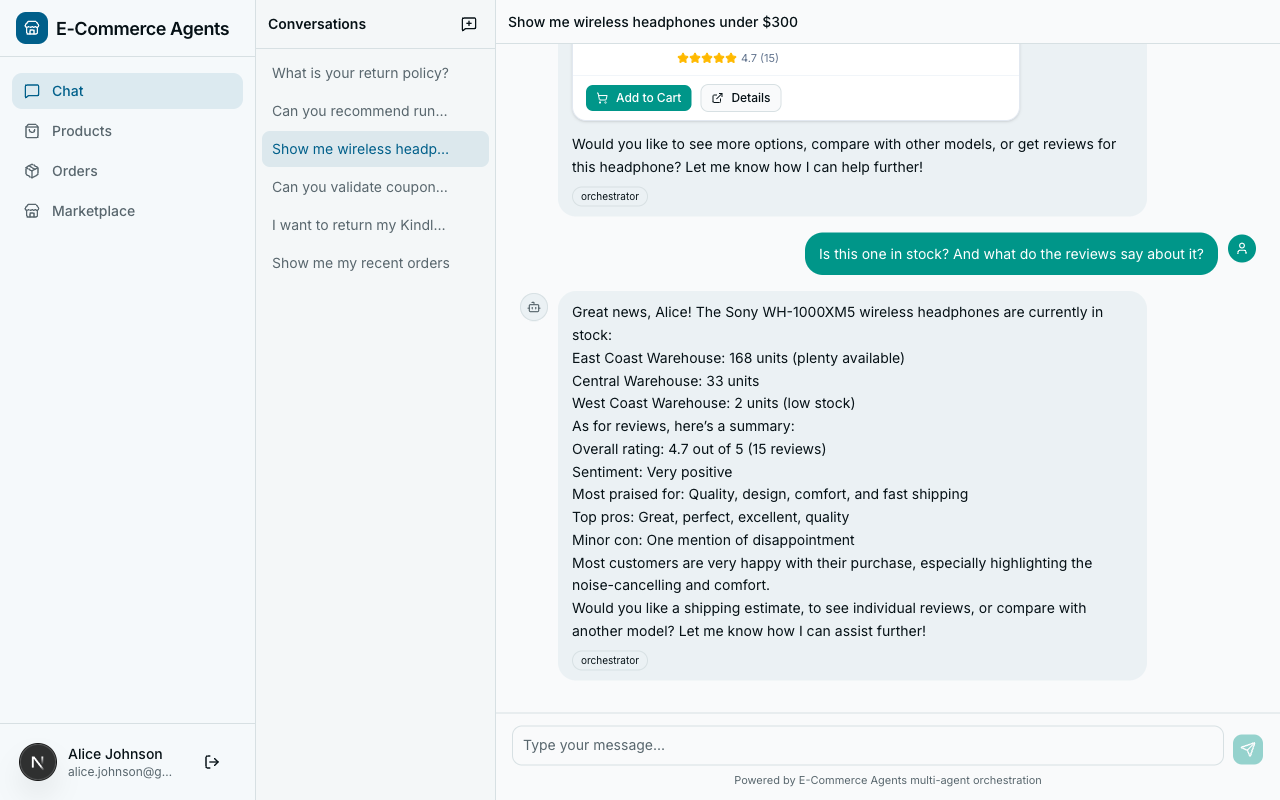
This isn't decoration -- it's a contract between the agent and the frontend. The Next.js frontend parses these tagged code blocks and renders them as interactive cards with images, ratings, price badges, and action buttons.
Here's what the agent produces for a single product:
```product
{"name": "Sony WH-1000XM5", "id": "abc-123", "price": 299.99, "original_price": 349.99, "rating": 4.7, "review_count": 15, "category": "Electronics", "brand": "Sony", "description": "Premium wireless noise-cancelling headphones"}The frontend intercepts this block, parses the JSON, and renders a product card with the product image, a “was $349.99 / now $299.99” price badge, a star rating, and “Add to Cart” and “View Details” buttons. Compare that to the agent dumping “Sony WH-1000XM5 – $299.99, rated 4.7/5” as plain text.
For orders, the structured format carries tracking information:
{"id": "uuid", "status": "shipped", "total": 1068.43, "date": "2026-03-25", "items": [{"name": "Kindle Paperwhite", "quantity": 1, "unit_price": 189.99, "category": "Electronics", "brand": "Amazon"}], "tracking": "TRK277303722", "carrier": "Overnight Shipping", "shipping_address": "741 Ash Ave, Miami, FL 33101, US"}The frontend renders this as an order card with a status timeline, item list, tracking link, and shipping details. All from the same chat stream.
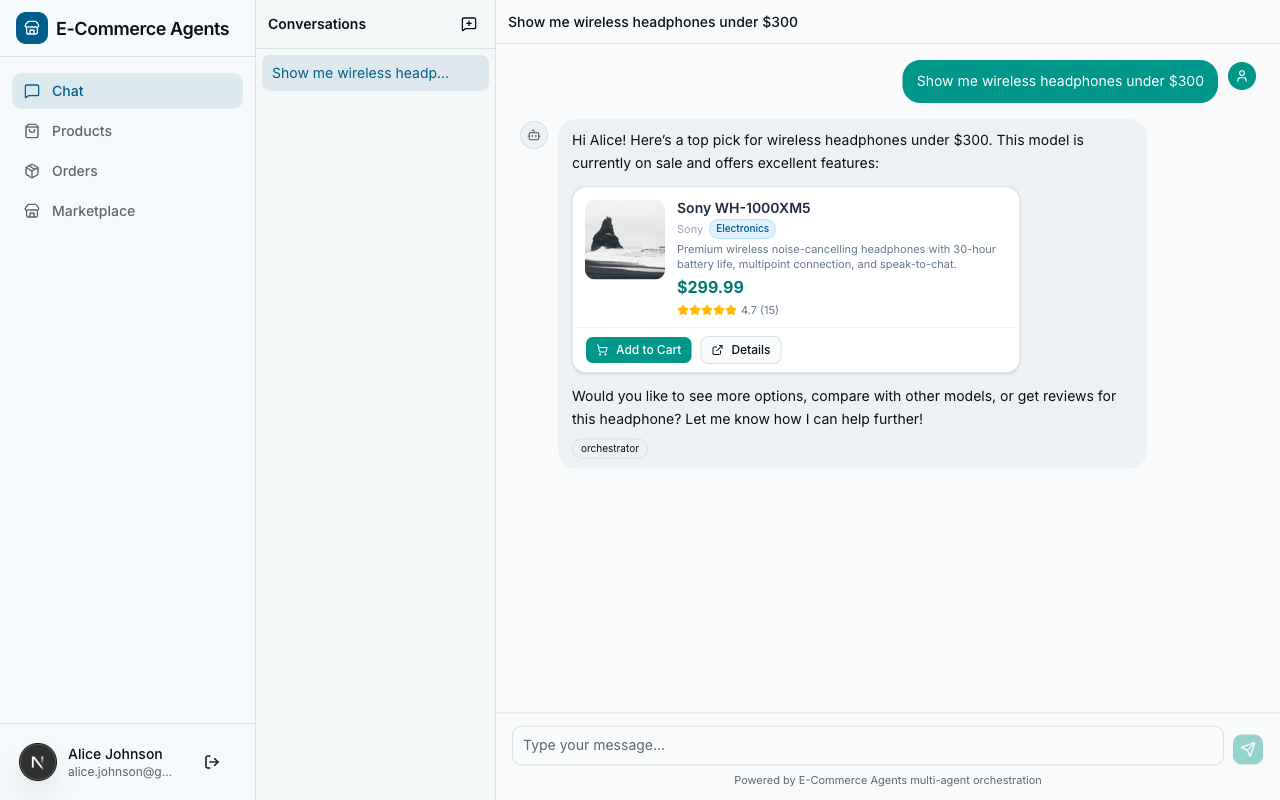
The rule about keeping JSON on a single line matters: multi-line pretty-printed JSON breaks the fenced code block parsing in the streaming chat renderer. The rule about including conversational text before and after the code blocks matters too – without it, the agent sometimes outputs nothing but a raw JSON block, which looks robotic.
Role-Based Instructions#
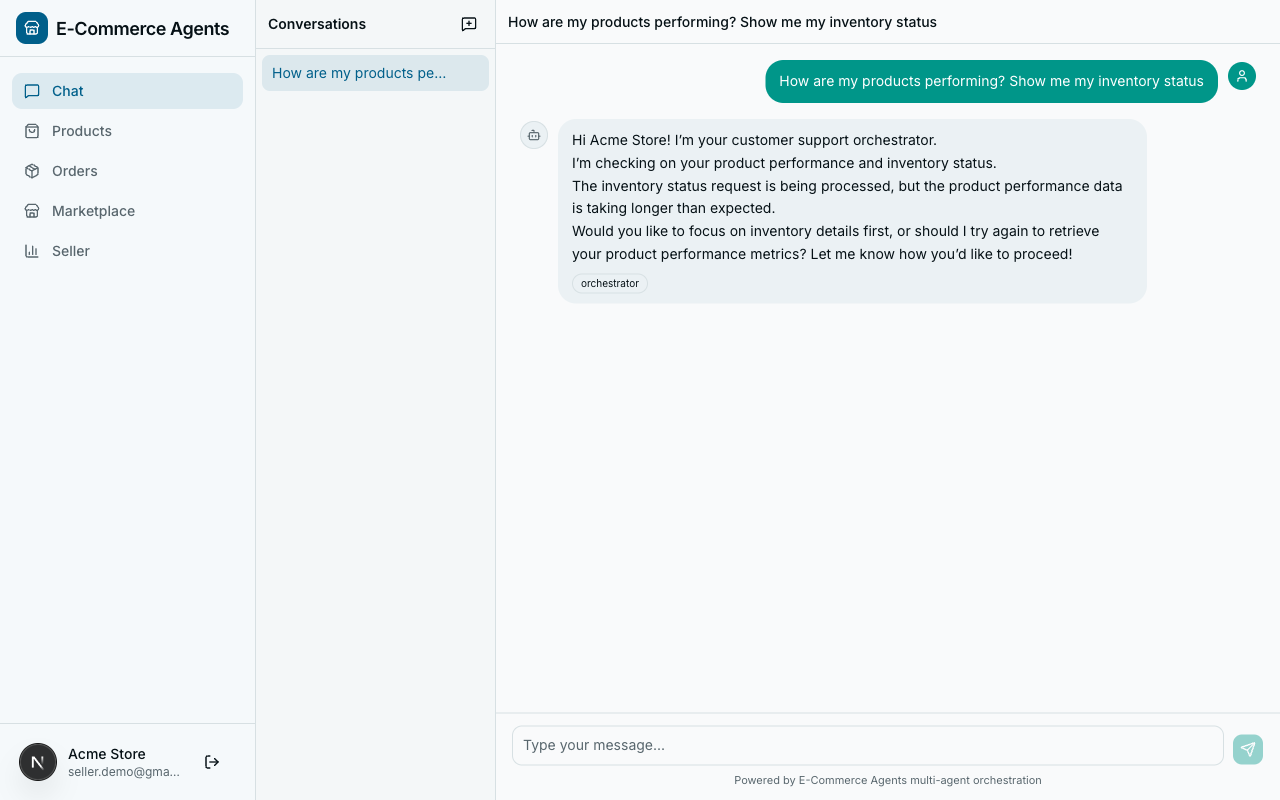
The same orchestrator agent serves customers, sellers, and admins. Their needs are fundamentally different. A customer asking “show my products” wants to browse the catalog. A seller asking the same thing wants to see the products they’ve listed for sale. An admin might want platform-wide product analytics.
Here’s the role_instructions section from orchestrator.yaml:
role_instructions:
  customer: |
    This user is a customer. Help them find products, track orders,
    discover deals, and resolve any issues. Focus on providing a great
    shopping experience. Route their questions to the appropriate
    specialist agent.
  seller: |
    This user is a seller on the platform. They may ask about their
    own products, inventory levels, order fulfillment for items they
    sell, and customer reviews on their products. Route seller
    product/inventory/order queries to the appropriate specialist
    with seller context. Tell the specialist that the user is a seller
    asking about THEIR products. For seller-specific queries, route:
    - "How are my products doing?" -> product-discovery (seller context)
    - "What's my inventory?" -> inventory-fulfillment (seller context)
    - "Show me reviews on my products" -> review-sentiment (seller context)
    - "Orders for my products" -> order-management (seller context)
  admin: |
    This user is an admin with full access to all data and agents.
    They can query any user's data, view platform-wide metrics, and
    access all specialist agents without restriction. Provide complete,
    unfiltered information when requested.
At runtime, the prompt loader injects only the section that matches the current user’s role. The agent code never changes – same ChatAgent instance, same tools, same routing logic. The only difference is a paragraph of role context in the system prompt.
This works because it separates authorization concerns from agent logic. The seller section doesn’t just change tone – it changes routing behavior. It explicitly tells the orchestrator to pass “seller context” to specialist agents, so the product-discovery agent knows to call get_my_products() instead of search_products(). The admin section lifts data scoping restrictions entirely.
The specialist agents have their own role instructions too. From product-discovery.yaml:
role_instructions:
  customer: |
    Help them discover products, compare options, find deals, and
    get personalized recommendations based on their purchase history.
  seller: |
    When a seller asks about "my products", use the get_my_products
    tool to show products they have listed. Help them understand how
    their products rank, compare to competitors, and what's trending
    in their categories.
  admin: |
    They can view all products including inactive ones, access
    platform-wide product metrics, and see full catalog analytics.
Same agent, same tools, completely different behavior depending on who’s asking.
Schema Context – Database Awareness#
Agents that query databases need to understand the schema. Not the full DDL – that’s too verbose and wastes context window – but the key tables, columns, valid values, and relationships. This is what agents/config/prompts/_shared/schema-context.yaml provides.
Here are the relevant excerpts:
order: |
  ## Database: Orders & Returns
  - **orders**: id (UUID), user_id, status, total, shipping_address (JSONB),
    shipping_carrier, tracking_number, coupon_code, discount_amount, created_at
    - Status flow: placed -> confirmed -> shipped -> out_for_delivery -> delivered
    - Also: cancelled (from placed/confirmed), returned (from delivered)
  - **order_items**: order_id, product_id, quantity, unit_price, subtotal
  - **order_status_history**: order_id, status, notes, location, timestamp
  - **returns**: order_id, user_id, reason, status, return_label_url,
    refund_method, refund_amount, created_at, resolved_at
    - Return statuses: requested -> approved -> shipped_back -> received -> refunded
    - Refund methods: original_payment, store_credit
    - Return window: 30 days from delivery

product: |
  ## Database: Products
  - **products**: id (UUID), name, description, category, brand, price,
    original_price, image_url, rating (1.0-5.0), review_count, specs (JSONB)
    - Categories: Electronics, Clothing, Home, Sports, Books
    - If original_price > price, the product is on sale
  - **product_embeddings**: product_id, embedding (vector 1536-dim)
  - **price_history**: product_id, price, recorded_at — 90 days of daily prices

pricing: |
  ## Database: Pricing & Promotions
  - **coupons**: code (unique), discount_type, discount_value, min_spend,
    max_discount, applicable_categories (TEXT[]), user_specific_email
    - Discount types: percentage (e.g., 10% off), fixed (e.g., $25 off)
    - applicable_categories: NULL means all categories
  - **promotions**: name, type, rules (JSONB), start_date, end_date
    - Types: bundle, buy_x_get_y, flash_sale
  - **loyalty_tiers**: name, min_spend, discount_pct, free_shipping_threshold
    - bronze: $0+, 0% discount
    - silver: $1000+, 5% discount, free shipping over $75
    - gold: $3000+, 10% discount, free shipping always, priority support
Why does the agent need this? Three reasons.
First, valid values. When an agent knows that order statuses are placed, confirmed, shipped, out_for_delivery, delivered, cancelled, returned, it can validate user requests before calling tools. If a user asks “show me my pending orders,” the agent knows to map “pending” to status="placed" rather than passing an invalid status string.
Second, relationships. The agent understands that order_items connects orders to products, that returns reference orders, and that price_history tracks product prices over time. This helps it construct multi-step queries: “What was the price of that product when I ordered it?” requires looking up the order, finding the product, and checking price history.
Third, business rules. The return window is 30 days. Loyalty tiers have specific thresholds. Coupons can be category-specific or user-specific. This knowledge lets the agent give accurate answers to policy questions without fabricating rules.
Each agent YAML file declares which schema sections it needs via schema_refs. The orchestrator has schema_refs: [] because it routes rather than queries. The product-discovery agent has schema_refs: [product, inventory]. The order-management agent has schema_refs: [order, product]. Each agent gets only the schema context relevant to its domain.
Tool Examples – Few-Shot Patterns#
LLMs perform better with concrete examples than abstract descriptions. The @tool decorator in MAF generates a JSON schema from your Python type hints, but that schema only tells the LLM what parameters a tool accepts – not how to use them effectively. That’s what agents/config/prompts/_shared/tool-examples.yaml provides.
Here’s the order tools section:
order_tools: |
  ## Tool Usage Guide

  ### get_user_orders(status?, limit?)
  Lists the current user's orders. No need to pass email —
  it uses the logged-in user automatically.
  - `get_user_orders()` -> all orders
  - `get_user_orders(status="shipped")` -> only shipped orders
  - `get_user_orders(status="placed", limit=5)` -> up to 5 placed orders
  - Valid statuses: placed, confirmed, shipped, out_for_delivery,
    delivered, cancelled, returned
  -> Returns: [{"order_id": "uuid", "status": "shipped",
     "total": 129.99, "item_count": 2, "date": "2026-03-15T..."}]

  ### get_order_details(order_id)
  Full order info including items, shipping, and status timeline.
  -> Returns: {"order_id": "...", "status": "shipped",
     "total": 129.99, "items": [{"name": "Sony WH-1000XM5",
     "quantity": 1, "unit_price": 299.99}],
     "status_history": [...], "shipping_address": {...}}

  ### cancel_order(order_id, reason)
  Cancel an order. Only works if status is "placed" or "confirmed".
  -> Returns: {"success": true, "refund_amount": 129.99}
     or {"error": "Cannot cancel — order already shipped"}

  ### check_return_eligibility(order_id)
  Check if an order can be returned (must be delivered within 30 days).
  -> Returns: {"eligible": true, "days_remaining": 15}
     or {"eligible": false, "reason": "..."}

  ### initiate_return(order_id, reason, refund_method)
  Start a return. refund_method: "original_payment" or "store_credit"
  -> Returns: {"return_id": "...", "label_url": "https://...",
     "status": "requested"}
Each tool example follows the same format: function signature with optional parameters marked, usage examples with concrete parameter values, and expected return shapes. This is few-shot prompting applied to tool use.
The return shapes are particularly important. When the agent knows that cancel_order returns either {"success": true, "refund_amount": ...} or {"error": "..."}, it can handle both cases in its response. Without this, the agent might not know how to interpret error responses and could relay raw error JSON to the user.
Similar to schema refs, each agent YAML declares which tool example sections it needs via tool_example_refs. The product-discovery agent references product_tools. The pricing-promotions agent references pricing_tools. This keeps each agent’s context window focused on its own domain.
YAML Configuration – Version-Controlled Prompts#
All of the prompt content we’ve looked at lives in YAML files, not Python strings. This is a deliberate architectural choice that solves three problems.
Problem 1: Hardcoded prompts are hard to review. When your system prompt is a 200-line Python string inside agent.py, code reviewers skip over it. It looks like a wall of text in a diff. Nobody reviews prompt changes with the same rigor as code changes.
Problem 2: Prompt changes shouldn’t require code deploys. Tuning an agent’s behavior is an iterative process. You want to add a constraint, observe the effect, tweak the wording, and repeat. If every iteration requires rebuilding a Docker image and redeploying, the feedback loop is painfully slow.
Problem 3: Shared content gets duplicated. When six agents all need the same grounding rules, storing those rules as a Python string in each agent means six copies to keep in sync.
The solution is a config/prompts/ directory with this structure:
agents/config/prompts/
  _shared/
    grounding-rules.yaml       # Universal rules for all agents
    schema-context.yaml        # Database schema by domain
    tool-examples.yaml         # Tool usage patterns by domain
  orchestrator.yaml            # Orchestrator-specific config
  product-discovery.yaml       # Product discovery agent
  order-management.yaml        # Order management agent
  pricing-promotions.yaml      # Pricing & promotions agent
  review-sentiment.yaml        # Review & sentiment agent
  inventory-fulfillment.yaml   # Inventory & fulfillment agent
Each agent YAML file follows a consistent structure:
name: product-discovery
version: "1.0"

system_prompt:
  base: |
    # The agent's core identity, capabilities, and guidelines
    ...

  role_instructions:
    customer: |
      # Customer-specific behavior
    seller: |
      # Seller-specific behavior
    admin: |
      # Admin-specific behavior

  schema_refs:
    - product       # Pull the 'product' section from schema-context.yaml
    - inventory     # Pull the 'inventory' section from schema-context.yaml

  tool_example_refs:
    - product_tools # Pull the 'product_tools' section from tool-examples.yaml
The schema_refs and tool_example_refs arrays are pointers into the shared YAML files. The prompt loader resolves these references at runtime and composes the final prompt. Change the grounding rules once, and every agent picks up the change on next load.
Benefits of this approach:
- PR-reviewable: Prompt changes show up as clean YAML diffs, not buried in Python code
- Versioned: The
versionfield lets you track prompt iterations alongside code changes - DRY: Shared content lives in
_shared/and is referenced, not duplicated - Composable: Each agent declares exactly which schema sections and tool examples it needs
- Hot-reloadable: In development, you can update a YAML file and see the effect without restarting the agent (clear the LRU cache)
The Prompt Loader – How It All Composes#
The agents/shared/prompt_loader.py module is the glue that assembles a final system prompt from all these pieces. Here’s the code:
"""YAML-based prompt configuration loader.

Loads agent system prompts from agents/config/prompts/ YAML files.
Supports role-specific instructions, shared schema context,
tool examples, and grounding rules.
"""

from __future__ import annotations

import logging
from functools import lru_cache
from pathlib import Path

import yaml

logger = logging.getLogger(__name__)

PROMPTS_DIR = Path(__file__).parent.parent / "config" / "prompts"
SHARED_DIR = PROMPTS_DIR / "_shared"


@lru_cache(maxsize=32)
def _load_yaml(path: Path) -> dict:
    """Load and cache a YAML file."""
    with open(path) as f:
        return yaml.safe_load(f) or {}


def load_prompt(agent_name: str, user_role: str = "customer") -> str:
    """Load and compose the system prompt for an agent.

    Args:
        agent_name: Agent identifier matching the YAML filename
        user_role: User's role for role-specific prompt sections

    Returns:
        Composed system prompt string
    """
    config_path = PROMPTS_DIR / f"{agent_name}.yaml"
    if not config_path.exists():
        logger.warning(
            "No YAML config found for %s, using empty prompt", agent_name
        )
        return ""

    config = _load_yaml(config_path)
    sp = config.get("system_prompt", {})

    parts: list[str] = []

    # 1. Base prompt
    base = sp.get("base", "")
    if base:
        parts.append(base.strip())

    # 2. Grounding rules (always included)
    grounding = _load_shared_file("grounding-rules.yaml")
    rules = grounding.get("rules", "")
    if rules:
        parts.append(rules.strip())

    # 3. Role-specific instructions
    role_instructions = sp.get("role_instructions", {})
    role_text = role_instructions.get(
        user_role, role_instructions.get("customer", "")
    )
    if role_text:
        parts.append(f"## Your Role Context\n{role_text.strip()}")

    # 4. Schema context
    schema_data = _load_shared_file("schema-context.yaml")
    for ref in sp.get("schema_refs", []):
        section = schema_data.get(ref, "")
        if section:
            parts.append(section.strip())

    # 5. Tool examples
    tool_data = _load_shared_file("tool-examples.yaml")
    for ref in sp.get("tool_example_refs", []):
        section = tool_data.get(ref, "")
        if section:
            parts.append(section.strip())

    return "\n\n".join(parts)


@lru_cache(maxsize=16)
def _load_shared_file(filename: str) -> dict:
    """Load a shared YAML file from the _shared directory."""
    path = SHARED_DIR / filename
    if not path.exists():
        logger.warning("Shared prompt file not found: %s", path)
        return {}
    return _load_yaml(path)
The composition order matters:
- Base prompt – The agent’s identity, capabilities, and guidelines come first. This is what the LLM sees at the top of the system message, establishing the agent’s “personality.”
- Grounding rules – Injected for every agent, always. These are non-negotiable constraints that override any tendency to fabricate data.
- Role instructions – The user-role-specific paragraph. Only the matching role section is included; the others are never sent to the LLM.
- Schema context – Database structure for the agent’s domain, resolved from
schema_refs. - Tool examples – Few-shot usage patterns, resolved from
tool_example_refs.
Calling the loader is a single line:
system_prompt = load_prompt("orchestrator", "customer")For the orchestrator with a customer role, this produces a composed prompt that includes the base orchestrator prompt, grounding rules, and customer role instructions. For the product-discovery agent with a seller role, it produces the product-discovery base prompt, grounding rules, seller role instructions, product and inventory schema context, and product tool examples.
The @lru_cache decorators on _load_yaml and _load_shared_file ensure that YAML files are read from disk only once. Subsequent calls for the same agent or shared file return the cached result. In production, this means zero I/O overhead after the first request. In development, you can clear the cache to pick up YAML changes without restarting the process.
Here’s how the prompt composition flows visually:
Five inputs, one output. The loader reads from YAML, applies the role filter, resolves references, and joins everything with double newlines. The result is a single string that goes into the system_prompt parameter of the MAF ChatAgent.
Putting It All Together#
Let’s trace a complete example. A seller named Bob logs in and asks the orchestrator: “How are my products doing?”
- The auth middleware identifies Bob as a seller and sets his role in ContextVars.
- The orchestrator’s
create_agent()function callsload_prompt("orchestrator", "seller"). - The prompt loader composes: base prompt + grounding rules + seller role instructions.
- The seller role instructions tell the orchestrator to route “my products” queries to product-discovery with seller context.
- The orchestrator calls
call_specialist_agent("product-discovery", "Bob is a seller asking about his own products. Show his listed products and how they're performing."). - The product-discovery agent was initialized with
load_prompt("product-discovery", "seller"), which includes the seller instruction to useget_my_products(). - The product-discovery agent calls the tool, gets Bob’s products from the database, and returns real data.
- The orchestrator synthesizes the response and presents it to Bob using the rich card format from the grounding rules.
At no point did any agent fabricate data. At no point did a customer’s role instructions leak into a seller’s experience. And the entire prompt configuration is reviewable in version control.
What’s Next#
We’ve covered the prompt architecture that keeps agents grounded, role-aware, and maintainable. But prompts only define what the agent should do – the tools define what it can do. In Part 3, we’ll build production-quality tools that query real databases, handle errors gracefully, and automatically scope data to the current user using ContextVars and asyncpg connection pools.
The full source code for everything in this article is available at github.com/nitin27may/e-commerce-agents. The prompt configuration lives in agents/config/prompts/, the loader in agents/shared/prompt_loader.py.