MAF v1 — DevUI for agents and workflows (Python)
Run MAF DevUI locally to test prompts, inspect tool calls and OTel spans, and register agents by code or directory discovery.
Why this chapter
The inner loop for an MAF developer is rough today. You change an agent’s instructions, want to see what it does, and the options are: drop into a REPL and paste messages, write a throwaway main.py, or spin up the full capstone stack. None of them give you a side-by-side view of the conversation, the tool calls, and the OpenTelemetry spans the agent just emitted.
DevUI (agent-framework-devui, shipped as a separate PyPI package) is Microsoft’s answer. One serve(entities=[agent]) call launches a local FastAPI server with a React dashboard on top, an OpenAI-compatible /v1/responses endpoint behind it, and a tracing panel wired to the same OTel pipeline Chapter 07 set up. You type a prompt in the browser, the agent runs, and every invoke_agent / chat / execute_tool span lights up in the sidebar with GenAI attributes on each row. You never leave one page.
DevUI is an explicit dev sample. Microsoft’s docs lead with “not intended for production use.” That framing matters: treat it like uvicorn --reload, not like part of the serving stack. It is the harness you reach for when you’re iterating on prompts, wiring a new tool, or triaging why an agent picked the wrong path.
Prerequisites
- Completed Chapter 02: Adding Tools (understand tools, agents, how a run produces spans).
- Familiar with Chapter 07: Observability (OTel vocabulary used in the DevUI tracing tab).
.envat the repo root with eitherOPENAI_API_KEYor the Azure OpenAI trio (AZURE_OPENAI_ENDPOINT,AZURE_OPENAI_KEY,AZURE_OPENAI_DEPLOYMENT).- Python 3.12+ and
uv.
The concept
DevUI is three things glued together:
- A registry of entities. An entity in DevUI is either an
Agentor aWorkflow. Entities are discovered in two ways: programmatic registration viaserve(entities=[...]), or filesystem discovery from a directory you point thedevuiCLI at. Either way, each entity gets an id (usually itsname) and an auto-generated URL. - An OpenAI-compatible HTTP server. DevUI exposes
/v1/responses(the same shape as OpenAI’s Responses API), so any OpenAI SDK can drive your agent as if it weregpt-4.1. Setbase_url="http://localhost:8090/v1", passmetadata={"entity_id": "devui-demo"}on the request, and you are running your MAF agent through a vendor-neutral contract. - A tracing panel. Opt into OTel on the server side (
instrumentation_enabled=True) and every agent run shows up as a trace tree in the sidebar: the sameinvoke_agent→chat→ HTTP spans Chapter 07 taught you to read, but rendered inline next to the chat you just had.
Runtime inspection vs static visualization
Chapter 20 and this chapter solve adjacent problems. Knowing which one to reach for saves an afternoon.
| Question | Tool |
|---|---|
| “What does the graph look like?” (structural) | Ch20: WorkflowViz.to_mermaid() / ToMermaidString() |
| “Does this commit change the graph shape?” | Ch20: diff .mmd in the PR |
| “What does the agent do when I give it this input?” | Ch20b: DevUI, chat pane |
| “Which branch of the workflow ran, and how long did the LLM call take?” | Ch20b: DevUI tracing tab |
| “What does latency look like for 1000 requests across all services in prod?” | Ch07: Aspire / Jaeger / Azure Monitor |
Ch20 is the code-review artefact. Ch20b is the inner-loop harness. Ch07’s production telemetry is the ops dashboard. All three consume the same underlying object (Workflow) or the same underlying wire format (OTLP), but they are pointed at different humans.
Jargon recap
- DevUI. The
agent-framework-devuiPython package. A FastAPI server + React UI + tracing panel for running one or more MAF entities interactively on localhost. Dev-only. - Entity. An
AgentorWorkflowregistered with DevUI. Each has an id (usually itsname) used to route requests. - Entity discovery. The two mechanisms DevUI uses to populate its registry. Programmatic: pass a list to
serve(entities=[...]). Directory: pointdevui ./entitiesat a folder of<name>/__init__.pyfiles, each exportingagentorworkflow. serve(): the single-call Python helper:from agent_framework.devui import serve. Boots the server, opens the browser, wires telemetry.devuiCLI: the shell entry point installed by the package.devui ./entities --port 8090boots DevUI against a discovered directory without writing any Python.- OpenAI-compatible Responses API. The
/v1/responsesHTTP contract published by OpenAI. DevUI implements it so the OpenAI SDK (or anything that speaks it) can drive your MAF agent unchanged. - Tracing panel. DevUI’s built-in OTel span viewer. Activated by
instrumentation_enabled=True; otherwise the server runs but the sidebar stays empty. - Sample gallery. If DevUI boots with an empty registry (no entities discovered, none passed), the UI shows a gallery of downloadable samples pulled from the MAF repo so first-timers have something to click.
Python
Full source: python/main.py2. The entire working example is ~25 lines of real code:
from agent_framework import Agentfrom agent_framework.devui import servefrom agent_framework.openai import OpenAIChatClient

def build_agent() -> Agent:    return Agent(        OpenAIChatClient(model="gpt-4.1", api_key=os.environ["OPENAI_API_KEY"]),        instructions="You are a friendly e-commerce assistant for a demo store.",        name="devui-demo",        description="Demo agent registered with MAF DevUI",    )

if __name__ == "__main__":    serve(        entities=[build_agent()],        port=8090,        auto_open=True,        instrumentation_enabled=True,    )
Three things are happening:
Agent(...)is a regular MAF agent, nothing DevUI-specific. Thenamefield becomes the entity id DevUI keys on. Change it and the URL changes.serve(entities=[agent])is the one-call programmatic registration path. DevUI builds the registry in memory, boots FastAPI, and (becauseauto_open=True) opens the default browser at the server URL.instrumentation_enabled=Trueturns on OTel inside the DevUI process. Without it the server still runs; the tracing tab in the sidebar just sits empty because nothing is emitting spans to consume.
port=8090 is a deliberate choice. The DevUI default is 8080, which collides with this repo’s orchestrator in the capstone. Pick any free port; chapter convention uses 8090 so it doesn’t conflict with anything else running locally.
The full serve() signature
Worth seeing once so you know which knobs you have:
def serve( entities: list[Any] | None = None, entities_dir: str | None = None, port: int = 8080, host: str = "127.0.0.1", auto_open: bool = False, cors_origins: list[str] | None = None, ui_enabled: bool = True, instrumentation_enabled: bool = False, mode: str = "developer", auth_enabled: bool = False, auth_token: str | None = None,) -> None: ...entities and entities_dir are the two registration paths; pass one or the other. ui_enabled=False runs headless (API only, no React UI) for smoke tests and CI.
mode="user" hides developer-only panels (trace tree, raw request/response dumps) and is what you use if you’re shipping DevUI to a non-developer reviewer. auth_enabled=True requires a Bearer token on every request, which is how you get a DevUI instance that’s safe to expose beyond 127.0.0.1.
A few defaults worth flagging because the API diverges from the CLI:
auto_opendefaults toFalseon the programmatic API,Trueon the CLI (devuiopens the browser unless--no-openis passed). If you want the browser to open fromserve(...), set it explicitly.instrumentation_enableddefaults toFalse. The CLI equivalent is the explicit--tracingflag. Either way you opt in to OTel; it’s never implicit.hostdefaults to127.0.0.1. Bind to0.0.0.0only when you’ve already setauth_enabled=True; otherwise you’ve just put an unauthenticated LLM proxy on your local network.cors_originsdefaults toNone, which in DevUI means “same-origin only.” Pass a list of URLs if you want a separate frontend (Next.js dev server, Storybook, notebook UI) to drive the same DevUI instance.
Option B: directory discovery
Programmatic registration is fine for one agent. For a repo with several agents and workflows, directory discovery scales better:
entities/ weather_agent/ __init__.py # must export: agent = Agent(...) pricing_workflow/ __init__.py # must export: workflow = WorkflowBuilder(...).build() .env # shared across entities (optional)Each __init__.py does the same work as build_agent() above, but exports the result as a module-level agent (or workflow) variable. DevUI imports the module, pulls the export, and registers it.
Launch with the CLI, no Python file required:
devui ./entities --port 8090 --tracingThe --tracing flag on the CLI is equivalent to instrumentation_enabled=True on the programmatic API. Other useful flags from devui --help:
--headless: API only, useful in CI.--no-open: skip the browser open (default for headless runs).--reload: watch the entities directory and hot-reload changed modules.--host 0.0.0.0: bind to all interfaces (pair with--auth).
Driving DevUI from code: the OpenAI SDK
Because /v1/responses is OpenAI-compatible, any OpenAI client works as a smoke test:
from openai import OpenAI
client = OpenAI(    base_url="http://localhost:8090/v1",    api_key="not-needed",  # DevUI ignores the key unless --auth is set)
response = client.responses.create(    metadata={"entity_id": "devui-demo"},  # the agent's name    input="Recommend a birthday gift for a 10-year-old who likes dinosaurs.",)
print(response.output[0].content[0].text)
The metadata={"entity_id": "..."} pattern is the routing trick: DevUI looks up the target entity in its registry and runs the request through that agent instead of forwarding to an LLM. You can point a CI smoke test, a Playwright harness, or a notebook at the same endpoint and it will exercise your real agent end-to-end.
Running the demo
cd tutorials/20b-devui/pythonuv syncuv run python main.py# Browser opens to http://localhost:8090# Chat pane is in the middle; sidebar has "Agents" + "Traces" tabs.Try a prompt that forces a tool selection (once you’ve added tools to the agent; Ch02 has the pattern). Each run produces a span tree in the Traces tab: invoke_agent devui-demo at the top, chat gpt-4.1 under it, HTTP as a grandchild. Click any span to see its attributes (gen_ai.request.model, gen_ai.usage.*, gen_ai.response.finish_reason).
What the UI looks like
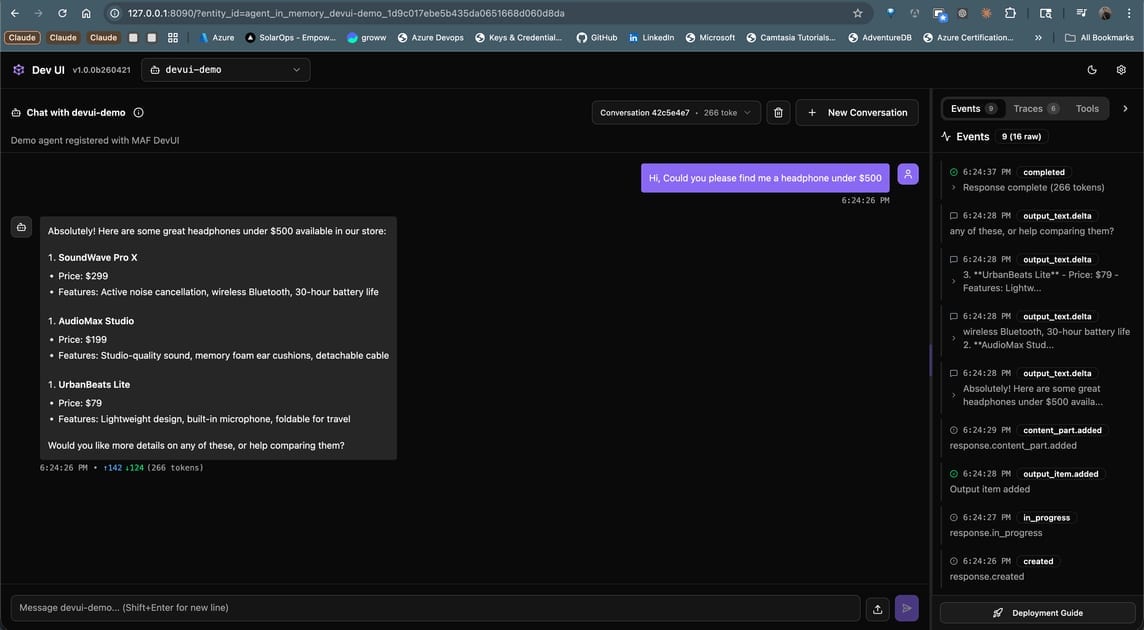
A real run against the demo agent: ask for headphones under $500, and DevUI shows the agent’s structured answer in the chat pane while the right sidebar streams lifecycle events as they fire. The Events, Traces, and Tools tabs at the top right are how you switch between the raw event feed, the OTel span tree, and the list of tools the agent can call. Token count (166 tokens) and response time render inline under each assistant turn.
The dashboard has three panes:
- Left sidebar. Entity list. Every agent / workflow registered with DevUI appears here with its name and description. Click to switch the chat pane’s target.
- Middle: chat / input pane. For agents this is a standard chat UI with file-upload support (multimodal input). For workflows DevUI introspects the first executor’s input type and auto-generates a form: a
str-typed first executor gets a plain text box, a Pydantic model gets one field per attribute. - Right sidebar: developer tools. Tabs for Traces (the span tree), Messages (raw request/response dumps), and Events (lifecycle events from the agent or workflow).
mode="user"hides the right sidebar;mode="developer"(the default) shows everything.
A single run typically finishes in a few seconds. The Traces tab updates live as spans close; you don’t need to refresh. Bumpy runs (a retry, a tool that errored, a long LLM call) are obvious at a glance because the span bars render to scale within the parent’s duration.
.NET
Coming soon. Microsoft’s DevUI docs3 carry a “Coming Soon” banner on the C# pivot; no Microsoft.Agents.AI.DevUI package ships today. Until it lands, three options for .NET readers:
- Run the Python example against a Python-authored agent. The
/v1/responsesendpoint is vendor-neutral. Any .NETHttpClientorMicrosoft.Extensions.AIchat client pointed athttp://localhost:8090/v1drives it unchanged. - Use the Aspire Dashboard (Chapter 07). Aspire is the passive-telemetry counterpart; it shows you what a running service emitted, not an interactive chat pane. For browsing a production trace tree, Aspire is actually the better tool even on Python.
- Watch github.com/microsoft/agent-framework for the C# DevUI announcement. When it ships, this chapter will get a
.NETwalkthrough matching the Python one.
The stub dotnet/README.md4 in this chapter’s folder records the same status so the dotnet/ path isn’t empty.
Running instructions
One command:
cd tutorials/20b-devui/pythonuv syncuv run python main.pyWhat to expect:
- The terminal prints
INFO: Uvicorn running on http://127.0.0.1:8090. - A browser tab opens to
http://localhost:8090. The sidebar shows one entity,devui-demo. - The chat pane accepts a prompt. Run one; a trace appears in the Traces tab within a few seconds.
Ctrl+Cstops the server. Re-runningmain.pyis safe; DevUI re-binds the port cleanly.
If the browser doesn’t open automatically, set auto_open=False and navigate manually, or check that nothing else is bound to :8090 (lsof -i :8090).
Smoke-testing the running server
Once the server is up, a one-liner with curl confirms /v1/responses is honouring the registry:
curl -s http://localhost:8090/v1/responses \ -H 'Content-Type: application/json' \ -d '{"metadata":{"entity_id":"devui-demo"},"input":"Say hi in one sentence."}' \ | jq '.output[0].content[0].text'Same contract the browser uses. If the curl returns an error that references an unknown entity, the registry is the first thing to check. GET /v1/entities lists everything DevUI knows about at the moment.
Aspire vs DevUI: when to reach for which
Both speak OTel. Both show traces. They are tuned for different jobs.
| Aspect | Aspire Dashboard (Ch07) | DevUI (Ch20b) |
|---|---|---|
| Intended use | Dev-time telemetry viewer across all services in the compose stack | Interactive test harness for one entity at a time |
| What you do with it | Look at what a running service emitted | Type a prompt, watch the agent run |
| Trace source | OTLP push from your service | OTel inside the DevUI process itself |
| Scope | Whole request graph (orchestrator → A2A → specialist → tools → LLM) | Single entity’s runs |
| Inputs supported | Whatever your service accepts | Text + file uploads; workflow inputs auto-introspected from the first executor’s schema |
| Production-shaped? | Closer; it’s what the team uses on-call | No; Microsoft says “not intended for production use” |
| API surface | OTLP gRPC / HTTP | OpenAI Responses API |
You want both during development: DevUI while you’re hammering on a single agent, Aspire while you’re watching a multi-service request flow through the capstone. They don’t fight; DevUI’s OTel can export to Aspire in parallel if you add an OTLP exporter to its tracer provider.
Gotchas
- Entity ids come from
name. The OpenAI SDK calls usemetadata={"entity_id": "<name>"}. Rename an agent and the URL breaks. Use the test intests/test_main.pyas a canary so renames are intentional, not accidental. instrumentation_enabled=Falseby default. The API default differs from what you probably want during development. PassTrueexplicitly, or the Traces tab stays empty and you waste 20 minutes thinking something is broken.- Port 8080 collides with the capstone orchestrator. The DevUI default is
8080; this chapter uses8090to stay out of its way. Check your compose stack before picking a port. - Directory discovery is import-based. DevUI imports each
__init__.py. Syntax errors or missing env vars surface as startup crashes. Runpython -c "import entities.weather_agent"first if a module won’t load; you’ll see the real traceback. agent-framework-devuiis a separate PyPI install. It’s not pulled in byagent-framework. Install it with--prebecause it ships on the beta track:pip install agent-framework-devui --pre(oruv addthe>=0.1.0b0constraint as we do in this chapter’spyproject.toml).- C# is not ready yet. If your primary stack is .NET, plan around DevUI for now. Use Aspire for telemetry and spin up a Python interpreter only for interactive agent tests. This chapter’s
dotnet/stub is deliberately empty pending the Microsoft release. - The sample gallery appears when the registry is empty. If you expected your agent to show up and instead see “Download these samples,” your
entities=[...]list is empty or your directory scan didn’t match any modules. Checkentities_diris absolute and every subfolder has an__init__.pywith the expected export. - OTel context does not auto-propagate out. Spans emitted by your agent during a DevUI run stay local to DevUI’s in-memory exporter unless you also register an OTLP exporter. If you want the same run to show up in Aspire, wire a second exporter via
TracerProviderbefore callingserve(). - Workflows need their first executor to expose an input schema. DevUI introspects that schema to generate the input form. An executor whose handler takes
Anyor an untyped dict renders as a blank text box. Type the first executor’s input precisely if you want a proper form. - Hot-reload is opt-in. The
--reloadflag watches the entities directory and re-imports on change. Without it, editing a prompt and hitting send still shows you the old behaviour because the module is cached. The programmaticserve()path has no equivalent; restart the process instead. .envprecedence is quiet. DevUI loads entity-local.envfiles on top of the parent-level one; later wins. An entity that setsOPENAI_API_KEYin its own.envwill override the shared key without warning. Fine once you know, confusing when you don’t.ui_enabled=Falsestill serves the API. You get/v1/responseswithout the React bundle, useful for CI smoke tests, but it also means a headless DevUI does not advertise itself in the browser. Pair with--no-openand explicit curl tests.
Tests
cd tutorials/20b-devui/pythonuv run pytest -v# 3 passed — module imports, agent instance built, name is 'devui-demo'.The tests don’t boot the DevUI server (that’s flaky inside pytest). They assert the two contracts that matter: (a) the DevUI + MAF imports resolve, so a breaking package rename surfaces immediately, and (b) build_agent() returns an Agent with the expected name, so a rename doesn’t silently break the OpenAI-SDK-driven smoke tests that route on entity_id.
All three skip gracefully when LLM credentials are absent; the pytestmark gate matches what every other chapter in this series does.
How this shows up in the capstone
DevUI is a dev-time tool, not a runtime dependency of the shipped capstone. It won’t appear in docker-compose.yml or any production diagram. What the capstone will get is a scripts/devui.py helper (Phase E follow-up tracked in plans/refactor/14-devui-harness.md) that imports the six specialist agents, hands them to serve(entities=[...]), and exposes them on :8090, giving any contributor a one-command path to poke at one agent in isolation without waking the full stack.
For everyday development the flow is:
./scripts/dev.sh # normal capstone stack (Aspire on :18888)python scripts/devui.py # side-channel — one agent at a time on :8090Both run together. Aspire watches passive telemetry; DevUI drives one agent interactively.
The capstone DevUI harness will also register the orchestrator’s workflow objects (pre-purchase research, return-replace, concierge) as entities alongside the agents. DevUI’s workflow input form (generated from the first executor’s schema) means a reviewer can exercise the whole pre-purchase pipeline from a browser without wiring a test script. That’s the single biggest advantage DevUI offers over Aspire: you can drive the workflow, not just watch one someone else drove.
What this chapter intentionally leaves for that follow-up:
- Auth in front of DevUI.
--auth/--auth-tokenflags plus reverse-proxy sketch for exposing DevUI to non-developer reviewers during a demo. - Parallel OTLP export. Wiring DevUI’s tracer provider to push spans to the capstone’s Aspire instance as well as the local panel, so the same run shows up in both UIs.
- Workflow entity registration. The directory layout under
entities/that maps each capstone workflow to its own__init__.py.
Further reading
This chapter
- Canonical article: nitinksingh.com/posts/maf-v1-20b-devui/
- Source on GitHub: tutorials/20b-devui1
- Previous: Chapter 20: Workflow Visualization · Next: Chapter 21: Putting it all together
Microsoft Agent Framework docs
- DevUI: Overview3
- DevUI: Directory Discovery
- DevUI: GitHub (samples + source)
Adjacent tooling
- Aspire Dashboard: passive telemetry for the full stack.
- OpenAI Responses API5: the contract DevUI implements.
- OpenAI Python SDK: how to drive DevUI from code.
Series shared resources
What’s next
Two chapters left. Chapter 20c: Production hardening covers the HTTP-layer auth gaps the original series left open: secure password reset, refresh-token rotation with reuse detection, and graceful key/secret rotation.
Then Chapter 21: Putting it all together closes the series by walking the real app file-by-file. DevUI comes along as a side tool, useful when a chapter points at agents/python/product_discovery/agent.py and you want to poke at that specific agent without waking the whole compose stack.
Static graphs from Ch20, interactive runs from Ch20b, full-stack telemetry from Ch07. Three lenses on the same code, each tuned for a different question.
References
-
tutorials/20b-devui — github.com ↩ ↩2
-
python/main.py— github.com ↩ -
DevUI docs — learn.microsoft.com ↩ ↩2
-
dotnet/README.md— github.com ↩ -
OpenAI Responses API — platform.openai.com ↩
Comments
Comments are GitHub discussions. Sign in with GitHub to post; reactions need no account.