
Every AI agent tutorial ends the same way: the agent returns a string, you render the string, done. The backend gets all the attention – tool calling, orchestration, prompt engineering – while the frontend gets <p>{response}</p> and a prayer.
The result is two problems: a wall of text (agent returns product data as paragraphs instead of cards), and a blank waiting screen (user stares at a spinner for 3-8 seconds before anything appears).
This article fixes both. The first half covers turning raw agent responses into interactive UI components – product cards with images and Add to Cart buttons, order cards with item tables and tracking info, all parsed client-side from the same strings the agents already return. The second half covers token-by-token streaming via Server-Sent Events, so the first word appears in under 200ms instead of the entire answer appearing after several seconds. Neither change requires modifying the backend agents.
Part A: Rich Cards from Agent Responses#
The Problem: Text Walls from Smart Agents#
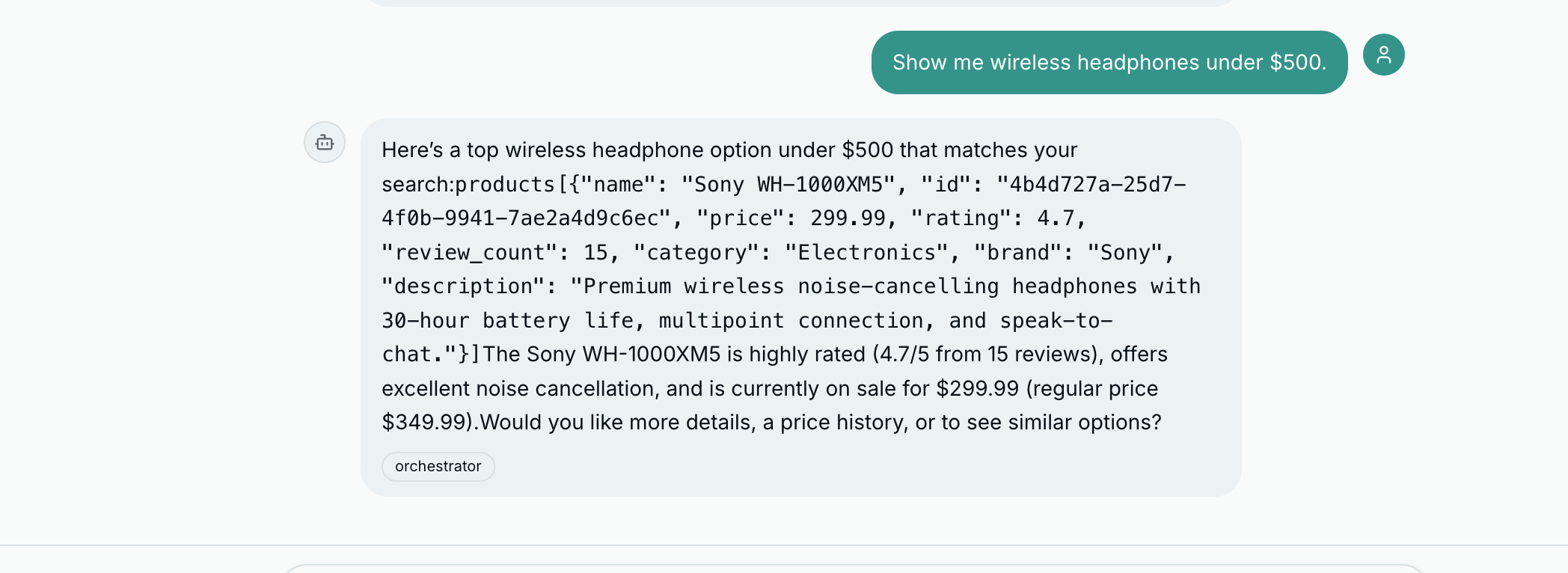
Consider what happens when a user asks “Show me wireless headphones under $200.” The product discovery agent does real work – queries the database, filters by category and price, ranks by relevance – and returns something like:
Sony WH-1000XM5 — Price: $349.99 (was $399.99) — Rating: 4.8/5 (127 reviews)
AirPods Pro — Price: $249.99 — Rating: 4.6/5 (89 reviews)
No images. No visual hierarchy. No way to act on the information. Every e-commerce site in the world shows products as cards with images and buttons. Our agent should too.
Two Approaches: Structured JSON and Regex Fallback#
Approach 1: Instruct the LLM to output structured JSON. In the agent’s system prompt, you include formatting rules telling it to wrap product data in fenced code blocks:
Here are some options for you:

```product
{"name": "Sony WH-1000XM5", "price": 349.99, "rating": 4.8, "review_count": 127, "category": "Electronics", "id": "a1b2c3d4-..."}
```

```product
{"name": "AirPods Pro", "price": 249.99, "rating": 4.6, "review_count": 89, "category": "Electronics", "id": "e5f6a7b8-..."}
```
Approach 2: Client-side pattern detection as fallback. LLMs do not always follow formatting instructions perfectly. The fallback parser uses regex to detect product-like and order-like patterns in plain text and extract structured data from them.
This dual approach means the UI always tries to render rich cards regardless of how cooperative the LLM was with formatting instructions.
The Parsing Pipeline#
All agent responses flow through a single function: parseContent. It takes a raw string and returns an array of typed segments.
interface Segment {
  type: string;
  text: string;
  data?: Record<string, unknown>;
}

function parseContent(content: string): Segment[] {
  // 1. Fenced code blocks (highest priority, most reliable)
  const codeBlockResult = parseCodeBlocks(content);
  if (codeBlockResult) return codeBlockResult;

  // 2. Order block with items in plain text
  const orderResult = parseOrderInText(content);
  if (orderResult) return orderResult;

  // 3. Product blocks in plain text
  const productResult = parseProductsInText(content);
  if (productResult) return productResult;

  // 4. Default: just markdown
  return [{ type: "text", text: content }];
}
The pipeline is a priority chain with early returns. If fenced code blocks are found, the regex fallbacks are skipped.
Step 1: Fenced code block extraction. Scans for ```product, ```order, or ```products blocks. Everything between the backticks is parsed as JSON. Text before, between, and after becomes text segments.
function parseCodeBlocks(content: string): Segment[] | null {
  const codeBlockRegex = /```(product|order|products)\n([\s\S]*?)```/g;
  const segments: Segment[] = [];
  let lastIndex = 0;
  let match;
  let found = false;

  while ((match = codeBlockRegex.exec(content)) !== null) {
    found = true;
    if (match.index > lastIndex) {
      const text = content.slice(lastIndex, match.index).trim();
      if (text) segments.push({ type: "text", text });
    }
    try {
      const data = JSON.parse(match[2]);
      if (match[1] === "products" && Array.isArray(data)) {
        data.forEach((d: Record<string, unknown>) =>
          segments.push({ type: "product", text: "", data: d })
        );
      } else {
        segments.push({ type: match[1], text: "", data });
      }
    } catch {
      segments.push({ type: "text", text: match[0] });
    }
    lastIndex = match.index + match[0].length;
  }

  if (!found) return null;
  return segments;
}
Note the try/catch around JSON.parse. If the LLM produces malformed JSON inside a fenced block, the parser falls through gracefully and renders the raw text instead of crashing.
Steps 2 and 3: Text fallbacks. If no code blocks are found, the parser checks for order-like content (a UUID in an “Order” context) and product-like content (name line followed by Price, Rating, Category lines). These are heuristic but reliable enough for ECommerce Agents’s structured responses.
Step 4: Plain markdown. If nothing matches, the entire content is returned as a single text segment rendered with ReactMarkdown.
Product Cards#
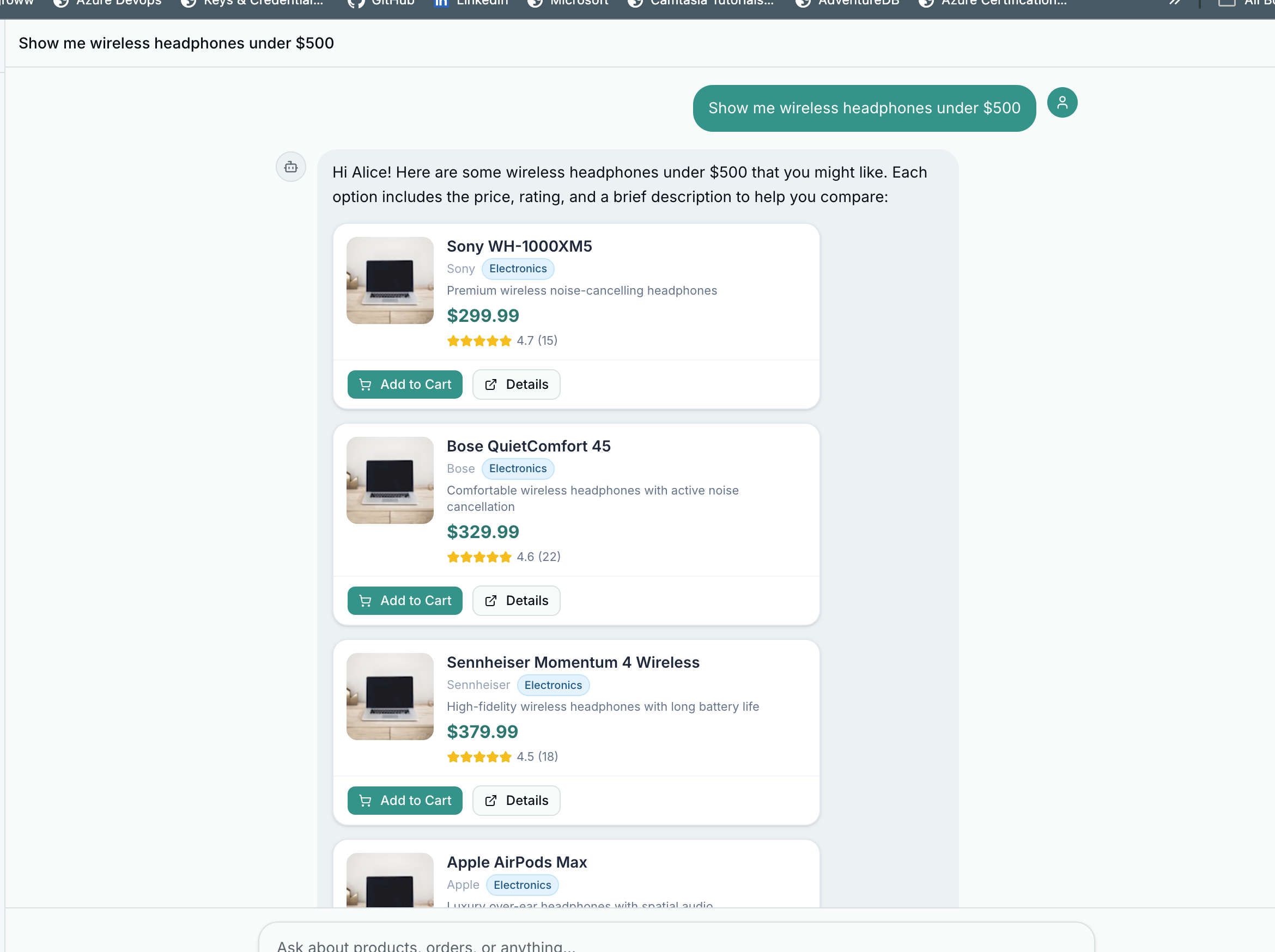
When a segment has type: "product", it renders as a ChatProductCard – a compact card designed to fit inside a chat bubble.
interface ProductData {
  id?: string;
  name?: string;
  price?: number;
  original_price?: number;
  rating?: number;
  review_count?: number;
  category?: string;
  brand?: string;
  description?: string;
  on_sale?: boolean;
}
The price section handles discounts: when original_price is higher than price, it shows the original with a strikethrough and a percentage-off badge.
{/* Price */}
<div className="flex items-center gap-1.5 mt-auto pt-0.5">
  {data.price != null && (
    <span className="text-base font-bold text-teal-700">
      ${data.price.toFixed(2)}
    </span>
  )}
  {hasDiscount && (
    <span className="text-xs text-slate-400 line-through">
      ${data.original_price!.toFixed(2)}
    </span>
  )}
  {hasDiscount && discountPct > 0 && (
    <Badge className="bg-red-500 text-white border-0 text-[9px] px-1.5 py-0">
      {discountPct}% OFF
    </Badge>
  )}
</div>
Category badges are color-coded by type:
const CATEGORY_COLORS: Record<string, string> = {
  electronics: "bg-sky-100 text-sky-800 border-sky-200",
  clothing: "bg-violet-100 text-violet-800 border-violet-200",
  home: "bg-emerald-100 text-emerald-800 border-emerald-200",
  sports: "bg-orange-100 text-orange-800 border-orange-200",
  books: "bg-amber-100 text-amber-800 border-amber-200",
};
Order Cards#
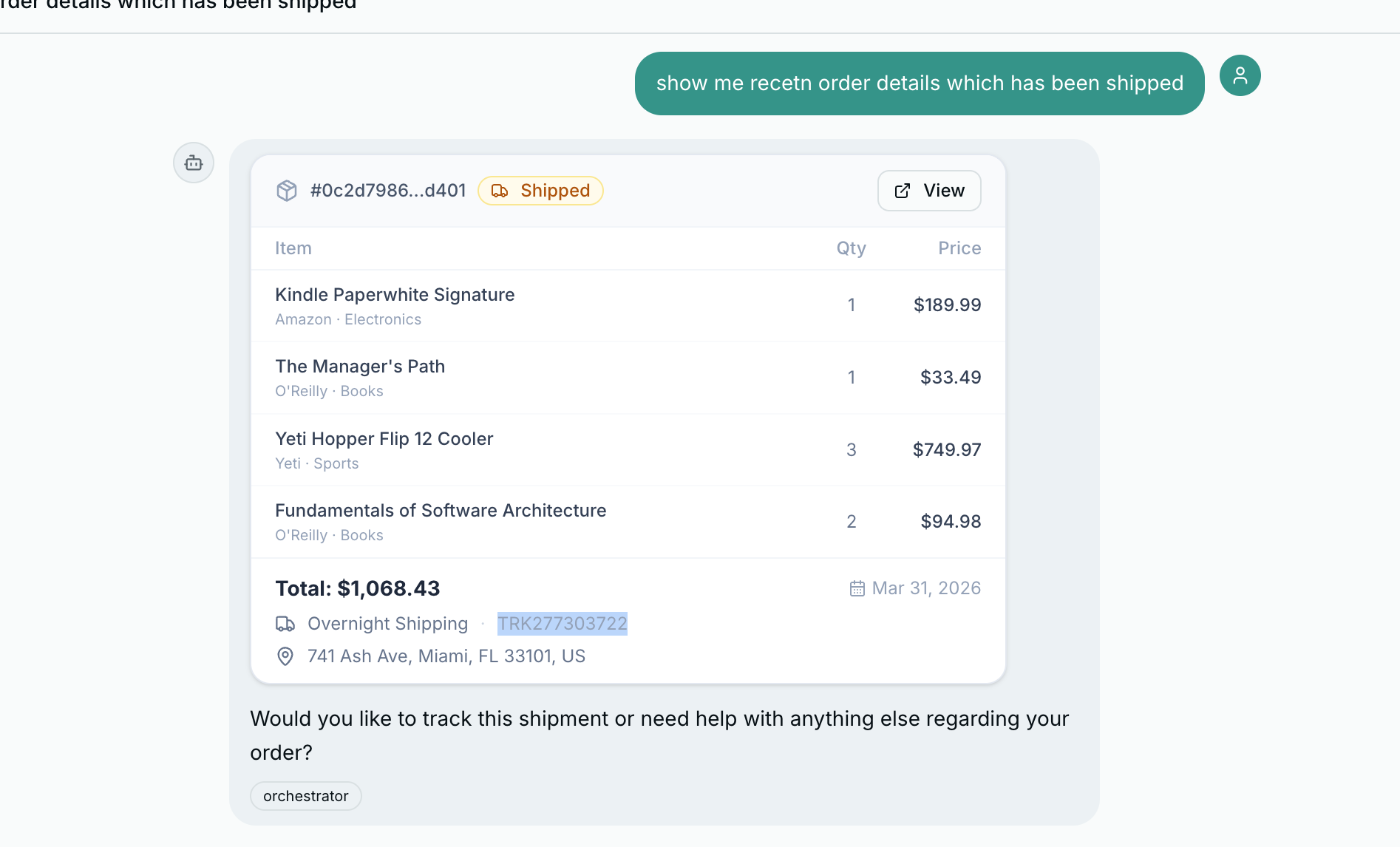
Order responses render as ChatOrderCard – a header with order ID and status badge, an items table with quantities and prices, and a footer with carrier, tracking number, and a compact timeline.
{/* Timeline (compact) */}
{timeline.length > 0 && (
<div className="flex items-center gap-1.5 text-[10px] text-slate-400 pt-0.5 flex-wrap">
<Clock className="size-3 shrink-0" />
{timeline.map((event, i) => (
<span key={i} className="flex items-center gap-1">
{i > 0 && <span className="text-slate-300">→</span>}
<span className="text-slate-500">{event.status}</span>
<span>({formatDate(event.date)})</span>
</span>
))}
</div>
)}
Action Buttons: Card Click to Chat Message to Agent#
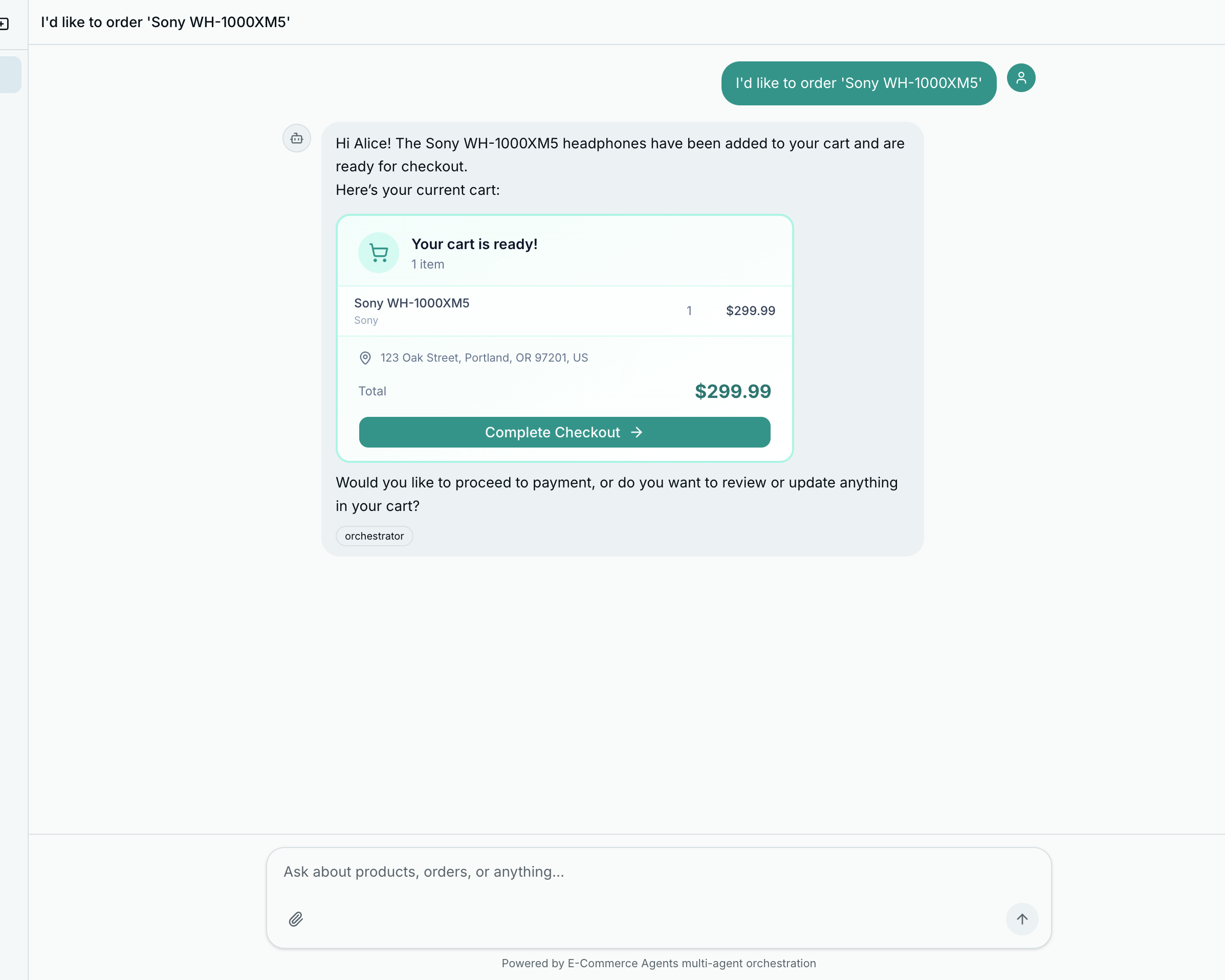
The most important UX pattern: when the user clicks “Add to Cart” on a product card, it sends a message into the chat as if the user typed it.
<Button
  size="sm"
  className="h-7 text-xs bg-teal-600 hover:bg-teal-700 text-white"
  onClick={() => onAction(`I'd like to order "${data.name}"`)}
>
  <ShoppingCart className="mr-1 size-3" />
  Add to Cart
</Button>
Back in the chat page, onAction feeds directly into sendMessage:
<RichMessage
  content={msg.content}
  onAction={(text) => sendMessage(text)}
/>
The user clicks a button, a message appears in the chat, the orchestrator receives it, routes to the order management agent, and the order flow begins – all within the conversational paradigm. No separate modals, no page navigation, no context switching.
This pattern has an important architectural benefit: the agent handles all business logic. The frontend never needs to know how ordering works, what validation is required, or what the order creation API looks like. It just sends a string and renders whatever comes back.
Part B: Token-by-Token Streaming with SSE#
Why Streaming Matters for Agent Systems#
There is a moment, about 800 milliseconds into an LLM request, where the user starts to wonder if the app is broken. By two seconds, they are reaching for the refresh button.
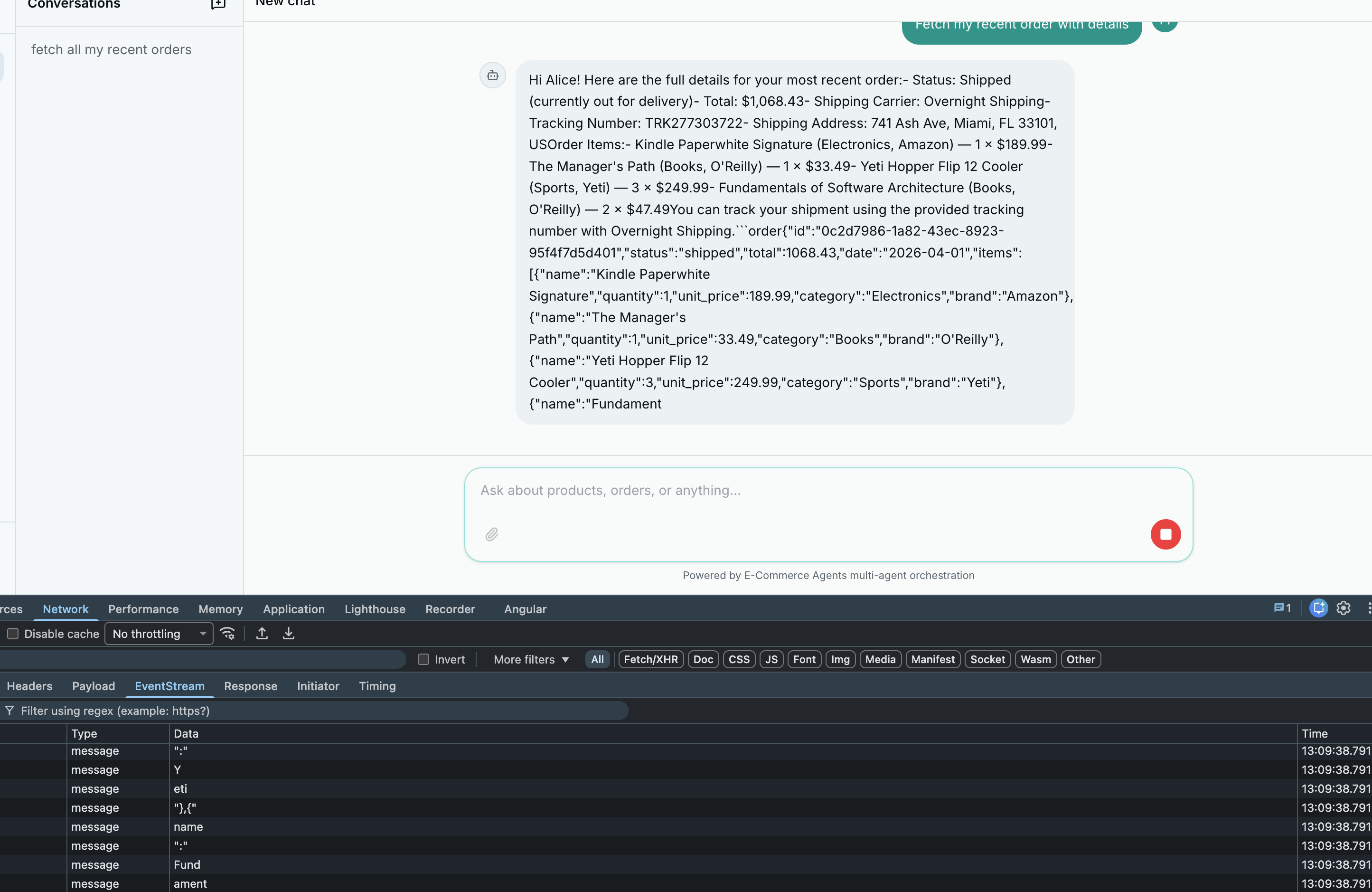
The non-streaming version of ECommerce Agents has exactly this problem. The user sends a message, the orchestrator calls a specialist, the specialist calls a tool, the tool hits the database, the result goes back through the LLM for formatting – and only then does the response appear, all at once, three to eight seconds later. During that entire wait, the user sees nothing.
Streaming fixes this. Instead of waiting for the complete response, each token is sent to the browser as the LLM generates it. The first word appears in under 200ms. The user sees the answer forming in real time and perceives the system as dramatically faster – even though the total time to generate the full response is identical.
A typical ECommerce Agents interaction:
- Orchestrator LLM decides to call
call_specialist_agent("product_discovery", ...) - Product discovery calls
search_products(query="wireless headphones", max_price=200) - Database returns results
- Product discovery formats the results
- Orchestrator incorporates the response and generates the final answer
Without streaming, steps 2-4 are invisible. With streaming, the orchestrator’s opening text (“Let me search for wireless headphones…”) appears immediately. When tool calls happen, there is a brief pause, then text resumes.
The Streaming Tool-Calling Loop#
The core of the implementation is _run_agent_with_tools_stream() in agents/shared/agent_host.py – a streaming variant of the existing _run_agent_with_tools() function. The function signature returns AsyncGenerator[str, None] instead of str. Each yield sends a text chunk to the caller.
The key difference from the non-streaming version is passing stream=True to the API. The response becomes an async iterator of small chunk objects:
# Python — Microsoft Agent Framework (Python SDK)
async def _run_agent_with_tools_stream(
    system_prompt: str,
    tools: list[Callable],
    user_message: str,
    history: list[dict] | None = None,
    user_context: str | None = None,
) -> AsyncGenerator[str, None]:
    # ... client setup (identical to non-streaming)

    for _ in range(5):
        content_chunks: list[str] = []
        tool_calls_by_index: dict[int, dict] = {}

        stream = await client.chat.completions.create(
            model=model, messages=messages, tools=tool_defs,
            tool_choice="auto", stream=True
        )

        async for chunk in stream:
            if not chunk.choices:
                continue
            delta = chunk.choices[0].delta

            # Text content -- yield immediately
            if delta.content:
                content_chunks.append(delta.content)
                yield delta.content

            # Tool calls -- accumulate across deltas (they arrive fragmented)
            if delta.tool_calls:
                for tc_delta in delta.tool_calls:
                    idx = tc_delta.index
                    if idx not in tool_calls_by_index:
                        tool_calls_by_index[idx] = {"id": "", "name": "", "arguments": ""}
                    entry = tool_calls_by_index[idx]
                    if tc_delta.id:
                        entry["id"] = tc_delta.id
                    if tc_delta.function:
                        if tc_delta.function.name:
                            entry["name"] = tc_delta.function.name
                        if tc_delta.function.arguments:
                            entry["arguments"] += tc_delta.function.arguments

            if chunk.choices[0].finish_reason is not None:
                break

        # No tool calls -- done
        if not tool_calls_by_index:
            return

        # Execute tools and loop (re-enters streaming for the post-tool LLM turn)
        messages.append({
            "role": "assistant",
            "content": "".join(content_chunks) or None,
            "tool_calls": [{"id": tc["id"], "type": "function",
                            "function": {"name": tc["name"], "arguments": tc["arguments"]}}
                           for tc in tool_calls_by_index.values()],
        })

        for tc in tool_calls_by_index.values():
            fn_name = tc["name"]
            fn_args = json.loads(tc["arguments"]) if tc["arguments"] else {}
            try:
                raw_fn = getattr(tool_map[fn_name], "func", tool_map[fn_name])
                result = await raw_fn(**fn_args)
                result_str = json.dumps(result, default=str) if not isinstance(result, str) else result
            except Exception as e:
                result_str = json.dumps({"error": str(e)})
            messages.append({"role": "tool", "tool_call_id": tc["id"], "content": result_str})
Two things happen in parallel while iterating chunks:
Text content arrives as delta.content – yield immediately, also accumulate for conversation history reconstruction.
Tool calls arrive fragmented. The first chunk carries the id and function name. Subsequent chunks carry fragments of the arguments JSON. Accumulate by index and reconstruct after the stream finishes.
The key insight: the streaming loop wraps the tool-calling loop. Each iteration is one LLM turn, streamed. Tool calls cause an additional iteration, also streamed. The post-tool response is also token-by-token.
The SSE Endpoint#
The streaming generator needs a transport to push tokens to the browser. Server-Sent Events (SSE) is the right choice: simpler than WebSockets (unidirectional, no connection upgrade negotiation), works over standard HTTP, natively supported by all modern browsers.
# Python — Microsoft Agent Framework (Python SDK)
# agents/orchestrator/routes.py

@router.post("/api/chat/stream")
async def chat_stream(body: ChatRequest, request: Request, user: dict = Depends(require_auth)):

    async def event_generator() -> AsyncGenerator[str, None]:
        full_response: list[str] = []

        try:
            async for chunk in _run_agent_with_tools_stream(
                system_prompt=system_prompt,
                tools=ORCHESTRATOR_TOOLS,
                user_message=body.message,
                history=history,
            ):
                full_response.append(chunk)
                yield f"data: {chunk}\n\n"
        except Exception:
            error_msg = "I apologize, but I encountered an issue."
            full_response.append(error_msg)
            yield f"data: {error_msg}\n\n"

        # Named metadata event, then termination signal
        yield f"event: metadata\ndata: {json.dumps({'conversation_id': conv_id})}\n\n"
        yield "data: [DONE]\n\n"

        # Persist to database after stream completes
        await pool.execute(...)

    return StreamingResponse(
        event_generator(),
        media_type="text/event-stream",
        headers={
            "Cache-Control": "no-cache",
            "Connection": "keep-alive",
            "X-Accel-Buffering": "no",   # Disables Nginx buffering
        },
    )
Three critical headers: Cache-Control: no-cache prevents proxies from buffering, Connection: keep-alive keeps the TCP connection open, X-Accel-Buffering: no tells Nginx not to buffer the response (the most common gotcha when deploying behind a reverse proxy).
Persistence after streaming. The non-streaming endpoint saves the assistant message before returning. The streaming endpoint cannot do this because the response is not complete when the HTTP response starts. Instead, the database write happens after all chunks are yielded. The event_generator() coroutine continues executing after the last yield – FastAPI drains the async generator fully, so the post-yield code always runs even if the client disconnects.
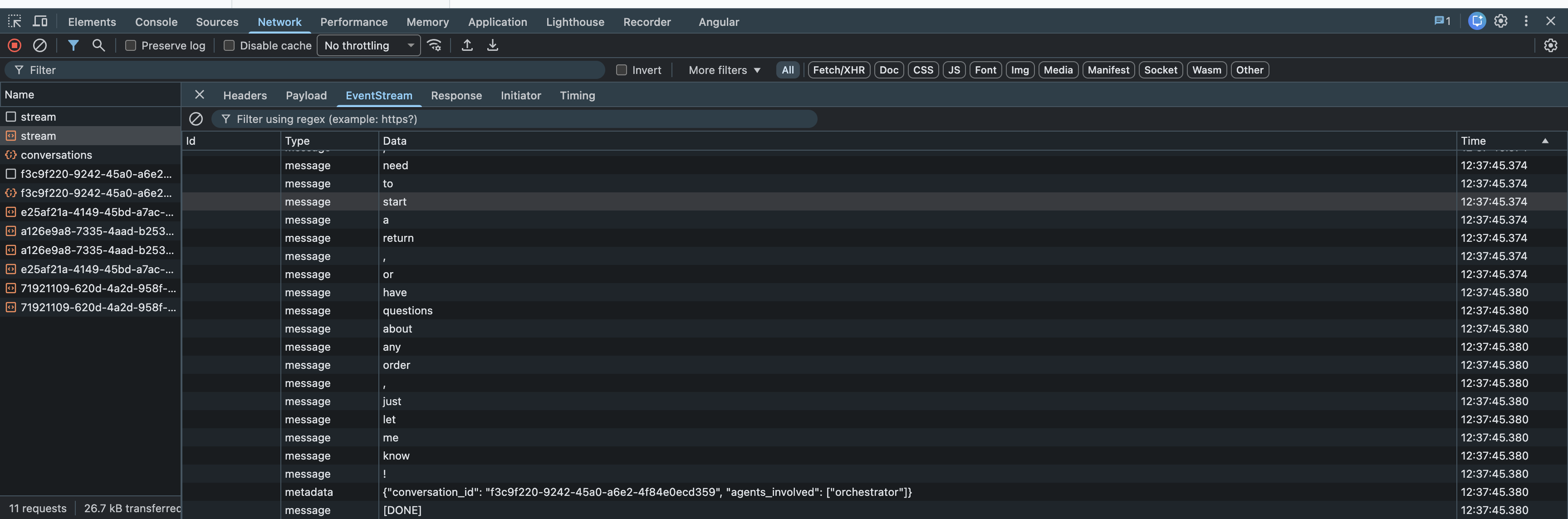
data: line is a separate event carrying a text chunk from the agent.
Frontend: Reading the SSE Stream#
The browser-side implementation uses fetch() + the Streams API (not EventSource, which only supports GET requests):
async chatStream(
  message: string,
  conversationId: string | undefined,
  onChunk: (text: string) => void,
): Promise<{ conversation_id: string; agents_involved: string[] }> {
  const res = await fetch(`${API_URL}/api/chat/stream`, {
    method: "POST",
    headers: { "Content-Type": "application/json", "Authorization": `Bearer ${this.token}` },
    body: JSON.stringify({ message, conversation_id: conversationId }),
  });

  const reader = res.body?.getReader();
  const decoder = new TextDecoder();
  let buffer = "";
  let metadata = null;

  try {
    while (true) {
      const { done, value } = await reader!.read();
      if (done) break;

      buffer += decoder.decode(value, { stream: true });
      const lines = buffer.split("\n");
      buffer = lines.pop() ?? "";  // Keep incomplete line in buffer

      let currentEventType = "";
      for (const line of lines) {
        if (line.startsWith("event: ")) {
          currentEventType = line.slice(7).trim();
          continue;
        }
        if (line.startsWith("data: ")) {
          const data = line.slice(6);
          if (data === "[DONE]") continue;
          if (currentEventType === "metadata") {
            try { metadata = JSON.parse(data); } catch {}
            continue;
          }
          onChunk(data);  // Text chunk -- call the React setState callback
        }
      }
    }
  } finally {
    reader!.releaseLock();
  }

  return metadata ?? { conversation_id: conversationId ?? "", agents_involved: [] };
}
The buffer strategy handles network packet boundaries: SSE chunks do not necessarily align with network packets. A single reader.read() call might return half of one SSE event and half of another. Appending to a buffer and keeping the last (potentially incomplete) line handles this correctly.
In React, the onChunk callback appends to state:
const [streamingText, setStreamingText] = useState("");

await api.chatStream(
  message,
  conversationId,
  (chunk) => setStreamingText((prev) => prev + chunk),
);
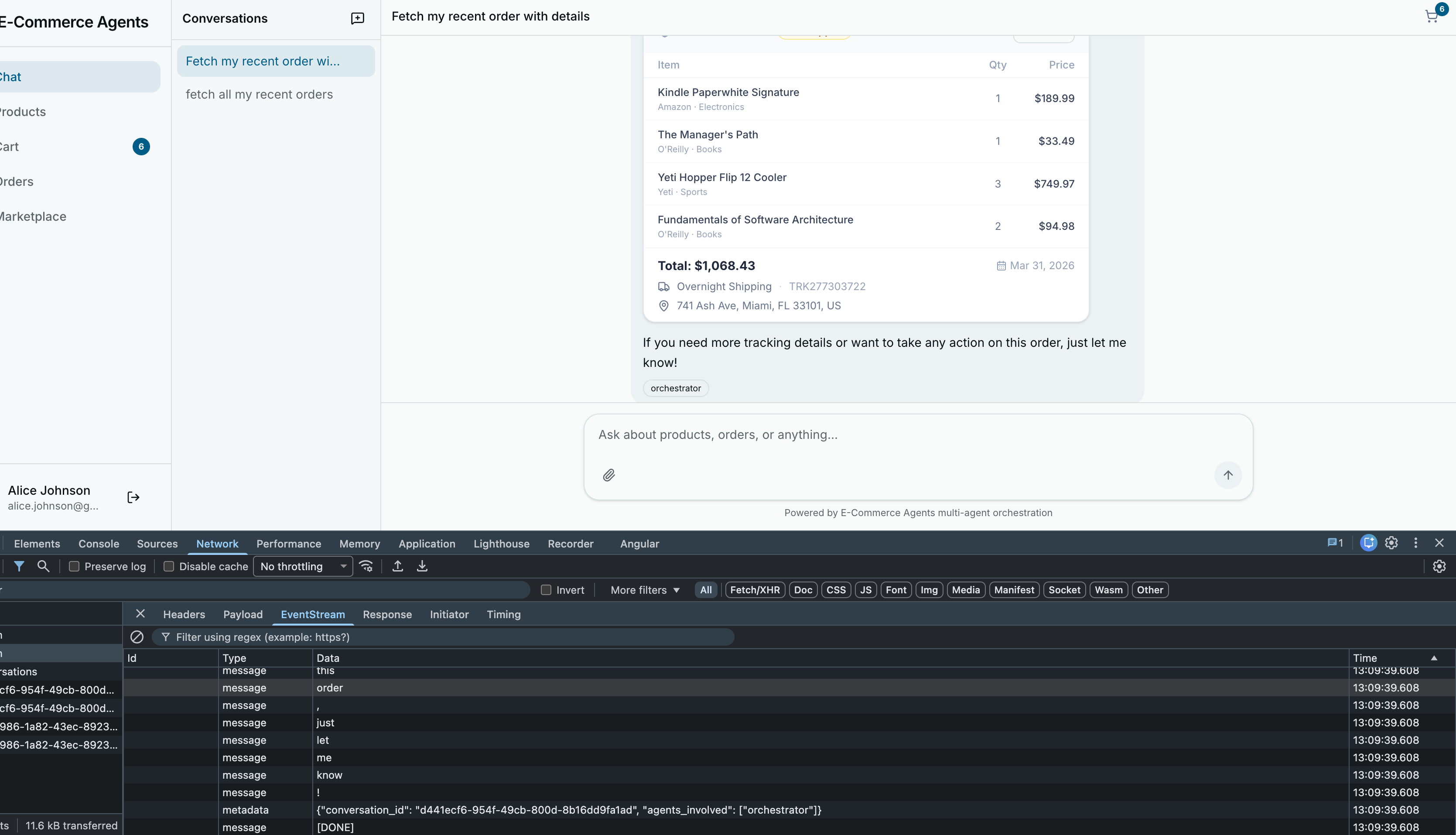
React batches state updates, so rapid setStreamingText calls group into single render frames, keeping the UI smooth even at high token throughput.
What Happens During Tool Calls#
During a tool call, the stream pauses. The timeline for a product search:
0ms    - Stream starts, first text chunk arrives
150ms  - "Let me search for wireless headphones..."
400ms  - finish_reason: tool_calls (stream pauses)
400ms  - Tool execution begins (call_specialist_agent → search_products)
1200ms - Database returns results
1800ms - New streaming turn starts
1850ms - First chunk of product results arrives
3500ms - Stream complete, [DONE] sent
The 400ms gap during tool execution is noticeable but not disruptive – the user has already started reading the opening text. If you wanted to eliminate the dead time, add a custom SSE event during tool execution (event: tool_start\ndata: searching_products\n\n) and show a subtle indicator in the UI.
What’s Next#
The frontend now renders rich interactive cards and streams responses token by token. The next production concern is hardening the system against unauthorized access.
In Part 7: Production Readiness, we secure all of this – JWT authentication, role-based access control, user-scoped data isolation, and Docker Compose deployment with health checks and proper startup ordering.
The complete source code is available at github.com/nitin27may/e-commerce-agents.