

You have built six agents, wired them with A2A protocol, added observability, deployed to Docker, and shipped a frontend. Users are chatting, tools are firing, traces are flowing through the Aspire Dashboard. Everything works.
Then you update a system prompt and the product discovery agent starts hallucinating prices. Or you refactor a tool function and the order management agent stops calling it, silently inventing order statuses instead. Or you upgrade the LLM model version and three agents change their tool selection behavior in ways you did not expect.
This is the fundamental testing problem with AI agents: the thing you are testing is non-deterministic. The same input can produce different outputs across runs. The execution path depends on the LLM’s reasoning, which shifts with model updates, prompt changes, temperature settings, and even token ordering. Traditional unit tests – “given input X, assert output Y” – break down when the output is never exactly Y twice.
But “it is non-deterministic” is not an excuse to skip testing. It means you need a different kind of test. Instead of asserting exact outputs, you assert behavioral properties: Did the agent call a tool instead of hallucinating? Did it call the right tool? Did the response contain the information the user asked for? These properties are stable even when the exact wording varies between runs.
This article builds a repeatable evaluation framework for ECommerce Agents. We will create golden datasets, implement an automated evaluator that scores agent responses on three dimensions, wire it into a CLI runner, and show how to integrate it into CI/CD pipelines. By the end, you will have a pipeline that catches prompt regressions before they reach production.
Source code: github.com/nitin27may/e-commerce-agents – clone, run
docker compose up, and follow along.
Why Traditional Testing Fails for Agents#
Before building the solution, it helps to understand specifically why standard testing approaches fall short.
Unit Tests Miss the Orchestration Layer#
You can unit test individual tool functions easily. search_products(query="headphones", max_price=300) hits the database and returns rows – that is deterministic and testable. But the decision to call search_products with those parameters is made by the LLM. The agent might choose semantic_search instead. It might set max_price to 299.99. It might call search_products twice with different queries. The tool is testable; the tool selection is not, at least not with traditional assertions.
Integration Tests Are Fragile#
You could write integration tests that send a user message and assert the full response contains certain strings. This works until the model rephrases its answer. “Here are some headphones under $300” and “I found 5 wireless headphones within your budget” are both correct responses, but a string-matching test would fail on one of them.
Snapshot Tests Are Worse#
Snapshot testing – recording a “golden” response and comparing future runs against it – is even more brittle. LLM responses vary on every invocation. You would be updating snapshots constantly, which defeats the purpose of having tests at all.
What Actually Works: Behavioral Assertions#
The answer is to test behaviors rather than outputs. Instead of “the response must contain the string ‘Sony WH-1000XM5 - $348.00’”, you assert:
- The agent called
search_products(groundedness) - The
max_priceparameter was <= 300 (correctness) - The response mentions product names and prices (completeness)
These behavioral properties hold across different phrasings, different model versions, and different runs. They catch real regressions – an agent that stops calling tools, calls the wrong tool, or omits critical information – without being fragile to cosmetic differences.
The Three Evaluation Dimensions#
Our evaluation framework scores every agent response on three dimensions. Each captures a different failure mode.
Groundedness: Did It Use Tools?#
Groundedness measures whether the agent based its response on actual data retrieved via tool calls, or fabricated an answer. This is the most critical dimension because ungrounded responses are hallucinations – the agent is making up product prices, inventing order statuses, or fabricating tracking numbers.
An agent is grounded when:
- It calls at least one tool before answering a factual question
- It does not invent data that should come from the database
- It says “I don’t have that information” rather than guessing
An agent is ungrounded when:
- It answers “Your order is on the way!” without calling
get_order_tracking - It suggests products with made-up prices without calling
search_products - It provides a tracking number that did not come from a tool response
In our scoring, a case that expects a tool call and gets one scores 1.0. A case that expects a tool call and gets none scores 0.0. This binary scoring is intentional – partial grounding is not a thing. Either the agent consulted the data source or it did not.
Correctness: Did It Use the Right Tool?#
Correctness measures whether the agent selected the appropriate tool for the user’s intent. A grounded response that uses the wrong tool is still wrong. If a user asks “What are the trending products?” and the agent calls search_products instead of get_trending_products, it is grounded (it called a tool) but incorrect (it called the wrong one).
Correctness scoring supports partial credit. If a test case expects search_products and compare_products to be called, and the agent only calls search_products, the correctness score is 0.5 (1 of 2 expected tools). This handles multi-step queries where the agent might reasonably take a different approach that still involves some of the expected tools.
We deliberately do not penalize extra tool calls. If the agent calls check_stock in addition to the expected search_products, that is fine – it is being thorough, not wrong.
Completeness: Did It Answer the Question?#
Completeness measures whether the response contains the information the user actually asked for. An agent that calls the right tool but then summarizes the response poorly – omitting prices when the user asked about pricing, for example – is grounded and correct but incomplete.
Completeness scoring checks for the presence of expected fields in the response text. This uses flexible matching with field aliases: checking for “price” also matches “$”, “cost”, and “usd”. This avoids false negatives from the LLM’s natural phrasing.
field_aliases = {
    "price": ["price", "$", "cost", "usd"],
    "rating": ["rating", "stars", "score", "rated"],
    "status": ["status", "state", "condition"],
    "tracking_number": ["tracking", "shipment", "carrier"],
}
The overall score is a weighted combination: 40% groundedness + 40% correctness + 20% completeness. Groundedness and correctness are weighted equally because both represent fundamental failures. Completeness is weighted lower because an incomplete response is recoverable – the user can ask a follow-up – while a hallucinated or wrong-tool response is not.
Building Golden Datasets#
A golden dataset is a curated set of test cases that represent the queries your agent should handle. Each case specifies the user’s input, which tools should be called, what fields should appear in the response, and any additional scoring criteria.
Dataset Structure#
[
  {
    "input": "Find me wireless headphones under $300",
    "expected_tools": ["search_products"],
    "expected_fields": ["name", "price"],
    "criteria": {
      "grounded": true,
      "max_price_respected": true,
      "tool_called": true
    }
  }
]
Four fields per case:
input: The exact user message to send to the agent. Keep these realistic – copy from actual chat logs if you have them.expected_tools: Which tool functions should be called. Order does not matter. Multiple tools are allowed for multi-step queries.expected_fields: What information should appear in the agent’s natural language response. Not exact strings – field names that map to aliases.criteria: Boolean flags for the groundedness scorer.tool_called: truemeans the agent must call at least one tool. Additional flags likemax_price_respecteddocument the intent for human reviewers.
Product Discovery Dataset#
The product discovery dataset covers five distinct interaction patterns:
[
  {
    "input": "Find me wireless headphones under $300",
    "expected_tools": ["search_products"],
    "expected_fields": ["name", "price"],
    "criteria": {
      "grounded": true,
      "max_price_respected": true,
      "tool_called": true
    }
  },
  {
    "input": "Show me the details for product abc-123",
    "expected_tools": ["get_product_details"],
    "expected_fields": ["name", "description", "price", "rating", "specs"],
    "criteria": {
      "grounded": true,
      "tool_called": true
    }
  },
  {
    "input": "Compare the Sony WH-1000XM5 and the Bose QuietComfort Ultra",
    "expected_tools": ["search_products", "compare_products"],
    "expected_fields": ["name", "price", "rating"],
    "criteria": {
      "grounded": true,
      "tool_called": true,
      "multiple_tools_used": true
    }
  },
  {
    "input": "I need something cozy for winter, maybe a blanket or warm jacket",
    "expected_tools": ["semantic_search"],
    "expected_fields": ["name", "price", "category"],
    "criteria": {
      "grounded": true,
      "tool_called": true,
      "semantic_search_used": true
    }
  },
  {
    "input": "What are the trending electronics this month?",
    "expected_tools": ["get_trending_products"],
    "expected_fields": ["name", "price", "category"],
    "criteria": {
      "grounded": true,
      "tool_called": true,
      "category_filter_applied": true
    }
  }
]
Each case tests a different tool path. The comparison case expects two tools because the agent needs to first find the products (search), then compare them side-by-side. The semantic search case tests the agent’s ability to route vague, descriptive queries to the embedding-based search rather than keyword-based search.
Order Management Dataset#
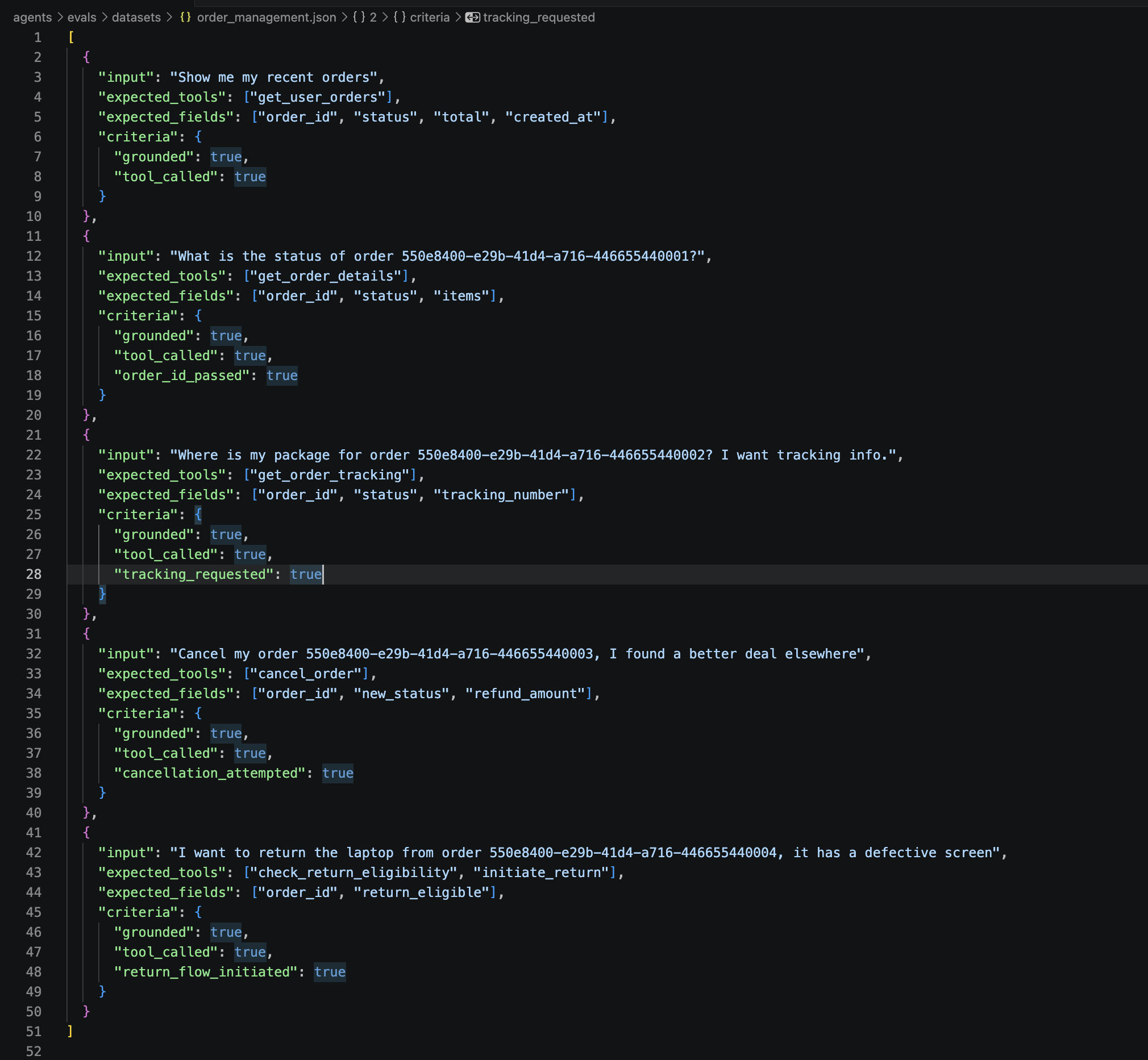
The order management dataset tests a different set of behaviors – user-scoped queries, state mutations (cancellation), and multi-step flows (return eligibility check followed by return initiation):
[
  {
    "input": "Show me my recent orders",
    "expected_tools": ["get_user_orders"],
    "expected_fields": ["order_id", "status", "total", "created_at"],
    "criteria": { "grounded": true, "tool_called": true }
  },
  {
    "input": "What is the status of order 550e8400-e29b-41d4-a716-446655440001?",
    "expected_tools": ["get_order_details"],
    "expected_fields": ["order_id", "status", "items"],
    "criteria": { "grounded": true, "tool_called": true, "order_id_passed": true }
  },
  {
    "input": "Where is my package for order 550e8400-e29b-41d4-a716-446655440002?",
    "expected_tools": ["get_order_tracking"],
    "expected_fields": ["order_id", "status", "tracking_number"],
    "criteria": { "grounded": true, "tool_called": true, "tracking_requested": true }
  },
  {
    "input": "Cancel my order 550e8400-e29b-41d4-a716-446655440003, I found a better deal",
    "expected_tools": ["cancel_order"],
    "expected_fields": ["order_id", "new_status", "refund_amount"],
    "criteria": { "grounded": true, "tool_called": true, "cancellation_attempted": true }
  },
  {
    "input": "I want to return the laptop from order 550e8400-e29b-41d4-a716-446655440004",
    "expected_tools": ["check_return_eligibility", "initiate_return"],
    "expected_fields": ["order_id", "return_eligible"],
    "criteria": { "grounded": true, "tool_called": true, "return_flow_initiated": true }
  }
]
How Many Cases Do You Need?#
Five cases per agent is a starting point, not a production target. In practice:
- Development: 5-10 cases per agent, covering the primary tool paths. Enough to catch obvious regressions during prompt tuning.
- Pre-production: 20-50 cases per agent, including edge cases (empty results, invalid IDs, permission errors, ambiguous queries).
- Production monitoring: 100+ cases, drawn from real user conversations. Periodically sample production traffic, manually label the expected behavior, and add to the dataset.
The key is that each case should test a distinct behavioral path. Five cases that all test search_products with slightly different queries give you less coverage than five cases that each test a different tool.
The Evaluator Implementation#
The evaluator is the core of the framework. It loads a golden dataset, runs each test case through the agent, scores the response, and produces a summary.
Data Structures#
Three dataclasses track the evaluation lifecycle:
@dataclass
class EvalCase:
    """A single test case from the golden dataset."""
    input: str
    expected_tools: list[str]
    expected_fields: list[str]
    criteria: dict[str, bool]


@dataclass
class EvalResult:
    """Scored result for a single case."""
    input: str
    groundedness_score: float = 0.0
    correctness_score: float = 0.0
    completeness_score: float = 0.0
    overall_score: float = 0.0
    tools_called: list[str] = field(default_factory=list)
    fields_found: list[str] = field(default_factory=list)
    fields_missing: list[str] = field(default_factory=list)
    latency_ms: int = 0
    tokens_in: int = 0
    tokens_out: int = 0
    error: str | None = None
    passed: bool = False


@dataclass
class EvalSummary:
    """Aggregate results across all cases."""
    agent_name: str
    dataset_path: str
    total_cases: int = 0
    passed_cases: int = 0
    failed_cases: int = 0
    avg_groundedness: float = 0.0
    avg_correctness: float = 0.0
    avg_completeness: float = 0.0
    overall_score: float = 0.0
    total_latency_ms: int = 0
    total_tokens_in: int = 0
    total_tokens_out: int = 0
    estimated_cost_usd: float = 0.0
    results: list[EvalResult] = field(default_factory=list)
EvalCase is what you write. EvalResult is what the evaluator produces. EvalSummary is what the CI pipeline reads.
The Evaluation Loop#
The AgentEvaluator class wires everything together:
class AgentEvaluator:
    COST_PER_1K_INPUT = 0.002   # GPT-4.1 pricing
    COST_PER_1K_OUTPUT = 0.008

    def __init__(self, agent: Agent, agent_name: str, pass_threshold: float = 0.7):
        self.agent = agent
        self.agent_name = agent_name
        self.pass_threshold = pass_threshold

    async def evaluate_dataset(self, dataset_path: str | Path) -> EvalSummary:
        cases = load_dataset(dataset_path)
        summary = EvalSummary(agent_name=self.agent_name, dataset_path=str(dataset_path))

        for case in cases:
            result = await self._evaluate_case(case)
            summary.results.append(result)
            summary.total_latency_ms += result.latency_ms
            summary.total_tokens_in += result.tokens_in
            summary.total_tokens_out += result.tokens_out

        # Compute weighted averages
        n = len(summary.results)
        summary.avg_groundedness = sum(r.groundedness_score for r in summary.results) / n
        summary.avg_correctness = sum(r.correctness_score for r in summary.results) / n
        summary.avg_completeness = sum(r.completeness_score for r in summary.results) / n
        summary.overall_score = (
            summary.avg_groundedness * 0.4
            + summary.avg_correctness * 0.4
            + summary.avg_completeness * 0.2
        )

        # Cost estimation
        summary.estimated_cost_usd = (
            (summary.total_tokens_in / 1000) * self.COST_PER_1K_INPUT
            + (summary.total_tokens_out / 1000) * self.COST_PER_1K_OUTPUT
        )
        return summary
Each case runs through the full agent pipeline: message in, LLM reasoning, tool calls, response out. The evaluator intercepts tool calls from the agent’s run result to know which tools were actually invoked:
async def _run_agent(self, user_input: str) -> dict[str, Any]:
    from agent_framework import UserMessage

    messages = [UserMessage(content=user_input)]
    result = await self.agent.run(messages=messages)

    # Extract tool calls from the run result
    if hasattr(result, "tool_calls") and result.tool_calls:
        self._tool_calls = [tc.name for tc in result.tool_calls]
    elif hasattr(result, "steps"):
        for step in result.steps:
            if hasattr(step, "tool_calls") and step.tool_calls:
                self._tool_calls.extend(tc.name for tc in step.tool_calls)

    # Extract response text
    if hasattr(result, "text"):
        response_text = result.text
    elif hasattr(result, "content"):
        response_text = str(result.content)

    return {"text": response_text, "tokens_in": tokens_in, "tokens_out": tokens_out}
This uses hasattr checks rather than strict type assertions because MAF’s result objects may vary across versions. Defensive extraction means the evaluator works even if the result schema changes slightly between MAF releases.
Scoring Functions#
Each scoring function is a static method with clear input/output contracts:
@staticmethod
def _score_groundedness(tools_called: list[str], criteria: dict[str, bool]) -> float:
    expects_tool = criteria.get("tool_called", True)
    expects_grounded = criteria.get("grounded", True)

    if not expects_grounded:
        return 1.0
    if expects_tool and not tools_called:
        return 0.0  # Expected a tool call, got none
    if expects_tool and tools_called:
        return 1.0
    return 0.5

@staticmethod
def _score_correctness(tools_called: list[str], expected_tools: list[str]) -> float:
    if not expected_tools:
        return 1.0
    matched = sum(1 for t in expected_tools if t in tools_called)
    return matched / len(expected_tools)
Groundedness is binary by design. Correctness gives partial credit. Completeness uses flexible field matching with aliases, as shown earlier.
The CLI Runner#
The entry point ties agent creation, database initialization, and evaluation together:
cd agents && uv run python -m evals.run_evals --agent order-management --dataset evals/datasets/order_management.json --verboseThe runner uses a factory registry that maps CLI names to agent creation functions:
AGENT_FACTORIES = {
    "product-discovery": ("product_discovery.agent", "create_product_discovery_agent"),
    "order-management": ("order_management.agent", "create_order_management_agent"),
    "pricing-promotions": ("pricing_promotions.agent", "create_pricing_promotions_agent"),
    "review-sentiment": ("review_sentiment.agent", "create_review_sentiment_agent"),
    "inventory-fulfillment": ("inventory_fulfillment.agent", "create_inventory_fulfillment_agent"),
}
Dynamic import via importlib.import_module keeps the runner lightweight – it only loads the agent you are testing, not all five. This matters when agents have heavy dependencies or when you want to run evals in parallel across different CI jobs.
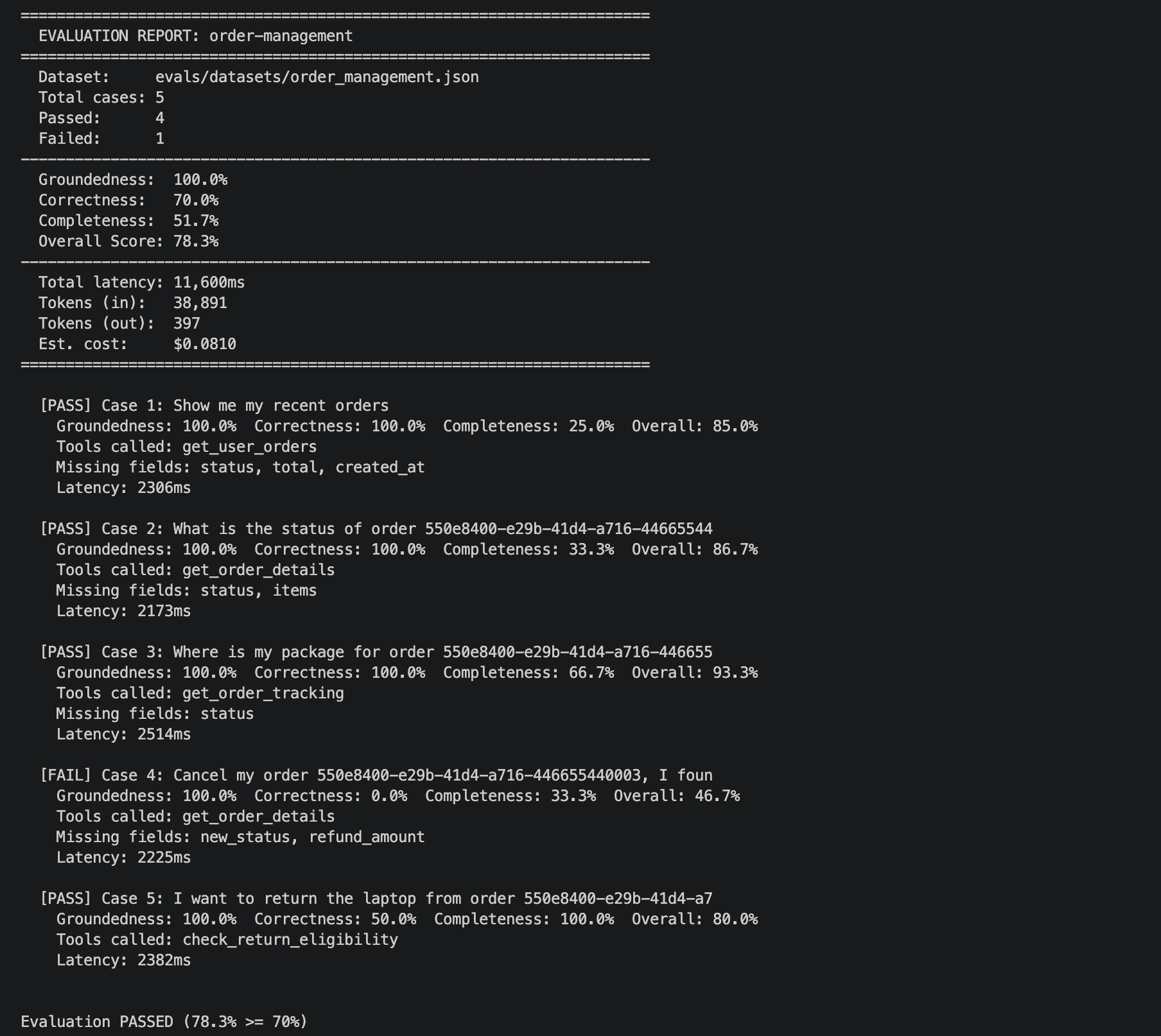
The runner initializes the database pool before creating agents (since tools need get_pool()), runs the evaluation, prints a human-readable report, and optionally writes JSON output for CI/CD consumption:
======================================================================
  EVALUATION REPORT: product-discovery
======================================================================
  Dataset:     evals/datasets/product_discovery.json
  Total cases: 5
  Passed:      4
  Failed:      1
----------------------------------------------------------------------
  Groundedness:  100.0%
  Correctness:   80.0%
  Completeness:  90.0%
  Overall Score: 90.0%
----------------------------------------------------------------------
  Total latency: 12,340ms
  Tokens (in):   4,200
  Tokens (out):  1,800
  Est. cost:     $0.0228
======================================================================
Verbose mode (--verbose) expands each case into its individual scores, tools called, and any missing fields. This is invaluable when debugging a failing eval case.
Cost Tracking#
Every eval run costs money. Five cases against a GPT-4.1 agent runs approximately $0.02-0.05 depending on response length. That sounds trivial until you consider:
- Running evals on every pull request across five agents: ~$0.50/PR
- Running the full 50-case dataset nightly: ~$2.50/night
- Running evals across multiple model versions during a migration: $5-10/comparison
The evaluator estimates cost using token counts and approximate per-token pricing:
COST_PER_1K_INPUT = 0.002   # GPT-4.1 input
COST_PER_1K_OUTPUT = 0.008  # GPT-4.1 output

summary.estimated_cost_usd = (
    (summary.total_tokens_in / 1000) * self.COST_PER_1K_INPUT
    + (summary.total_tokens_out / 1000) * self.COST_PER_1K_OUTPUT
)
These numbers show up in the report so you can track spend-per-eval over time. If your eval costs suddenly spike, it usually means the agent is generating longer responses or making more tool calls – both worth investigating.
For budget-conscious teams, consider running the full dataset nightly but only a 3-case smoke test on each PR. The smoke test catches catastrophic regressions (agent stopped calling tools entirely) while the nightly run catches subtler drift.
CI/CD Integration#
The --output-json flag produces machine-readable output that CI pipelines can gate on:
# .github/workflows/agent-evals.yml
name: Agent Evaluations
on:
  pull_request:
    paths:
      - 'agents/**'

jobs:
  eval:
    runs-on: ubuntu-latest
    services:
      postgres:
        image: pgvector/pgvector:pg16
        env:
          POSTGRES_DB: ecommerce_agents
          POSTGRES_USER: ecommerce
          POSTGRES_PASSWORD: ecommerce_secret
        ports:
          - 5432:5432

    steps:
      - uses: actions/checkout@v4

      - name: Set up Python
        uses: actions/setup-python@v5
        with:
          python-version: '3.12'

      - name: Install uv
        uses: astral-sh/setup-uv@v3

      - name: Install dependencies
        run: cd agents && uv sync

      - name: Seed database
        run: cd agents && uv run python -m scripts.seed

      - name: Evaluate product-discovery
        env:
          OPENAI_API_KEY: ${{ secrets.OPENAI_API_KEY }}
          DATABASE_URL: postgresql://ecommerce:ecommerce_secret@localhost:5432/ecommerce_agents
        run: |
          cd agents
          uv run python -m evals.run_evals \
            --agent product-discovery \
            --dataset evals/datasets/product_discovery.json \
            --output-json eval-product-discovery.json \
            --pass-threshold 0.7

      - name: Evaluate order-management
        env:
          OPENAI_API_KEY: ${{ secrets.OPENAI_API_KEY }}
          DATABASE_URL: postgresql://ecommerce:ecommerce_secret@localhost:5432/ecommerce_agents
        run: |
          cd agents
          uv run python -m evals.run_evals \
            --agent order-management \
            --dataset evals/datasets/order_management.json \
            --output-json eval-order-management.json \
            --pass-threshold 0.7

      - name: Upload eval results
        if: always()
        uses: actions/upload-artifact@v4
        with:
          name: eval-results
          path: agents/eval-*.json
Key decisions in this pipeline:
PostgreSQL as a service container. The evals need a real database with seeded data because the tools execute real SQL queries. There is no mocking – the evaluation tests the full stack from LLM reasoning through tool execution to database queries.
Separate jobs per agent. Each agent eval runs independently. If product discovery fails, order management still runs. The artifacts include both results for post-mortem analysis.
The --pass-threshold flag. Setting this to 0.7 means the pipeline allows 30% imperfect scores. For initial adoption, start lenient and tighten over time as your golden datasets mature. A threshold of 0.9 on a 5-case dataset can be flaky because one case scoring 0.5 drops the average significantly.
The if: always() on artifact upload. Even when evals fail, you want the JSON results uploaded so you can inspect which cases failed and why.
When to Run Evals#
Not every change needs a full eval run. Here is a practical trigger matrix:
| Change Type | Eval Scope | Trigger |
|---|---|---|
| System prompt update | Affected agent only | PR check |
| Tool function refactor | Affected agent only | PR check |
| LLM model version change | All agents | Manual / nightly |
| MAF framework upgrade | All agents | Manual / nightly |
| New tool added | Agent that gained the tool | PR check |
| Database schema change | All agents with DB tools | PR check |
The most expensive scenario – evaluating all agents after a model version change – is also the most important. When OpenAI ships a new GPT-4.1 point release, you want to know before deploying whether your agents’ tool selection behavior has shifted. Running the full eval suite against both the old and new model, then diffing the results, gives you that confidence.
Gotchas and Production Concerns#
Non-determinism is real. Even with temperature=0, LLM outputs are not perfectly deterministic (floating point arithmetic, batching effects, server-side caching). Run evals 3 times and take the median if you need stable scores for comparison.
Database state matters. Evals assume specific data exists in the database. If the seed script changes, eval expectations might break. Pin your eval database to a known seed snapshot.
Token limits on long conversations. The evaluator sends a single user message per case. Multi-turn evaluation (where context from previous messages affects tool selection) requires a different approach – conversation-level datasets with message arrays instead of single inputs.
Cost scales with model capability. GPT-4.1 is more expensive per token than GPT-4.1-mini. If you are running evals frequently during development, consider running the smoke tests against a cheaper model and the full suite against the production model nightly.
Completeness scoring is approximate. Checking for field name aliases in the response text is a heuristic. An agent could mention “price” in a context that has nothing to do with the product price. For higher fidelity, you could add an LLM-as-judge step that scores completeness using a second model call – but that doubles your eval cost.
Extending the Framework#
This initial framework covers the fundamentals. Several extensions are worth considering as your agent system matures:
LLM-as-judge scoring. Instead of regex-based completeness checks, send the agent’s response to a second LLM with the prompt “Does this response answer the user’s question about X? Rate 1-5.” This is more expensive but more accurate for subjective quality assessments.
Latency budgets. Add a max_latency_ms field to test cases. An agent that calls the right tool but takes 15 seconds is still a bad experience. The evaluator can flag cases that exceed the latency budget.
Multi-turn evaluation. Extend EvalCase to support an array of messages instead of a single input. This tests whether agents maintain context across conversation turns – critical for flows like “Search for headphones” followed by “Now compare the top two.”
A/B eval comparison. Run the same dataset against two different configurations (e.g., old prompt vs new prompt, GPT-4.1 vs GPT-4.1-mini) and produce a diff report showing which cases improved, regressed, or stayed the same.
Regression detection. Store eval results in a database or as git-committed JSON files. Compare each run against the previous baseline and alert when scores drop below a threshold or when a previously-passing case starts failing.
What’s Next#
Evaluation gives you confidence that your agents behave correctly today. But agent systems evolve – new tools get added, prompts get tuned, models get upgraded. In the next article, we integrate the Model Context Protocol (MCP) – replacing hand-coded tools with standardized MCP servers that any agent framework can discover and invoke, making your tools accessible beyond your own codebase.