
If you’ve ever built a microservices architecture, you know the pain points all too well: spending hours setting up PostgreSQL locally, wrestling with Redis configurations, debugging why RabbitMQ won’t connect, managing connection strings across multiple services, and let’s not even talk about implementing distributed tracing manually.
What if all of this could be reduced to a few lines of C# code?
.NET Aspire does exactly that. Microsoft describes it as providing “tools, templates, and packages for building observable, production-ready distributed apps” with a “code-first, single source of truth that defines your app’s services, resources, and connections.”
In this guide, I’ll walk through a production-quality e-commerce microservices demo I built with .NET Aspire. I’ll show the actual code and explain how I set up five services, PostgreSQL, Redis, and RabbitMQ—all orchestrated from a single C# file.
Source Code: github.com/nitin27may/aspire-Microservices
What is .NET Aspire?#
Here’s what .NET Aspire actually is:
.NET Aspire is an opinionated, cloud-ready stack for building observable, production-ready, distributed applications. It provides:
- AppHost Orchestration: Define services, dependencies, and configuration entirely in C# code
- Rich Integrations: NuGet packages for popular services (databases, caches, message brokers) with standardized interfaces
- Built-in Observability: OpenTelemetry-based logging, tracing, and metrics out of the box
- Service Discovery: Automatic service discovery without external tools like Consul or Eureka
- Developer Dashboard: Real-time monitoring, logs, and traces
- Consistent Tooling: Project templates for Visual Studio, VS Code, and CLI
The key insight is that Aspire focuses on the inner-loop development experience—making it incredibly easy to develop, debug, and test distributed applications locally. It’s not meant to replace Kubernetes in production; instead, it provides abstractions that eliminate low-level implementation details during development.
Polyglot Support: Works With Any Language#
Aspire’s polyglot support is easy to miss. While Aspire itself is built on .NET, it can orchestrate applications written in any language:
| Language/Runtime | How to Add | Example |
|---|---|---|
| Node.js | builder.AddNpmApp() | React, Angular, Express.js apps |
| Python | builder.AddPythonApp() | Flask, FastAPI, Django services |
| Go | builder.AddExecutable() | Any Go binary |
| Java | builder.AddExecutable() | Spring Boot applications |
| Any Container | builder.AddContainer() | Any Docker image |
Example: Adding a Node.js Frontend
var frontend = builder.AddNpmApp("frontend", "../frontend")
    .WithReference(apiService)
    .WithHttpEndpoint(port: 3000, env: "PORT")
    .WithExternalHttpEndpoints();
Example: Adding a Python Service
var pythonApi = builder.AddPythonApp("analytics", "../analytics-service", "main.py")
    .WithReference(postgres)
    .WithHttpEndpoint(port: 8000);
This means you can use Aspire as the orchestration layer for your entire microservices ecosystem, regardless of what languages your team uses. The service discovery, observability, and infrastructure management benefits apply to all services in your AppHost.
The Problem with Traditional Microservices Development#
You know the drill. You’re starting a new project with a few APIs, a database, Redis for caching, and RabbitMQ for async communication. Here’s what your first few days look like:
Day 1: Infrastructure Setup#
# Install PostgreSQL locally... or use Docker?
docker pull postgres:15
docker run -d --name postgres -e POSTGRES_PASSWORD=secret -p 5432:5432 postgres:15

# Wait, I also need Redis
docker pull redis:7
docker run -d --name redis -p 6379:6379 redis:7

# And RabbitMQ with the management plugin
docker pull rabbitmq:3-management
docker run -d --name rabbitmq -p 5672:5672 -p 15672:15672 rabbitmq:3-management
Day 2: Connection String Hell#
// appsettings.json - Service A
{
  "ConnectionStrings": {
    "Database": "Host=localhost;Port=5432;Database=serviceA;Username=postgres;Password=secret"
  }
}

// appsettings.json - Service B (copy-paste, change database name)
// appsettings.json - Service C (copy-paste again...)
// appsettings.Development.json - different values
// Environment variables in production - completely different
Day 3: Service Discovery Nightmare#
// How does Service A find Service B?
// Option 1: Hardcode URLs (bad)
var client = new HttpClient { BaseAddress = new Uri("http://localhost:5001") };

// Option 2: Configuration (better, but still manual)
var serviceUrl = configuration["Services:ServiceB:Url"];

// Option 3: Service registry (complex setup required)
// Install Consul, configure agents, write health checks...
Day 4: Observability Gap#
// Distributed tracing? That requires:
// - OpenTelemetry SDK in each service
// - Jaeger or Zipkin deployment
// - Correlation ID propagation
// - Custom instrumentation
// - Hours of configuration
This keeps happening in every microservices project. The infrastructure work eats into actual development time.
The Real Challenges#
| Challenge | Impact |
|---|---|
| Infrastructure Setup | Hours spent installing and configuring databases, caches, message brokers |
| Connection String Management | Hardcoded values, secrets in source control, environment drift |
| Service Discovery | Complex setup with Consul/Eureka or brittle hardcoded URLs |
| Observability | Distributed tracing requires significant investment |
| Local Development | “It works on my machine” syndrome, inconsistent environments |
| Startup Orchestration | Services crash because dependencies aren’t ready |
| Container Management | Docker Compose files grow complex, port conflicts, volume management |
.NET Aspire addresses all of these.
Getting Started with .NET Aspire#
Here’s how to get started with .NET Aspire from scratch before we look at the full e-commerce demo.
Prerequisites#
To work with .NET Aspire, you need:
| Requirement | Details |
|---|---|
| .NET SDK | .NET 8.0 or .NET 9.0 |
| Container Runtime | Docker Desktop or Podman |
| IDE (Optional) | Visual Studio 2022 (v17.9+), VS Code with C# Dev Kit, or JetBrains Rider |
Installing Aspire Templates#
Open your terminal and run:
# Install the Aspire project templates
dotnet new install Aspire.ProjectTemplates

# To install a specific version
dotnet new install Aspire.ProjectTemplates::9.4.0
Creating Your First Aspire Project#
# Create a new Aspire Starter Application
dotnet new aspire-starter -n MyFirstAspireApp

# Navigate to the AppHost project
cd MyFirstAspireApp/MyFirstAspireApp.AppHost

# Run the application
dotnet run
Aspire will:
- Start your services
- Launch the Aspire Dashboard
- Display the dashboard URL in the console (typically
https://localhost:17198)
Available Templates#
After installing Aspire templates, you have access to:
| Template | Description | Command |
|---|---|---|
| Aspire Starter | Full starter with AppHost + ServiceDefaults + API + Web | dotnet new aspire-starter |
| Aspire Empty | Minimal AppHost + ServiceDefaults | dotnet new aspire |
| Aspire AppHost | Add AppHost to existing solution | dotnet new aspire-apphost |
| Aspire Service Defaults | Add ServiceDefaults project | dotnet new aspire-servicedefaults |
| Aspire Test Project | Integration test project | dotnet new aspire-test |
Official Resources#
E-Commerce Demo: Architecture Overview#
The e-commerce application I built to demonstrate Aspire’s capabilities is not a toy example. It’s a production-quality implementation with five microservices, event-driven communication, caching, and proper authentication.
(Customer Interface)"] end subgraph Orchestration["Orchestration Layer"] Aspire[".NET Aspire AppHost
(Service Discovery & Orchestration)"] end subgraph Microservices["Microservices Layer"] Catalog["Product Catalog API
(Products, Categories, Search)"] Users["User Management API
(Auth, JWT, Identity)"] Orders["Orders API
(Order Processing)"] Inventory["Inventory API
(Stock Management)"] Notifications["Notifications API
(Email Service)"] end subgraph Infrastructure["Infrastructure Layer"] Postgres[("PostgreSQL
(5 Databases)")] Redis[("Redis
(Distributed Cache)")] RabbitMQ["RabbitMQ
(Message Broker)"] end %% Frontend to Microservices Web -->|HTTP/REST| Catalog Web -->|HTTP/REST| Users Web -->|HTTP/REST| Orders Web -->|HTTP/REST| Inventory %% Orchestration Aspire -.->|Manages| Catalog Aspire -.->|Manages| Users Aspire -.->|Manages| Orders Aspire -.->|Manages| Inventory Aspire -.->|Manages| Notifications %% Microservices to Infrastructure Catalog -->|EF Core| Postgres Users -->|EF Core| Postgres Orders -->|EF Core| Postgres Inventory -->|EF Core| Postgres Notifications -->|EF Core| Postgres %% Caching Catalog <-->|Cache| Redis Inventory <-->|Cache| Redis %% Message Queue Orders -->|Publish Events| RabbitMQ RabbitMQ -->|Consume Events| Inventory RabbitMQ -->|Consume Events| Notifications style Frontend fill:#4A90E2,stroke:#2E5C8A,stroke-width:3px,color:#fff style Orchestration fill:#F5A623,stroke:#D68910,stroke-width:3px,color:#fff style Microservices fill:#7B68EE,stroke:#5B48CE,stroke-width:3px,color:#fff style Infrastructure fill:#50C878,stroke:#3BA860,stroke-width:3px,color:#fff
Technology Stack#
| Component | Technology | Why This Choice |
|---|---|---|
| Orchestration | .NET Aspire AppHost | Single source of truth for all services |
| Frontend | Blazor Server + Bootstrap 5.3 | Rich interactive UI with C# |
| APIs | ASP.NET Core Minimal APIs | Lightweight, fast, modern patterns |
| Database | PostgreSQL (5 separate databases) | Database-per-service pattern |
| Caching | Redis | High-performance distributed cache |
| Messaging | RabbitMQ | Reliable async communication |
| Authentication | JWT + ASP.NET Core Identity | Industry-standard security |
| ORM | Entity Framework Core | Productivity with LINQ |
| API Docs | Scalar (OpenAPI) | Modern alternative to Swagger UI |
| Observability | OpenTelemetry (built-in) | Traces, metrics, logs—automatic |
Microservices Breakdown#
| Service | Responsibility | Dependencies |
|---|---|---|
| Product Catalog API | Products, categories, search, filtering | PostgreSQL, Redis |
| User Management API | Registration, authentication, profiles | PostgreSQL |
| Orders API | Order creation, history, status | PostgreSQL, RabbitMQ |
| Inventory API | Stock management, reservations | PostgreSQL, Redis, RabbitMQ |
| Notifications API | Email confirmations, alerts | PostgreSQL, RabbitMQ |
| Web Frontend | Customer UI | All APIs |
The AppHost: Your Single Source of Truth#
The heart of .NET Aspire is the AppHost project. Your entire distributed application topology is defined in clean, readable C# code. No YAML, no JSON configuration files, no Docker Compose.
Here’s our complete e-commerce orchestration:
using Microsoft.Extensions.Hosting;

var builder = DistributedApplication.CreateBuilder(args);

// ============================================
// INFRASTRUCTURE LAYER
// ============================================

// PostgreSQL with PgAdmin for database management
var postgres = builder.AddPostgres("postgres")
    .WithPgAdmin();  // Adds web-based admin UI automatically!

// Create isolated databases for each service
var catalogDb = postgres.AddDatabase("catalogdb");
var usersDb = postgres.AddDatabase("usersdb");
var ordersDb = postgres.AddDatabase("ordersdb");
var inventoryDb = postgres.AddDatabase("inventorydb");
var notificationsDb = postgres.AddDatabase("notificationsdb");

// Redis with Commander for cache inspection
var redis = builder.AddRedis("redis")
    .WithRedisCommander();  // Visual tool to inspect cache

// RabbitMQ with Management Plugin
var rabbitMq = builder.AddRabbitMQ("rabbitmq")
    .WithManagementPlugin();  // Web UI at port 15672

// ============================================
// MICROSERVICES LAYER
// ============================================

// Product Catalog - needs database and cache
var productCatalogApi = builder.AddProject<Projects.ECommerce_ProductCatalog_Api>("productcatalogapi")
    .WithReference(catalogDb)
    .WithReference(redis)
    .WaitFor(catalogDb)
    .WaitFor(redis);

// User Management - needs database only
var userManagementApi = builder.AddProject<Projects.ECommerce_UserManagement_Api>("usermanagementapi")
    .WithReference(usersDb)
    .WaitFor(usersDb);

// Inventory - needs database, cache, and message queue
var inventoryApi = builder.AddProject<Projects.ECommerce_Inventory_Api>("inventoryapi")
    .WithReference(inventoryDb)
    .WithReference(redis)
    .WithReference(rabbitMq)
    .WaitFor(inventoryDb)
    .WaitFor(redis)
    .WaitFor(rabbitMq);

// Orders - needs database, message queue, and other services
var ordersApi = builder.AddProject<Projects.ECommerce_Orders_Api>("ordersapi")
    .WithReference(ordersDb)
    .WithReference(rabbitMq)
    .WithReference(inventoryApi)      // Service-to-service reference!
    .WithReference(userManagementApi)
    .WithReference(productCatalogApi)
    .WaitFor(ordersDb)
    .WaitFor(rabbitMq);

// Notifications - consumes events from message queue
var notificationsApi = builder.AddProject<Projects.ECommerce_Notifications_Api>("notificationsapi")
    .WithReference(notificationsDb)
    .WithReference(rabbitMq)
    .WithReference(userManagementApi)
    .WaitFor(notificationsDb)
    .WaitFor(rabbitMq);

// ============================================
// PRESENTATION LAYER
// ============================================

// Blazor Web Frontend
builder.AddProject<Projects.ECommerce_Web>("webfrontend")
    .WithExternalHttpEndpoints()  // Expose to browser
    .WithReference(productCatalogApi)
    .WithReference(userManagementApi)
    .WithReference(ordersApi)
    .WithReference(inventoryApi)
    .WaitFor(productCatalogApi)
    .WaitFor(userManagementApi)
    .WaitFor(ordersApi)
    .WaitFor(inventoryApi);

builder.Build().Run();
Understanding the Key Concepts#
Here’s what’s happening in this code:
1. Infrastructure Declaration#
var postgres = builder.AddPostgres("postgres")
    .WithPgAdmin();
This single line:
- Pulls the PostgreSQL container image
- Starts a PostgreSQL server
- Configures networking automatically
- Adds PgAdmin web interface for database management
- Generates secure passwords
- All without you writing a single Docker command!
2. Database-Per-Service Pattern#
var catalogDb = postgres.AddDatabase("catalogdb");
var usersDb = postgres.AddDatabase("usersdb");
Each service gets its own database, ensuring data isolation. Aspire creates all five databases in the same PostgreSQL instance automatically.
3. Dependency Declaration with WithReference()#
var productCatalogApi = builder.AddProject<Projects.ECommerce_ProductCatalog_Api>("productcatalogapi")
    .WithReference(catalogDb)
    .WithReference(redis);
WithReference() does multiple things:
- Injects connection strings as environment variables
- Configures service discovery endpoints
- Establishes a dependency graph for startup ordering
4. Startup Orchestration with WaitFor()#
.WaitFor(catalogDb)
.WaitFor(redis);
Unlike Docker Compose’s depends_on which only waits for container start, WaitFor() uses health checks to ensure the dependency is actually ready to accept connections. No more “connection refused” errors on startup!
5. Management UIs Included#
.WithPgAdmin()        // Database management
.WithRedisCommander() // Cache inspection
.WithManagementPlugin() // RabbitMQ dashboard
These method calls add production-quality management tools automatically. No separate installation, no configuration.
What Aspire Does Behind the Scenes#
When you run dotnet run in the AppHost project, Aspire:
- Pulls container images for PostgreSQL, Redis, RabbitMQ
- Creates containers with proper networking configuration
- Generates connection strings with secure passwords
- Injects environment variables into each service
- Waits for health checks to pass before starting dependent services
- Starts the Aspire Dashboard for monitoring
- Configures OpenTelemetry exporters for all services
Service Discovery: How It Works#
Service discovery is where most microservices setups get messy. How does the Orders API know where to find the Inventory API? The answers range from bad to complex:
Traditional Approaches (Before Aspire)#
Option 1: Hardcoded URLs (Don’t do this)
var client = new HttpClient { BaseAddress = new Uri("http://localhost:5001") };
// Breaks in different environments, can't scale
Option 2: Configuration-based (Better, but tedious)
// appsettings.json
{ "Services": { "InventoryApi": "http://localhost:5001" } }

// Program.cs
var url = configuration["Services:InventoryApi"];
// Manual configuration for every environment
Option 3: Service Registry (Complex)
// Requires Consul/Eureka setup, health check configuration,
// service registration code, DNS or client-side discovery...
// Significant infrastructure overhead
The Aspire Way#
With .NET Aspire, service discovery is automatic. Here’s how our Orders API calls the Inventory API:
// In Program.cs - Register HttpClient with service name
builder.Services.AddHttpClient("inventoryapi", client =>
{
    client.BaseAddress = new Uri("https+http://inventoryapi");
});

// The "inventoryapi" name matches the AppHost registration
The URL https+http://inventoryapi gets resolved by Aspire’s service discovery. No hardcoded URLs, no environment variables to manage, no service registry to set up.
How It Works Under the Hood#
= https://localhost:7001"] Var2["services__inventoryapi__http__0
= http://localhost:5001"] end subgraph OrdersAPI["Orders API"] HttpClient["new Uri('https+http://inventoryapi')"] ServiceDiscovery["Service Discovery Resolution"] Endpoint["Resolved Endpoint:
https://localhost:7001"] HttpClient --> ServiceDiscovery ServiceDiscovery --> Endpoint end EnvVars --> InjectedVars InjectedVars --> ServiceDiscovery style AppHost fill:#F5A623,stroke:#D68910,stroke-width:2px,color:#fff style InjectedVars fill:#50C878,stroke:#3BA860,stroke-width:2px,color:#fff style OrdersAPI fill:#4A90E2,stroke:#2E5C8A,stroke-width:2px,color:#fff
The service discovery flow:
- AppHost registers services with logical names like
inventoryapi - Environment variables are injected with actual endpoints for each protocol
- Service Discovery middleware intercepts the
https+http://scheme - Resolution happens automatically - HTTPS is preferred, HTTP is fallback
- Built-in resilience handles transient failures with retries and circuit breakers
Key Features of Aspire Service Discovery#
- Automatic Endpoint Resolution: Service names resolve to actual URLs
- HTTPS/HTTP Fallback: The
https+http://scheme tries HTTPS first, falls back to HTTP - Built-in Resilience: Configurable retry policies, circuit breakers
- Zero Configuration: Works out of the box with
WithReference() - Environment Agnostic: Same code works locally and in production
OpenTelemetry: Observability Out of the Box#
Proper observability in distributed systems has a steep setup cost. Getting distributed tracing working traditionally requires:
- Installing OpenTelemetry SDKs in each service
- Configuring exporters for traces, metrics, and logs
- Setting up collectors (Jaeger, Zipkin, Prometheus)
- Implementing correlation ID propagation
- Deploying and maintaining observability infrastructure
With .NET Aspire, all of this is a single line of code:
builder.AddServiceDefaults();What AddServiceDefaults() Provides#
This single method call configures:
| Feature | Description |
|---|---|
| OpenTelemetry Tracing | Automatic trace propagation across services |
| OpenTelemetry Metrics | CPU, memory, request latency, error rates |
| Structured Logging | Correlated logs with trace context |
| Health Checks | /health and /alive endpoints |
| Service Discovery | HttpClient configured for service resolution |
| Resilience | Standard resilience handlers for HTTP calls |
Inside the ServiceDefaults Extension#
Here’s what our Extensions.cs in the ServiceDefaults project looks like:
public static class Extensions
{
    public static IHostApplicationBuilder AddServiceDefaults(this IHostApplicationBuilder builder)
    {
        // Configure OpenTelemetry for tracing and metrics
        builder.ConfigureOpenTelemetry();

        // Add health check endpoints
        builder.AddDefaultHealthChecks();

        // Enable service discovery
        builder.Services.AddServiceDiscovery();

        // Configure HttpClient with resilience and service discovery
        builder.Services.ConfigureHttpClientDefaults(http =>
        {
            http.AddStandardResilienceHandler();  // Retries, circuit breaker
            http.AddServiceDiscovery();            // Resolve service names
        });

        return builder;
    }

    public static IHostApplicationBuilder ConfigureOpenTelemetry(this IHostApplicationBuilder builder)
    {
        builder.Logging.AddOpenTelemetry(logging =>
        {
            logging.IncludeFormattedMessage = true;
            logging.IncludeScopes = true;
        });

        builder.Services.AddOpenTelemetry()
            .WithMetrics(metrics =>
            {
                metrics.AddAspNetCoreInstrumentation()
                    .AddHttpClientInstrumentation()
                    .AddRuntimeInstrumentation();
            })
            .WithTracing(tracing =>
            {
                tracing.AddSource(builder.Environment.ApplicationName)
                    .AddAspNetCoreInstrumentation()
                    .AddHttpClientInstrumentation();
            });

        builder.AddOpenTelemetryExporters();

        return builder;
    }
}
The Aspire Dashboard: Your Observability Hub#
When you run the AppHost, the dashboard at https://localhost:17198 shows:
- All running services and their status
- Real-time logs from all services
- Distributed traces for debugging
- Metrics and performance data
You don’t need to set up Grafana, Prometheus, or an ELK stack separately.

Dashboard Features#
| Tab | What You See |
|---|---|
| Resources | All services, containers, their status, endpoints, and logs |
| Console Logs | Aggregated logs from all services with filtering |
| Structured Logs | Searchable structured log entries |
| Traces | Distributed traces showing request flow across services |
| Metrics | Performance metrics, request rates, latencies |
Tracing a Request Across Services#
Debugging an order creation that touches 4 services without this tooling means:
- SSH into each container
- Grep through logs for correlation IDs
- Manually piece together the request flow
- Spending hours on what should take minutes
With Aspire Dashboard, click on a trace and see the entire flow:
[webfrontend] POST /checkout → 245ms
  └── [ordersapi] POST /api/orders → 180ms
        ├── [inventoryapi] POST /api/inventory/check → 45ms
        │     └── [Redis] GET inventory:product:1 → 2ms
        └── [RabbitMQ] Publish order.created → 5ms
              ├── [inventoryapi] Consume order.created → 30ms
              └── [notificationsapi] Consume order.created → 50ms
That trace view alone has saved me hours of debugging.


Event-Driven Architecture with RabbitMQ#
Microservices communicate best through events. Synchronous HTTP calls create tight coupling; if the Inventory service is down, should the Orders service fail too? Event-driven architecture solves this by decoupling services through a message broker.
Our e-commerce app uses RabbitMQ for asynchronous communication:
The Event Flow#
When a customer places an order:
- Orders API creates the order in its database
- Orders API publishes an
OrderCreatedevent to RabbitMQ - Inventory API consumes the event and deducts stock (asynchronously)
- Notifications API consumes the event and sends confirmation email (asynchronously)
The order is confirmed to the customer immediately. Stock deduction and email happen in the background—no waiting.
Setting Up RabbitMQ Consumer#
Here’s how our Inventory service consumes order events:
public class OrderEventConsumer : BackgroundService
{
    private readonly IServiceProvider _serviceProvider;
    private readonly IConnection _rabbitConnection;  // Injected by Aspire!
    private readonly ILogger<OrderEventConsumer> _logger;

    public OrderEventConsumer(
        IServiceProvider serviceProvider,
        IConnection rabbitConnection,  // Auto-configured connection
        ILogger<OrderEventConsumer> logger)
    {
        _serviceProvider = serviceProvider;
        _rabbitConnection = rabbitConnection;
        _logger = logger;
    }

    protected override Task ExecuteAsync(CancellationToken stoppingToken)
    {
        _logger.LogInformation("OrderEventConsumer starting...");

        var channel = _rabbitConnection.CreateModel();

        // Declare exchange with topic routing
        channel.ExchangeDeclare(
            exchange: "orders.exchange",
            type: ExchangeType.Topic,
            durable: true,
            autoDelete: false);

        // Declare queue for inventory service
        channel.QueueDeclare(
            queue: "orders.inventory",
            durable: true,
            exclusive: false,
            autoDelete: false);

        // Bind queue to exchange with routing key
        channel.QueueBind(
            queue: "orders.inventory",
            exchange: "orders.exchange",
            routingKey: "order.created");

        var consumer = new EventingBasicConsumer(channel);
        consumer.Received += (sender, args) =>
        {
            try
            {
                var body = Encoding.UTF8.GetString(args.Body.ToArray());
                var orderEvent = JsonSerializer.Deserialize<OrderCreatedEvent>(body);

                if (orderEvent != null)
                {
                    _logger.LogInformation("Processing order: {OrderId}", orderEvent.OrderId);

                    // Create scope for scoped services
                    using var scope = _serviceProvider.CreateScope();
                    var inventoryService = scope.ServiceProvider
                        .GetRequiredService<InventoryService>();

                    // Deduct inventory for all items in the order
                    inventoryService.DeductInventoryAsync(
                        orderEvent.OrderId,
                        orderEvent.Items
                    ).GetAwaiter().GetResult();
                }

                // Acknowledge successful processing
                channel.BasicAck(args.DeliveryTag, multiple: false);
            }
            catch (Exception ex)
            {
                _logger.LogError(ex, "Error processing order event");
                // Requeue for retry
                channel.BasicNack(args.DeliveryTag, multiple: false, requeue: true);
            }
        };

        channel.BasicConsume(
            queue: "orders.inventory",
            autoAck: false,  // Manual acknowledgment
            consumer: consumer);

        _logger.LogInformation("Waiting for order events...");

        // Keep running until cancellation
        stoppingToken.Register(() =>
        {
            channel.Close();
            channel.Dispose();
        });

        return Task.CompletedTask;
    }
}
Adding RabbitMQ in Your Service#
The RabbitMQ connection is automatically configured by Aspire:
// In Program.cs - One line!
builder.AddRabbitMQClient("rabbitmq");

// The IConnection is now available for dependency injection
// Connection string, credentials - all handled automatically
The Shared Event Contract#
Services communicate through a shared contract:
// In ECommerce.Shared.Contracts project
public record OrderCreatedEvent
{
    public Guid OrderId { get; init; }
    public string OrderNumber { get; init; }
    public string UserId { get; init; }
    public decimal TotalAmount { get; init; }
    public List<OrderItemEvent> Items { get; init; }
    public DateTime CreatedAt { get; init; }
}

public record OrderItemEvent
{
    public int ProductId { get; init; }
    public string ProductName { get; init; }
    public int Quantity { get; init; }
    public decimal UnitPrice { get; init; }
}
Benefits of This Approach#
| Benefit | Description |
|---|---|
| Loose Coupling | Services don’t need to know about each other |
| Resilience | If Inventory is down, orders still process |
| Scalability | Add more consumers to handle load |
| Auditability | Events provide natural audit trail |
| Eventual Consistency | Stock eventually reflects orders |
The .WithManagementPlugin() call provisions the RabbitMQ Management UI automatically — accessible directly from the Aspire Dashboard resource list.

orders.inventory and orders.notifications queues visible, both running and durable. This comes from a single .WithManagementPlugin() call in the AppHost.
Caching with Redis#
Every product page view hitting the database doesn’t scale. Redis gives you sub-millisecond reads and keeps database load in check.
Adding Redis in Aspire#
// In AppHost
var redis = builder.AddRedis("redis")
    .WithRedisCommander();  // Visual inspection tool

// In Product Catalog API
builder.AddRedisClient("redis");
Cache-Aside Pattern Implementation#
Our Product Catalog service uses the cache-aside (lazy-loading) pattern:
// In Program.cs
builder.AddRedisClient("redis");

// In ProductCatalogService
public class ProductCatalogService
{
    private readonly CatalogDbContext _context;
    private readonly IConnectionMultiplexer _redis;
    private readonly ILogger<ProductCatalogService> _logger;
    private static readonly TimeSpan CacheExpiry = TimeSpan.FromMinutes(5);

    public ProductCatalogService(
        CatalogDbContext context,
        IConnectionMultiplexer redis,  // Injected by Aspire
        ILogger<ProductCatalogService> logger)
    {
        _context = context;
        _redis = redis;
        _logger = logger;
    }

    public async Task<IEnumerable<ProductDto>> GetProductsAsync()
    {
        var cacheKey = "products:all";
        var db = _redis.GetDatabase();

        // 1. Check cache first
        var cached = await db.StringGetAsync(cacheKey);

        if (!cached.IsNullOrEmpty)
        {
            _logger.LogDebug("Cache hit for {CacheKey}", cacheKey);
            return JsonSerializer.Deserialize<IEnumerable<ProductDto>>(cached!);
        }

        // 2. Cache miss - query database
        _logger.LogDebug("Cache miss for {CacheKey}, querying database", cacheKey);

        var products = await _context.Products
            .Include(p => p.Category)
            .Where(p => p.IsActive)
            .Select(p => new ProductDto
            {
                Id = p.Id,
                Name = p.Name,
                Description = p.Description,
                Price = p.Price,
                ImageUrl = p.ImageUrl,
                CategoryName = p.Category.Name
            })
            .ToListAsync();

        // 3. Store in cache for next request
        await db.StringSetAsync(
            cacheKey,
            JsonSerializer.Serialize(products),
            CacheExpiry);

        return products;
    }

    public async Task InvalidateCacheAsync()
    {
        var db = _redis.GetDatabase();
        await db.KeyDeleteAsync("products:all");
        _logger.LogInformation("Product cache invalidated");
    }
}
Caching Strategy#
| Service | What’s Cached | TTL | Invalidation |
|---|---|---|---|
| Product Catalog | Products, Categories | 5 min | On product update |
| Inventory | Stock levels | 1 min | On stock change, order events |
Why Redis Commander?#
Adding .WithRedisCommander() gives you a web UI to:
- View all cached keys
- Inspect cache values
- Monitor memory usage
- Delete keys manually for debugging
I use this constantly when debugging cache issues.

.WithRedisCommander().
Complete Data Flow: User Journey#
Here’s the complete data flow when a customer places an order:
Database Per Service Pattern#
The database-per-service pattern gives each service full ownership of its data. No shared schemas, no cross-service queries, no coordination nightmares.
Why Separate Databases?#
| Benefit | Description |
|---|---|
| Data Isolation | Services can’t accidentally read/write each other’s data |
| Independent Scaling | Scale databases based on service-specific load |
| Technology Freedom | Each service could use a different database type |
| Schema Independence | Change schema without coordinating with other teams |
| Fault Isolation | Database issues don’t cascade to other services |
Our Database Structure#
| Service | Database | Tables | Purpose |
|---|---|---|---|
| Product Catalog | catalogdb | Products, Categories | Product information |
| User Management | usersdb | Users, Roles, Claims | Identity & authentication |
| Orders | ordersdb | Orders, OrderItems | Order records |
| Inventory | inventorydb | Inventory, Reservations | Stock management |
| Notifications | notificationsdb | EmailLogs | Notification history |
How Aspire Makes This Easy#
Without Aspire, you’d need to:
- Create 5 databases manually
- Configure 5 connection strings
- Manage migrations for each
- Handle credentials securely
With Aspire:
var postgres = builder.AddPostgres("postgres");

var catalogDb = postgres.AddDatabase("catalogdb");
var usersDb = postgres.AddDatabase("usersdb");
var ordersDb = postgres.AddDatabase("ordersdb");
var inventoryDb = postgres.AddDatabase("inventorydb");
var notificationsDb = postgres.AddDatabase("notificationsdb");
Five lines create all databases, configure them, and inject connection strings into each service.
Running the Demo#
Here’s how to run it yourself.
Prerequisites Checklist#
- .NET 9 SDK (or .NET 8)
- Docker Desktop running
- Git installed
Quick Start#
# 1. Clone the repository
git clone https://github.com/nitin27may/aspire-Microservices.git
cd aspire-Microservices

# 2. Navigate to AppHost
cd src/ECommerce.AppHost

# 3. Run the application
dotnet run
What Happens Next#
When you run dotnet run, here’s the sequence:
1. Pulling PostgreSQL image...
2. Pulling Redis image...
3. Pulling RabbitMQ image...
4. Starting PostgreSQL container...
5. Creating databases: catalogdb, usersdb, ordersdb, inventorydb, notificationsdb
6. Starting Redis container...
7. Starting RabbitMQ container...
8. Waiting for health checks...
9. Starting productcatalogapi...
10. Starting usermanagementapi...
11. Starting inventoryapi...
12. Starting ordersapi...
13. Starting notificationsapi...
14. Starting webfrontend...
15. Aspire Dashboard available at: https://localhost:17198
Access Points#
| Service | URL | Description |
|---|---|---|
| Aspire Dashboard | https://localhost:17198 | Monitoring, logs, traces |
| Web Frontend | Shown in dashboard | E-commerce store UI |
| PgAdmin | Shown in dashboard | Database management |
| Redis Commander | Shown in dashboard | Cache inspection |
| RabbitMQ Management | Shown in dashboard | Message broker UI |
| API Documentation | Each API at /scalar/v1 | Interactive API docs |
Demo Credentials#
| Password | Role | |
|---|---|---|
demo@example.com | Demo123! | Customer |
test@example.com | Test123! | Customer |
PgAdmin launches at the URL shown in the Aspire Dashboard resources list — no separate install, no manual configuration.

.WithPgAdmin(). Connect to any of the Aspire-managed PostgreSQL instances directly from this UI.
Try the Complete User Journey#
- Browse Products - Navigate categories, search, filter
- Add to Cart - Products stored in browser localStorage
- Create Account - Or use demo credentials
- Checkout - Watch inventory validation happen
- View Order - Check order history
- Observe - Open Aspire Dashboard to see traces!
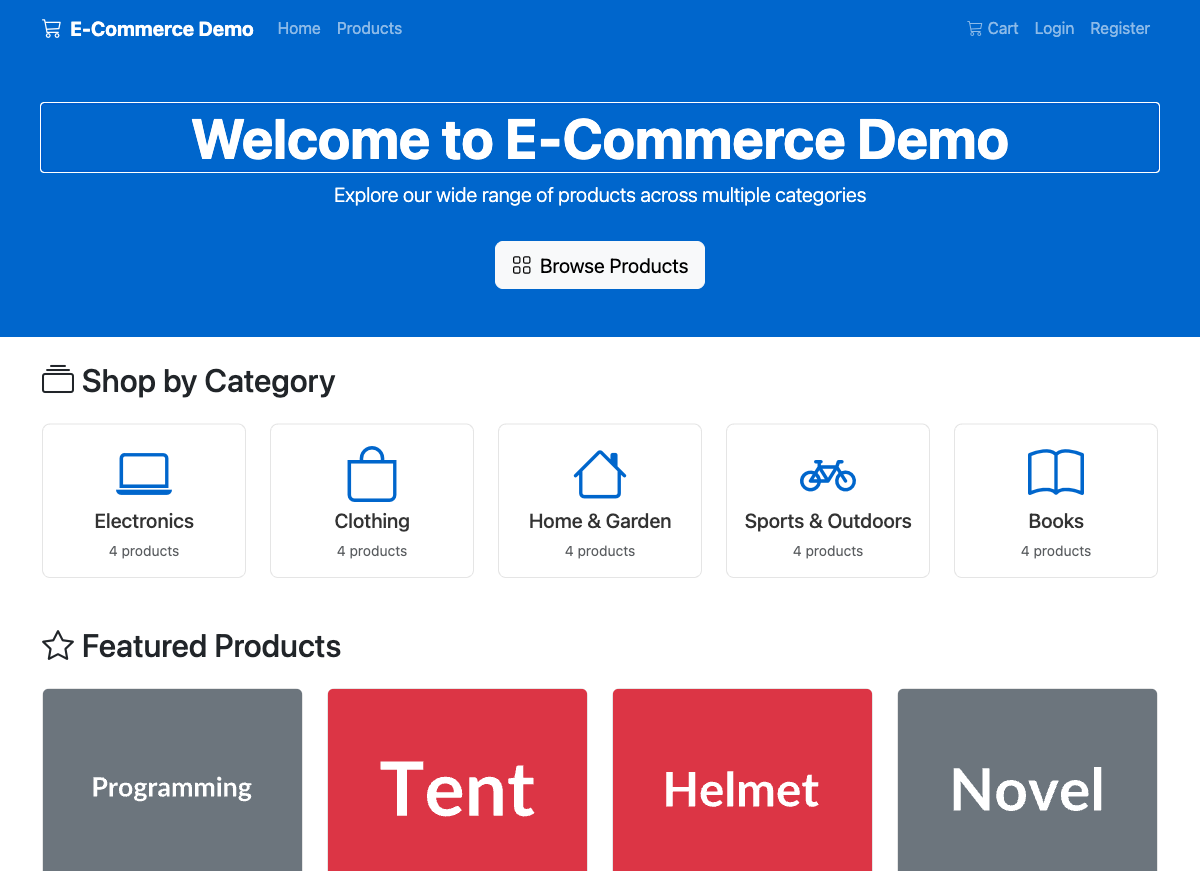
Before vs After: The Real Impact#
Here’s the difference Aspire makes.
Before Aspire (Traditional Approach)#
Step 1: Docker Compose for Infrastructure
# docker-compose.yml - 50+ lines just for infrastructure
version: '3.8'
services:
  postgres:
    image: postgres:15
    environment:
      POSTGRES_PASSWORD: ${POSTGRES_PASSWORD}
    ports:
      - "5432:5432"
    volumes:
      - postgres_data:/var/lib/postgresql/data
    healthcheck:
      test: ["CMD-SHELL", "pg_isready -U postgres"]
      interval: 10s
      timeout: 5s
      retries: 5

  redis:
    image: redis:7
    ports:
      - "6379:6379"
    healthcheck:
      test: ["CMD", "redis-cli", "ping"]
      interval: 10s
      timeout: 5s
      retries: 5

  rabbitmq:
    image: rabbitmq:3-management
    ports:
      - "5672:5672"
      - "15672:15672"
    environment:
      RABBITMQ_DEFAULT_USER: guest
      RABBITMQ_DEFAULT_PASS: guest
    healthcheck:
      test: ["CMD", "rabbitmq-diagnostics", "check_running"]
      interval: 10s
      timeout: 5s
      retries: 5

volumes:
  postgres_data:
Step 2: Connection Strings Everywhere
// appsettings.json for EACH service
{
  "ConnectionStrings": {
    "Database": "Host=localhost;Port=5432;Database=mydb;Username=postgres;Password=secret",
    "Redis": "localhost:6379",
    "RabbitMQ": "amqp://guest:guest@localhost:5672"
  }
}
Step 3: Environment Variables for Production
# .env file
POSTGRES_PASSWORD=production_secret_123
REDIS_URL=redis.production.internal:6379
RABBITMQ_URL=amqp://admin:prodpass@rabbitmq.production.internal:5672
Step 4: Service Discovery Setup
// Manual configuration or Consul/Eureka setup
services.AddHttpClient("inventory", client =>
{
    client.BaseAddress = new Uri(configuration["Services:Inventory:Url"]);
});
Step 5: OpenTelemetry Configuration
// Repeated in EVERY service
builder.Services.AddOpenTelemetry()
    .WithTracing(tracing =>
    {
        tracing.AddAspNetCoreInstrumentation()
            .AddHttpClientInstrumentation()
            .AddOtlpExporter(options =>
            {
                options.Endpoint = new Uri(configuration["Jaeger:Endpoint"]);
            });
    })
    .WithMetrics(metrics =>
    {
        metrics.AddAspNetCoreInstrumentation()
            .AddPrometheusExporter();
    });
Total: ~200+ lines of configuration across multiple files
With Aspire#
// Program.cs - ONE file, ~50 lines total
var builder = DistributedApplication.CreateBuilder(args);

var postgres = builder.AddPostgres("postgres").WithPgAdmin();
var catalogDb = postgres.AddDatabase("catalogdb");
var redis = builder.AddRedis("redis").WithRedisCommander();
var rabbitMq = builder.AddRabbitMQ("rabbitmq").WithManagementPlugin();

var catalogApi = builder.AddProject<Projects.CatalogApi>("catalogapi")
    .WithReference(catalogDb)
    .WithReference(redis)
    .WaitFor(catalogDb);

// ... other services

builder.Build().Run();
Total: ~50 lines in ONE file. That’s it.
Side-by-Side Comparison#
| Challenge | Traditional Approach | .NET Aspire Solution | Time Saved |
|---|---|---|---|
| Infrastructure | Docker Compose + manual config | builder.AddPostgres() | Hours → Seconds |
| Connection Strings | appsettings.json, env vars, secrets | Automatic injection | Manual → Automatic |
| Service Discovery | Consul, Eureka, or hardcoded URLs | Built-in with WithReference() | Days → Minutes |
| Observability | OpenTelemetry + Jaeger/Zipkin setup | AddServiceDefaults() | Days → One Line |
| Local Development | Multiple terminals, manual starts | Single dotnet run | N terminals → 1 |
| Startup Order | Docker depends_on (unreliable) | WaitFor() with health checks | Flaky → Reliable |
| Management UIs | Install separately, configure | Method chaining | Setup → Built-in |
| Debugging | Log diving, correlation IDs | Aspire Dashboard traces | Hours → Minutes |
Project Structure#
For reference, here’s how the e-commerce demo is organized:
aspire-Microservices/
├── ECommerce.sln                    # Solution file
├── docs/
│   ├── architecture-overview.md     # Architecture diagram
│   ├── data-flow-diagram.md         # Sequence diagrams
│   └── blog-article.md              # This article
└── src/
    ├── ECommerce.AppHost/           # Aspire orchestration
    │   └── Program.cs               # All infrastructure defined here
    ├── ECommerce.ServiceDefaults/   # Shared configuration
    │   └── Extensions.cs            # OpenTelemetry, health checks
    ├── ECommerce.ProductCatalog.Api/ # Products microservice
    ├── ECommerce.UserManagement.Api/ # Users microservice
    ├── ECommerce.Orders.Api/        # Orders microservice
    ├── ECommerce.Inventory.Api/     # Inventory microservice
    ├── ECommerce.Notifications.Api/ # Notifications microservice
    ├── ECommerce.Web/               # Blazor frontend
    └── Shared/
        └── ECommerce.Shared.Contracts/ # Event contracts
Key Takeaways#
After building this e-commerce demo with .NET Aspire, here are my key insights:
What Aspire Does Exceptionally Well#
- Eliminates Infrastructure Friction - No more “let me set up PostgreSQL first” delays
- Makes Observability Trivial - Distributed tracing that actually works out of the box
- Simplifies Service Communication - Service discovery without external tools
- Provides Consistent Developer Experience - Same workflow from
dotnet newto production - Integrates Management Tools - PgAdmin, Redis Commander, RabbitMQ UI included
What Aspire is NOT#
- Not a replacement for Kubernetes - Aspire focuses on development, K8s on production orchestration
- Not a deployment tool - You still need Azure Container Apps, K8s, or similar for production
- Not an opinionated business framework - It’s infrastructure abstraction, not application architecture
When to Use .NET Aspire#
| Use Case | Recommendation |
|---|---|
| New .NET microservices project | Strongly recommended |
| Existing .NET project | Worth migrating for observability alone |
| Polyglot microservices (Node.js, Python, Go) | Aspire can orchestrate any language |
| Non-.NET services | Use AddNpmApp(), AddPythonApp(), or AddContainer() |
| Learning microservices | Perfect for understanding patterns |
| Team with varied experience | Lowers barrier to entry significantly |
Conclusion#
.NET Aspire handles the infrastructure plumbing that used to take days of setup. Connection strings, service discovery, observability—all defined in C# and managed automatically.
This e-commerce demo shows patterns I use in actual projects:
- Microservices Architecture with clear service boundaries
- Event-Driven Communication with RabbitMQ
- Caching Strategies with Redis
- Database-Per-Service pattern
- JWT Authentication across services
- Distributed Tracing for debugging
Clone the demo and run dotnet run from the AppHost. Open the Aspire Dashboard, place an order, and watch the distributed trace show you exactly what happened across every service. That’s the fastest way to understand what Aspire actually gives you. If you’re on an existing .NET project, the next post covers how to add Aspire without a rewrite.
Resources and Further Reading#
Official Documentation#
This Demo#
Related Topics#
Questions or feedback? Open an issue on GitHub or connect with me.