

Tools are what separate a conversational AI from an AI agent. Without tools, your agent is a chatbot. With the right tools, it becomes an autonomous assistant that can search, validate, and take action.
In Part 2, we crafted the system prompts that shape how our agents think. But thinking is only half the equation. An agent that can reason about inventory but cannot actually check stock levels is useless. The tools we give an agent define its capabilities – they are the boundary between “I can discuss this topic” and “I can do this for you.”
This article walks through the real tool implementations in ECommerce Agents: query tools that read data, action tools that write data, validation tools that enforce business rules, and the ContextVar pattern that automatically scopes every operation to the current user. All code is production Python using asyncpg, Microsoft Agent Framework’s @tool decorator, and Annotated type hints for schema generation.
Source code: github.com/nitin27may/e-commerce-agents – clone, run
docker compose up, and follow along.
Tool Design Principles#
Before writing any tool code, there are a few principles that separate good tools from frustrating ones.
Single responsibility. Each tool does one thing. search_products searches. get_product_details fetches a single product. Don’t combine them into a product_tool that takes a mode parameter – the LLM will misuse it.
Clear descriptions are your API docs for the LLM. The description parameter in @tool() is what the model reads when deciding which tool to call. Vague descriptions lead to wrong tool selection. Compare:
# Bad: vague, the model will call this for everything product-related
@tool(name="products", description="Get products")
async def products(query: str) -> list[dict]: ...

# Good: specific about what it does, what it supports, when to use it
@tool(name="search_products",
      description="Search the product catalog using natural language. "
                  "Supports filtering by category, price range, and rating.")
async def search_products(
    query: Annotated[str | None, Field(description="Natural language search query")] = None,
    category: Annotated[str | None, Field(description="Filter by category: Electronics, Clothing, Home, Sports, Books")] = None,
    ...
) -> list[dict]: ...
Notice the Field(description=...) on each parameter. The LLM uses these descriptions to decide what values to pass. Listing the valid categories directly in the description (“Electronics, Clothing, Home, Sports, Books”) saves a round-trip where the model would otherwise guess or ask the user.
Annotated types generate the JSON schema. Microsoft Agent Framework uses Annotated[type, Field(...)] to produce the function-calling schema that gets sent to the LLM. The model never sees your Python code – it sees the generated JSON schema. Make every field description count.
Return dicts, not strings. Structured return values let the LLM extract exactly what it needs. A tool that returns "Found 3 products" is less useful than one that returns a list of dicts with id, name, price, and rating fields. The model can format, filter, and summarize structured data far better than it can parse prose.
Graceful errors over exceptions. We will cover this in detail later, but the short version: return {"error": "message"} instead of raising. The LLM handles error dicts gracefully; unhandled exceptions crash the agent loop.
Query Tools: Reading Data#
The most common tool category is query tools – tools that read from the database and return structured results. In ECommerce Agents, the Product Discovery agent has several of these. Here is the full search_products implementation from agents/product_discovery/tools.py:
@tool(name="search_products",
      description="Search the product catalog using natural language. "
                  "Supports filtering by category, price range, and rating.")
async def search_products(
    query: Annotated[str | None, Field(description="Natural language search query (optional if using category filter)")] = None,
    category: Annotated[str | None, Field(description="Filter by category: Electronics, Clothing, Home, Sports, Books")] = None,
    min_price: Annotated[float | None, Field(description="Minimum price filter")] = None,
    max_price: Annotated[float | None, Field(description="Maximum price filter")] = None,
    min_rating: Annotated[float | None, Field(description="Minimum rating (1-5)")] = None,
    sort_by: Annotated[str | None, Field(description="Sort by: price_asc, price_desc, rating, newest")] = None,
    limit: Annotated[int, Field(description="Max results to return")] = 10,
) -> list[dict]:
    pool = get_pool()
    conditions = ["p.is_active = TRUE"]
    args: list = []
    idx = 1

    # Full-text search on name + description — split query into words
    # so "wireless headphones" matches "wireless noise-cancelling headphones"
    if query:
        words = [w for w in query.strip().split() if len(w) >= 2]
        for word in words:
            conditions.append(f"(p.name ILIKE ${idx} OR p.description ILIKE ${idx})")
            args.append(f"%{word}%")
            idx += 1

    if category:
        conditions.append(f"p.category = ${idx}")
        args.append(category)
        idx += 1

    if min_price is not None:
        conditions.append(f"p.price >= ${idx}")
        args.append(min_price)
        idx += 1

    if max_price is not None:
        conditions.append(f"p.price <= ${idx}")
        args.append(max_price)
        idx += 1

    if min_rating is not None:
        conditions.append(f"p.rating >= ${idx}")
        args.append(min_rating)
        idx += 1

    order = {
        "price_asc": "p.price ASC",
        "price_desc": "p.price DESC",
        "rating": "p.rating DESC",
        "newest": "p.created_at DESC",
    }.get(sort_by or "", "p.rating DESC, p.review_count DESC")

    where = " AND ".join(conditions)
    sql = f"""
        SELECT p.id, p.name, p.description, p.category, p.brand, p.price,
               p.original_price, p.rating, p.review_count, p.specs
        FROM products p
        WHERE {where}
        ORDER BY {order}
        LIMIT {limit}
    """

    async with pool.acquire() as conn:
        rows = await conn.fetch(sql, *args)
        return [
            {
                "id": str(r["id"]),
                "name": r["name"],
                "description": r["description"][:150],
                "category": r["category"],
                "brand": r["brand"],
                "price": float(r["price"]),
                "original_price": float(r["original_price"]) if r["original_price"] else None,
                "on_sale": r["original_price"] is not None and r["price"] < r["original_price"],
                "rating": float(r["rating"]),
                "review_count": r["review_count"],
            }
            for r in rows
        ]
There is a lot going on here. Let’s break down the pattern.
Dynamic query building. The tool constructs a SQL query conditionally based on which parameters the LLM provided. The conditions list starts with a baseline filter (is_active = TRUE) and grows as parameters come in. The idx counter tracks asyncpg’s $1, $2, ... placeholder numbering – each new condition gets the next index.
Word splitting for fuzzy search. The query “wireless headphones” gets split into ["wireless", "headphones"], and each word generates its own ILIKE condition. This means a product named “Wireless Noise-Cancelling Headphones” matches even though the exact phrase “wireless headphones” doesn’t appear. Simple, effective, no full-text search setup required.
Truncated descriptions. The return value truncates description to 150 characters (r["description"][:150]). This is intentional – when listing 10 products, the LLM doesn’t need the full description of each one. It saves tokens and keeps the model’s context focused on what matters for the current query. The user can always call get_product_details for the full picture.
Computed fields. The on_sale field is computed on the fly: r["original_price"] is not None and r["price"] < r["original_price"]. The LLM can use this to highlight deals without doing the comparison itself.
The companion tool get_product_details follows the same pattern but for a single product:
@tool(name="get_product_details",
      description="Get complete details for a specific product including full specs.")
async def get_product_details(
    product_id: Annotated[str, Field(description="UUID of the product")],
) -> dict:
    pool = get_pool()
    async with pool.acquire() as conn:
        row = await conn.fetchrow(
            """SELECT id, name, description, category, brand, price, original_price,
                      image_url, rating, review_count, specs
               FROM products WHERE id = $1""",
            product_id,
        )
        if not row:
            return {"error": f"Product not found: {product_id}"}

        return {
            "id": str(row["id"]),
            "name": row["name"],
            "description": row["description"],
            "category": row["category"],
            "brand": row["brand"],
            "price": float(row["price"]),
            "original_price": float(row["original_price"]) if row["original_price"] else None,
            "on_sale": row["original_price"] is not None and row["price"] < row["original_price"],
            "rating": float(row["rating"]),
            "review_count": row["review_count"],
            "specs": json.loads(row["specs"]) if isinstance(row["specs"], str) else dict(row["specs"]),
        }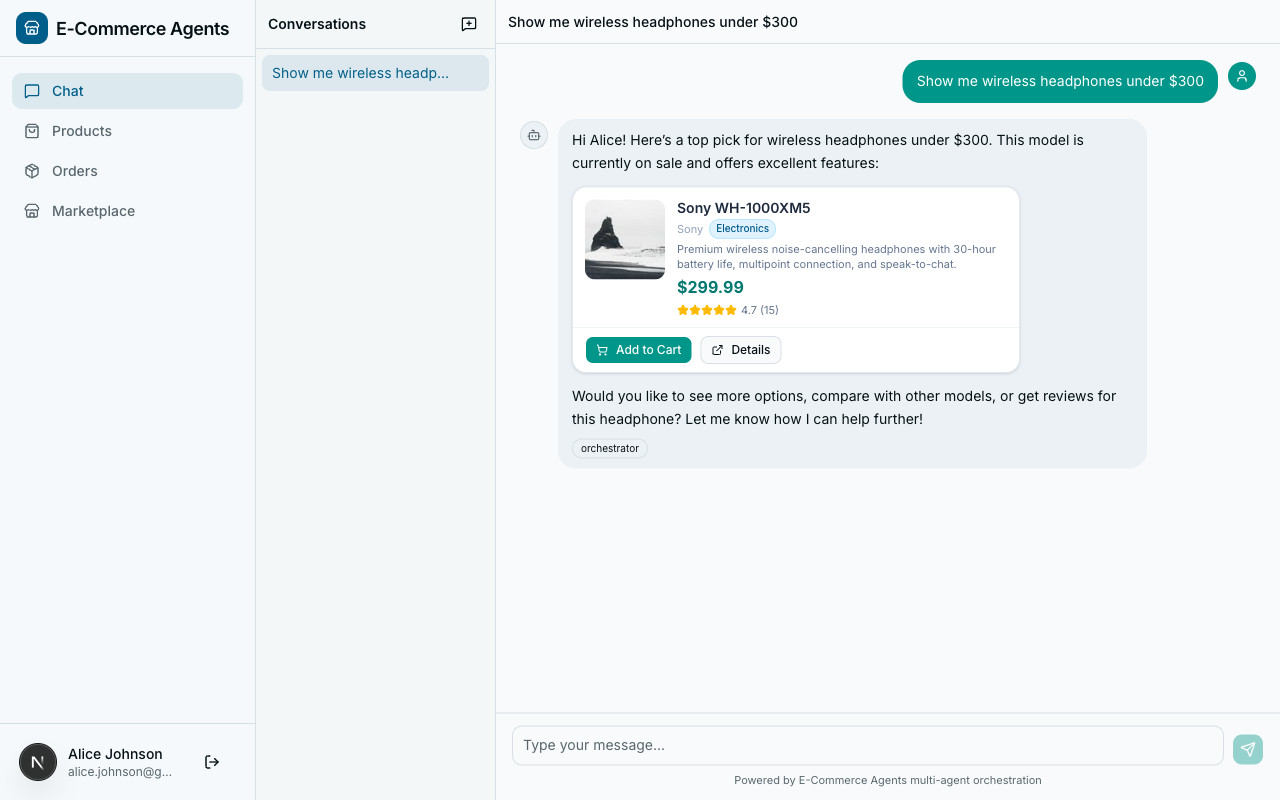
Notice: full description (no truncation), full specs dict. This is the “drill down” tool – the model calls search_products first, gets IDs, then calls get_product_details for the one the user asks about. Two tools, two responsibilities, clean separation.
Action Tools: Writing and Modifying Data#
Action tools are riskier than query tools. They change state. A bad query returns wrong results; a bad action creates an invalid return or double-charges a customer. The pattern here is: validate everything before mutating anything.
Here is initiate_return from agents/shared/tools/return_tools.py:
@tool(name="initiate_return",
      description="Initiate a return for a delivered order. Generates a return shipping label.")
async def initiate_return(
    order_id: Annotated[str, Field(description="UUID of the order to return")],
    reason: Annotated[str, Field(description="Reason for the return")],
    refund_method: Annotated[str, Field(description="Refund method: 'original_payment' or 'store_credit'")] = "original_payment",
) -> dict:
    email = current_user_email.get()
    if not email:
        return {"error": "No user context available"}

    if refund_method not in ("original_payment", "store_credit"):
        return {"error": "Invalid refund method. Choose 'original_payment' or 'store_credit'."}

    pool = get_pool()
    async with pool.acquire() as conn:
        # Verify ownership and delivered status
        order = await conn.fetchrow(
            """SELECT o.id, o.user_id, o.status, o.total
               FROM orders o
               JOIN users u ON o.user_id = u.id
               WHERE o.id = $1 AND u.email = $2""",
            order_id, email,
        )
        if not order:
            return {"error": f"Order not found or access denied: {order_id}"}

        if order["status"] != "delivered":
            return {"error": f"Cannot return order in '{order['status']}' status. "
                             "Only delivered orders can be returned."}

        # Check no existing return
        existing = await conn.fetchrow(
            "SELECT id FROM returns WHERE order_id = $1", order_id,
        )
        if existing:
            return {"error": "A return has already been initiated for this order.",
                    "return_id": str(existing["id"])}

        # Generate mock return label URL
        label_token = uuid.uuid4().hex[:12]
        return_label_url = f"https://returns.example.com/labels/{label_token}"

        # Create return record
        return_id = await conn.fetchval(
            """INSERT INTO returns (order_id, user_id, reason, status,
                                   return_label_url, refund_method, refund_amount)
               VALUES ($1, $2, $3, 'requested', $4, $5, $6)
               RETURNING id""",
            order_id, order["user_id"], reason, return_label_url,
            refund_method, order["total"],
        )

        # Update order status
        await conn.execute(
            "UPDATE orders SET status = 'returned' WHERE id = $1", order_id,
        )

        # Record in order status history
        await conn.execute(
            """INSERT INTO order_status_history (order_id, status, notes)
               VALUES ($1, 'returned', $2)""",
            order_id, f"Return initiated: {reason}",
        )

        refund_timeline = ("instantly" if refund_method == "store_credit"
                           else "within 5-7 business days")

        return {
            "return_id": str(return_id),
            "order_id": str(order["id"]),
            "status": "requested",
            "reason": reason,
            "refund_method": refund_method,
            "refund_amount": float(order["total"]),
            "return_label_url": return_label_url,
            "message": f"Return initiated successfully. Print your return label "
                       f"and ship the items back. Refund of "
                       f"${float(order['total']):.2f} will be processed "
                       f"{refund_timeline} after we receive the package.",
        }
The structure follows a strict validation-then-action pattern:
- Check user context.
current_user_email.get()must have a value (we’ll cover how this gets set shortly). - Validate input. The
refund_methodmust be one of two allowed values. Catch this before touching the database. - Verify ownership. The query joins
orderswithusersand filters by bothorder_idandemail. A user cannot return someone else’s order – the query simply returns no rows. - Check preconditions. The order must be in “delivered” status. No existing return can exist. These are guard clauses that return error dicts.
- Perform the action. Only after all checks pass do we INSERT the return record, UPDATE the order status, and INSERT the history entry.
- Return a rich result. The response includes the return ID, label URL, refund amount, and a human-readable message. The LLM uses the message directly when responding to the user.
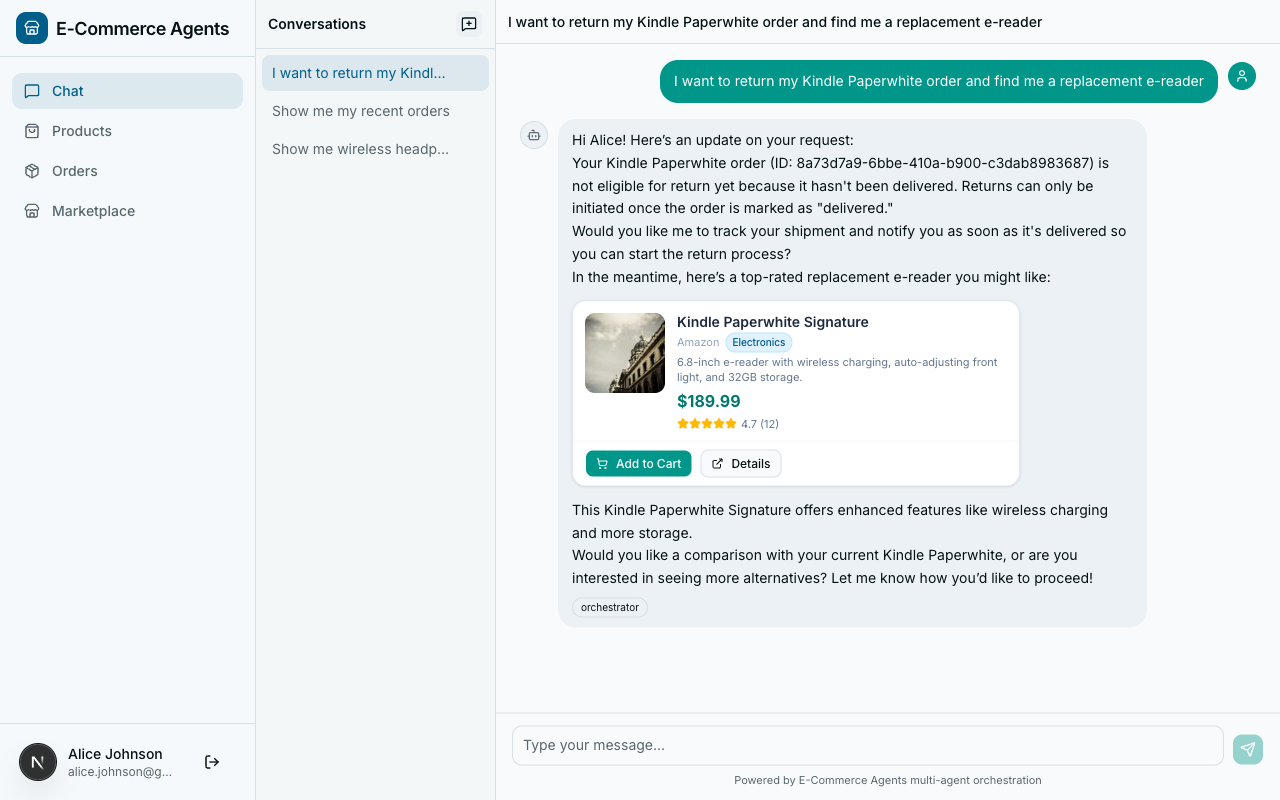
This pattern – validate, verify ownership, check preconditions, then act – should be your default for every action tool. The LLM will sometimes call tools with bad inputs. Your tool should handle that gracefully, not corrupt your database.
Validation Tools: Checking Business Rules#
Validation tools sit between query and action tools. They don’t change state, but they do more than simple lookups – they enforce business logic. The validate_coupon tool from agents/pricing_promotions/tools.py is a good example:
@tool(name="validate_coupon",
      description="Validate a coupon code. Checks expiry, min spend, usage limit, "
                  "applicable categories, and user-specific restrictions.")
async def validate_coupon(
    code: Annotated[str, Field(description="Coupon code to validate")],
    cart_total: Annotated[float, Field(description="Current cart total before discount")],
    category: Annotated[str | None, Field(description="Product category to check applicability")] = None,
) -> dict:
    email = current_user_email.get()
    pool = get_pool()
    async with pool.acquire() as conn:
        row = await conn.fetchrow(
            """SELECT id, code, description, discount_type, discount_value,
                      min_spend, max_discount, usage_limit, times_used,
                      valid_from, valid_until, applicable_categories,
                      user_specific_email, is_active
               FROM coupons WHERE UPPER(code) = UPPER($1)""",
            code,
        )
        if not row:
            return {"valid": False, "error": f"Coupon '{code}' not found"}

        if not row["is_active"]:
            return {"valid": False, "code": code, "error": "Coupon is no longer active"}

        if row["valid_until"]:
            from datetime import datetime, timezone
            now = datetime.now(timezone.utc)
            if now > row["valid_until"]:
                return {"valid": False, "code": code, "error": "Coupon has expired"}
            if now < row["valid_from"]:
                return {"valid": False, "code": code, "error": "Coupon is not yet valid"}

        if row["usage_limit"] is not None and row["times_used"] >= row["usage_limit"]:
            return {"valid": False, "code": code, "error": "Coupon usage limit reached"}

        if row["min_spend"] and cart_total < float(row["min_spend"]):
            return {
                "valid": False, "code": code,
                "error": f"Minimum spend of ${float(row['min_spend']):.2f} not met "
                         f"(cart: ${cart_total:.2f})",
            }

        if row["applicable_categories"] and category:
            if category not in row["applicable_categories"]:
                return {
                    "valid": False, "code": code,
                    "error": f"Coupon not valid for category '{category}'. "
                             f"Valid for: {', '.join(row['applicable_categories'])}",
                }

        if row["user_specific_email"] and row["user_specific_email"] != email:
            return {"valid": False, "code": code,
                    "error": "This coupon is restricted to a specific user"}

        # Calculate discount
        discount_type = row["discount_type"]
        discount_value = float(row["discount_value"])
        if discount_type == "percentage":
            discount_amount = cart_total * (discount_value / 100)
            if row["max_discount"]:
                discount_amount = min(discount_amount, float(row["max_discount"]))
        else:
            discount_amount = min(discount_value, cart_total)

        return {
            "valid": True,
            "code": row["code"],
            "description": row["description"],
            "discount_type": discount_type,
            "discount_value": discount_value,
            "discount_amount": round(discount_amount, 2),
            "new_total": round(cart_total - discount_amount, 2),
            "applicable_categories": row["applicable_categories"],
        }
This tool runs through six validation checks in sequence: active status, date validity, usage limits, minimum spend, category applicability, and user-specific restrictions. Each check returns a specific error message explaining why the coupon failed. The LLM relays these messages to the user – “Minimum spend of $50.00 not met (cart: $35.00)” is a message the user can actually act on.
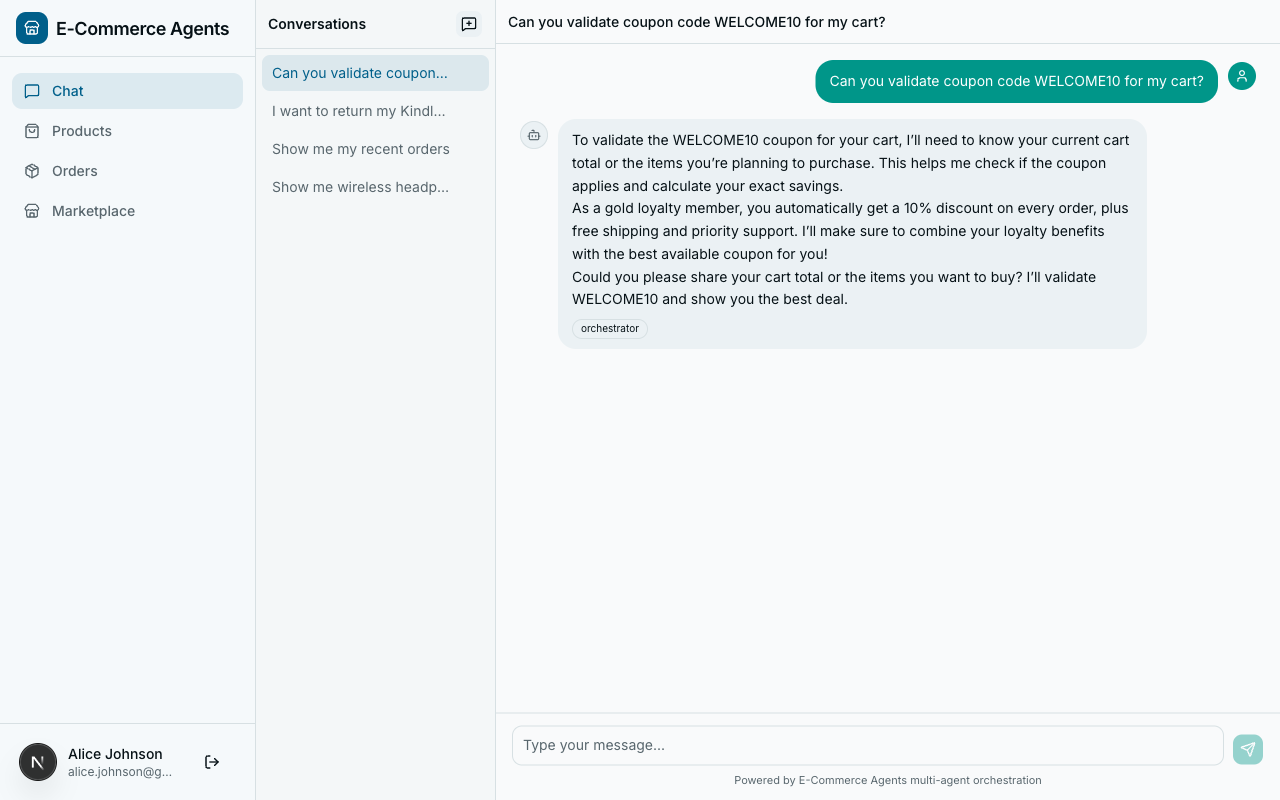
The cascade of early returns is deliberate. Each check is independent and self-contained. Adding a new validation rule means adding one more guard clause at the end of the chain, not restructuring a nested conditional tree.
When validation passes, the tool calculates the actual discount amount (respecting percentage caps via max_discount) and returns both the discount_amount and the new_total. This gives the LLM everything it needs to present the result without doing arithmetic.
User-Scoped Tools with ContextVars#
Look back at initiate_return. The first thing it does is email = current_user_email.get(). Where does that value come from? The user never passes their email as a tool parameter, and the LLM doesn’t hallucinate it. The answer is Python’s contextvars module.
Here is agents/shared/context.py in its entirety:
"""Request-scoped state via ContextVars.

Set by auth middleware, read by tools.
"""

from contextvars import ContextVar

current_user_email: ContextVar[str] = ContextVar("current_user_email", default="")
current_user_role: ContextVar[str] = ContextVar("current_user_role", default="")
current_session_id: ContextVar[str] = ContextVar("current_session_id", default="")
current_conversation_history: ContextVar[list] = ContextVar("current_conversation_history", default=[])
Four ContextVar instances. That’s it. The magic is in how they get populated. In agents/shared/auth.py, the AgentAuthMiddleware intercepts every incoming HTTP request, authenticates it (via JWT or inter-agent shared secret), and sets the context vars:
class AgentAuthMiddleware(BaseHTTPMiddleware):
    async def dispatch(self, request: Request, call_next: RequestResponseEndpoint) -> Response:
        # ... authentication logic ...

        # After successful auth, set the context vars
        current_user_email.set(email)
        current_user_role.set(role)
        current_session_id.set(session_id)

        return await call_next(request)
From this point forward, any code executing within the same async context – including tool functions invoked by the agent – can call current_user_email.get() and get the authenticated user’s email. No parameter passing, no dependency injection, no global mutable state that leaks between requests.
This pattern has two major benefits:
Cleaner tool signatures. The LLM never sees an email parameter. The initiate_return tool takes order_id, reason, and refund_method – the things the user actually provides. The user’s identity is implicit, handled by infrastructure. This means the model cannot accidentally pass the wrong email, and a malicious prompt injection cannot trick the agent into accessing another user’s data.
Automatic data scoping. Every database query that touches user-owned data joins through the user’s email. In initiate_return, the query is:
SELECT o.id, o.user_id, o.status, o.total
FROM orders o
JOIN users u ON o.user_id = u.id
WHERE o.id = $1 AND u.email = $2
If a user asks “return order abc-123” and that order belongs to someone else, the query returns zero rows and the tool returns {"error": "Order not found or access denied"}. The tool doesn’t distinguish between “doesn’t exist” and “not yours” – and that’s intentional. You don’t want to leak information about other users’ orders.
Shared Tools Across Agents#
Some tools are needed by multiple agents. The check_stock tool, for example, is used by both the Product Discovery agent (to show availability alongside search results) and the Inventory & Fulfillment agent (to manage stock levels). Duplicating the code would be a maintenance headache.
ECommerce Agents solves this with a shared/tools/ directory:
agents/shared/tools/
    __init__.py
    inventory_tools.py      # check_stock, get_warehouse_availability
    pricing_tools.py        # get_price_history
    return_tools.py         # check_return_eligibility, initiate_return, process_refund
    loyalty_tools.py        # loyalty tier queries
    user_tools.py           # user profile lookups
    seller_tools.py         # seller-facing operations
Each agent imports only the tools it needs. Here is check_stock from agents/shared/tools/inventory_tools.py:
@tool(name="check_stock",
      description="Check stock levels across all warehouses for a specific product.")
async def check_stock(
    product_id: Annotated[str, Field(description="UUID of the product to check")],
) -> dict:
    pool = get_pool()
    async with pool.acquire() as conn:
        rows = await conn.fetch(
            """SELECT w.name as warehouse, w.region, wi.quantity, wi.reorder_threshold
               FROM warehouse_inventory wi
               JOIN warehouses w ON wi.warehouse_id = w.id
               WHERE wi.product_id = $1
               ORDER BY w.region""",
            product_id,
        )
        if not rows:
            return {"product_id": product_id, "in_stock": False,
                    "warehouses": [], "total_quantity": 0}

        warehouses = [
            {
                "warehouse": r["warehouse"],
                "region": r["region"],
                "quantity": r["quantity"],
                "low_stock": r["quantity"] <= r["reorder_threshold"],
            }
            for r in rows
        ]
        total = sum(r["quantity"] for r in rows)
        return {
            "product_id": product_id,
            "in_stock": total > 0,
            "total_quantity": total,
            "warehouses": warehouses,
        }
When the Product Discovery agent is created, it imports check_stock from the shared directory and registers it alongside its own domain-specific tools. The Inventory agent does the same. One implementation, two consumers, zero duplication.
The rule of thumb: if a tool accesses a database table that multiple agents need, put it in shared/tools/. If it’s purely domain-specific (like semantic_search which only makes sense for product discovery), keep it in the agent’s own tools.py.
Error Handling in Tools#
A tool that raises an unhandled exception can crash the agent’s processing loop. The framework may recover, but the user sees a generic error message and the trace becomes harder to debug. The better pattern: catch errors and return structured error dicts.
Every tool in ECommerce Agents follows this convention:
# Not found
if not row:
    return {"error": f"Product not found: {product_id}"}

# Authorization failure
if not email:
    return {"error": "No user context available"}

# Business rule violation
if order["status"] != "delivered":
    return {"error": f"Cannot return order in '{order['status']}' status. "
                     "Only delivered orders can be returned."}

# Input validation
if refund_method not in ("original_payment", "store_credit"):
    return {"error": "Invalid refund method. Choose 'original_payment' or 'store_credit'."}
When the LLM receives {"error": "some message"}, it naturally incorporates that message into its response to the user. The conversation continues. The user gets a helpful explanation of what went wrong and what they can do instead.
For unexpected errors – database connection failures, network timeouts – a top-level try/except is appropriate:
@tool(name="check_stock", description="...")
async def check_stock(product_id: Annotated[str, Field(...)]) -> dict:
    try:
        pool = get_pool()
        async with pool.acquire() as conn:
            # ... query logic ...
    except Exception as e:
        logging.exception("check_stock failed for product_id=%s", product_id)
        return {"error": "Unable to check stock at this time. Please try again."}
Log the full exception for your observability pipeline (covered in Part 5), but return a user-friendly message. Never expose stack traces or internal details in the error dict.
Testing Tools Independently#
Here is one of the best things about the @tool pattern: your tools are regular async Python functions. You can test them without spinning up an LLM, without running the agent framework, and without making API calls to OpenAI.
# tests/test_product_tools.py
import pytest
from unittest.mock import AsyncMock, patch, MagicMock

from product_discovery.tools import search_products, get_product_details


@pytest.mark.asyncio
async def test_search_products_by_category():
    mock_row = {
        "id": "abc-123",
        "name": "Test Headphones",
        "description": "Great wireless headphones for music lovers",
        "category": "Electronics",
        "brand": "TestBrand",
        "price": 99.99,
        "original_price": 129.99,
        "rating": 4.5,
        "review_count": 42,
        "specs": "{}",
    }
    mock_conn = AsyncMock()
    mock_conn.fetch.return_value = [mock_row]

    mock_pool = MagicMock()
    mock_pool.acquire.return_value.__aenter__ = AsyncMock(return_value=mock_conn)
    mock_pool.acquire.return_value.__aexit__ = AsyncMock(return_value=False)

    with patch("product_discovery.tools.get_pool", return_value=mock_pool):
        results = await search_products(category="Electronics")

    assert len(results) == 1
    assert results[0]["category"] == "Electronics"
    assert results[0]["on_sale"] is True


@pytest.mark.asyncio
async def test_get_product_details_not_found():
    mock_conn = AsyncMock()
    mock_conn.fetchrow.return_value = None

    mock_pool = MagicMock()
    mock_pool.acquire.return_value.__aenter__ = AsyncMock(return_value=mock_conn)
    mock_pool.acquire.return_value.__aexit__ = AsyncMock(return_value=False)

    with patch("product_discovery.tools.get_pool", return_value=mock_pool):
        result = await get_product_details(product_id="nonexistent-id")

    assert "error" in result
    assert "not found" in result["error"].lower()
For tools that use current_user_email.get(), set the context var in your test setup:
from shared.context import current_user_email

@pytest.mark.asyncio
async def test_initiate_return_requires_auth():
    current_user_email.set("")
    result = await initiate_return(order_id="abc", reason="defective")
    assert result == {"error": "No user context available"}
No HTTP server, no JWT tokens, no database. Mock the pool, set the context vars, call the function, assert the result. This makes it trivial to get high test coverage on your tool logic – the part of your agent system that matters most.
What’s Next#
We’ve built the tools that give our agents real capabilities: searching products, initiating returns, validating coupons, checking inventory. Each tool follows a consistent pattern – async function, asyncpg queries, structured return values, ContextVar-based user scoping, and error dicts instead of exceptions.
But right now each agent operates in isolation. The Product Discovery agent can search products but cannot check if a coupon applies. The Pricing agent can validate coupons but cannot look up order history. In Part 4, we’ll connect multiple agents together – building an orchestrator that routes requests to the right specialist using the A2A protocol and Microsoft Agent Framework’s HandoffOrchestration pattern.