

Ask a customer support agent at any decent retail store what you bought last month, and they will look it up. Ask them what kind of products you tend to prefer, and if they are good at their job, they will remember. The returning customer experience – “Welcome back, I remember you like running shoes in wide fit” – is one of the oldest tricks in retail. It works because it is genuinely useful.
AI agents, by default, have none of this. Every conversation starts from zero. The user explains their preferences again. The agent asks the same clarifying questions. The interaction feels transactional in a way that human interactions do not. The agent has amnesia, and the user pays the cost every single time.
This is the memory gap, and closing it is what separates a chatbot from an assistant that actually improves over time.
In this article, we add persistent memory to ECommerce Agents. Agents can now store observations about a user – their preferences, their past feedback, their behavioral patterns – and recall those observations in future conversations. The implementation is straightforward: a PostgreSQL table, two tool functions, and a ContextProvider integration that automatically injects relevant memories into every agent interaction.
Source code: github.com/nitin27may/e-commerce-agents – clone, run
docker compose up, and follow along.
The Memory Gap#
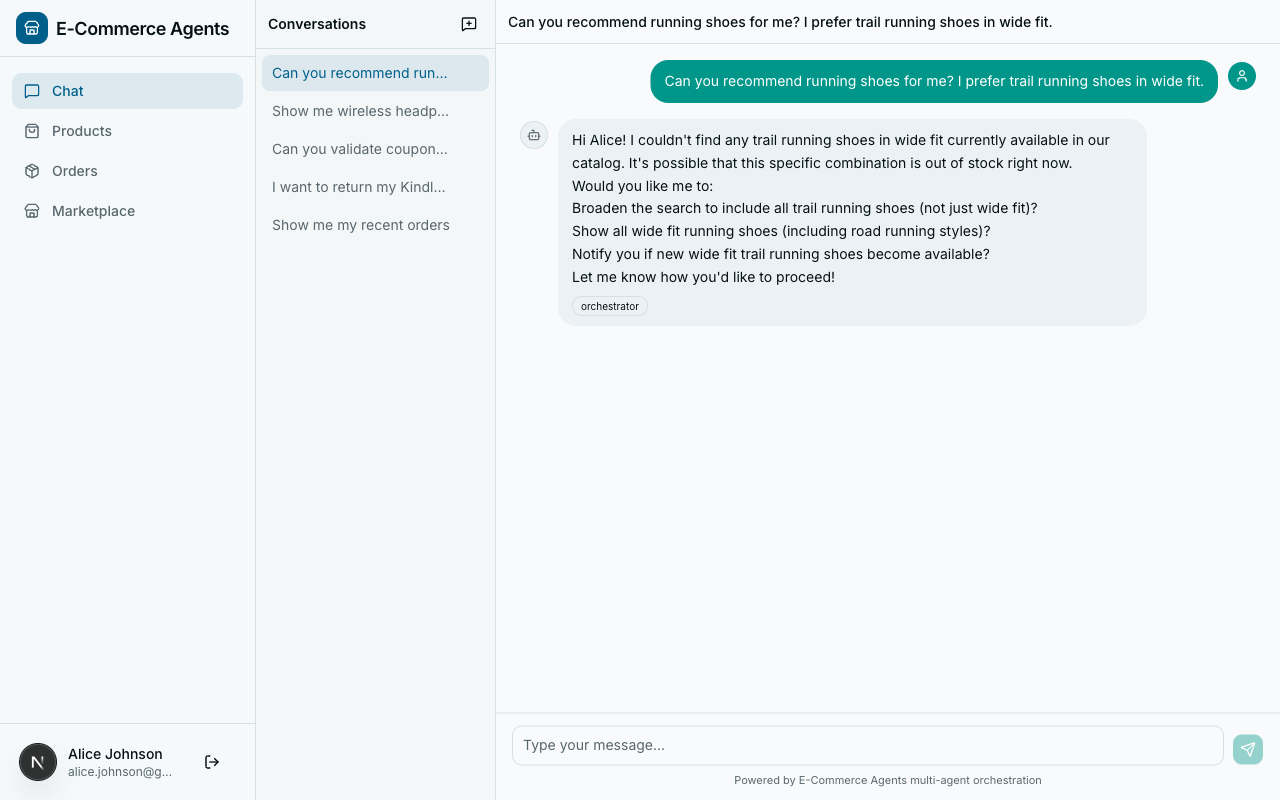
Consider two conversations with ECommerce Agents’s product discovery agent, a week apart.
Conversation 1:
User: “I’m looking for running shoes.” Agent: “Here are our top running shoes…” (shows 10 results) User: “I only wear wide fit. And I prefer trail running shoes, not road.” Agent: “Here are wide-fit trail running shoes…” (shows 3 results) User: “Perfect, I’ll take the Salomon Speedcross in size 11.”
Conversation 2 (one week later):
User: “Got any new running shoes?” Agent: “Here are our top running shoes…” (shows the same 10 generic results) User: (sighs, types the same constraints again)
The agent learned nothing. All the signal from conversation 1 – wide fit preference, trail over road, brand affinity for Salomon, size 11 – evaporated the moment the session ended. The user gave the agent explicit information about what they want, and the agent threw it away.
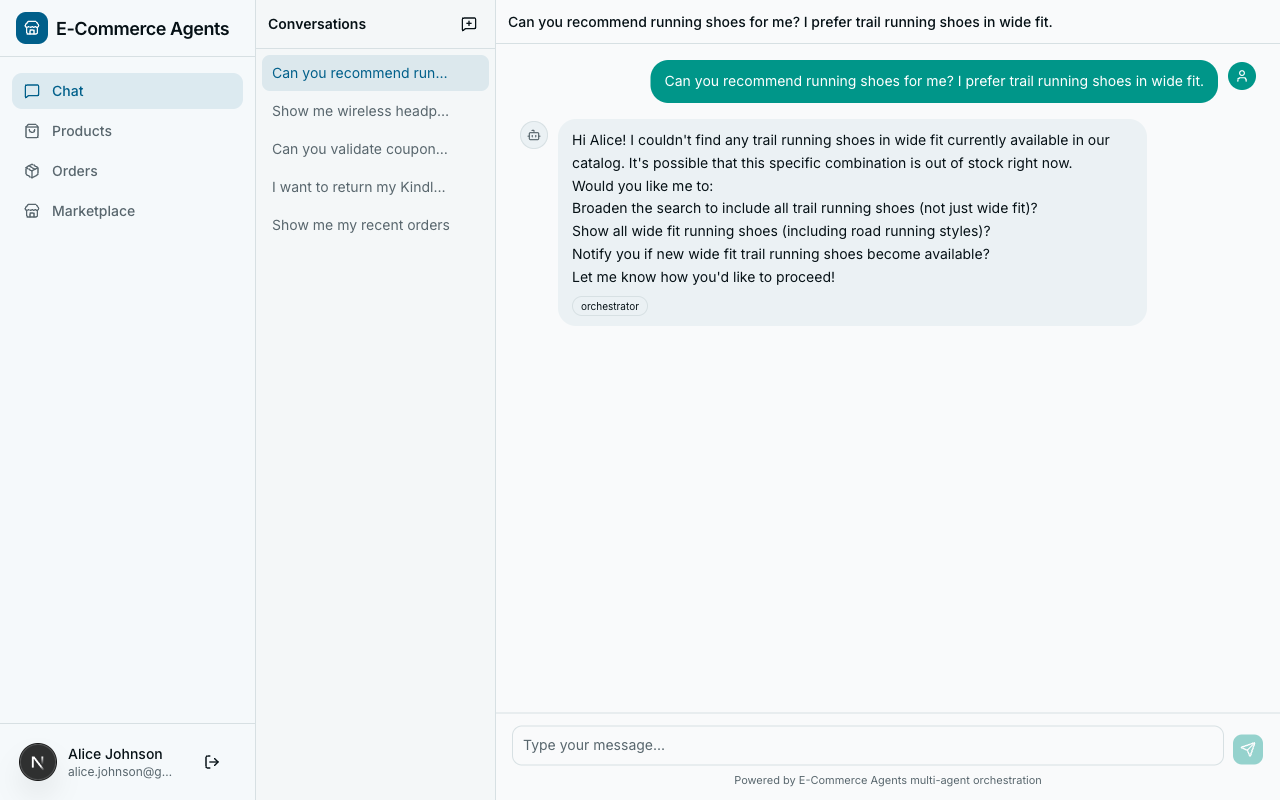
With memory, conversation 2 looks different:
User: “Got any new running shoes?” Agent: “I remember you prefer wide-fit trail running shoes – here are 3 new arrivals that match, including a new Salomon model in your size.”
That is the gap we are closing.
Types of Agent Memory#
Before writing code, it helps to think about what kinds of memory an agent system needs. The academic literature tends to split this into several categories. For a production e-commerce system, three matter most.
Short-Term Memory (Conversation Context)#
This is the chat history within a single session. ECommerce Agents already handles this – the orchestrator maintains a message list per conversation, and the LLM sees the full conversation when generating each response. No additional work needed here.
Long-Term Episodic Memory#
Facts and observations that persist across conversations. “This user prefers wide-fit shoes.” “This user complained about slow shipping last time.” “This user always asks about return policies before purchasing.” These are explicit memories stored in a database and retrieved when relevant.
This is what we are building in this article.
Semantic Memory (Embeddings)#
A more sophisticated form of long-term memory where memories are stored as vector embeddings and retrieved by semantic similarity rather than exact category match. Instead of filtering memories by a category column, you embed the current query and find the closest memories in vector space.
Our schema supports this – the agent_memories table includes a vector(1536) column for embeddings – but we are starting with the simpler category-based approach. Semantic retrieval is a natural extension once the foundational plumbing is in place, and pgvector makes the upgrade path trivial since the column is already there waiting.
Schema Design#
The memory system needs a table. Here is what we add to docker/postgres/init.sql:
-- ── Agent Memory ──────────────────────────────────────────────────
CREATE TABLE IF NOT EXISTS agent_memories (
    id UUID PRIMARY KEY DEFAULT gen_random_uuid(),
    user_id UUID NOT NULL REFERENCES users(id),
    category VARCHAR(50) NOT NULL,
    content TEXT NOT NULL,
    importance SMALLINT DEFAULT 5,
    embedding vector(1536),
    created_at TIMESTAMPTZ DEFAULT NOW(),
    expires_at TIMESTAMPTZ,
    is_active BOOLEAN DEFAULT TRUE
);
CREATE INDEX IF NOT EXISTS idx_memories_user ON agent_memories(user_id, is_active);
CREATE INDEX IF NOT EXISTS idx_memories_category ON agent_memories(user_id, category);
A few design decisions worth calling out:
category as a VARCHAR, not an enum. Categories are preference, behavior, feedback, and context. We could use a PostgreSQL enum, but a VARCHAR with application-level validation is simpler to evolve. Adding a new category does not require a schema migration.
importance as a SMALLINT (1-10). Not every memory is equally valuable. “User prefers Nike” (importance 7) should surface above “User once asked about a red shirt” (importance 3). The agent decides the importance when storing the memory, and recall sorts by importance descending.
embedding column with vector(1536). This is the pgvector column for future semantic retrieval. We use 1536 dimensions to match OpenAI’s text-embedding-3-small model, which is what ECommerce Agents uses for product embeddings. The column is nullable – we populate it later when we add semantic recall.
expires_at for temporal relevance. Some memories should not live forever. “User is shopping for a birthday gift this weekend” is useless next month. The expires_at column lets agents set expiration on time-sensitive memories. The recall query filters these out automatically.
is_active for soft deletion. Rather than deleting memories, we deactivate them. This preserves audit trails and makes it easy to implement an “undo” feature later.
Indexes. The two indexes cover the primary access patterns: fetching all active memories for a user, and fetching memories by category for a user. Both queries filter on user_id first, so it leads the composite index.
The store_memory Tool#
Agents need a way to store memories. In MAF, that means a @tool function. Here is the implementation in agents/shared/tools/memory_tools.py:
@tool(
    name="store_memory",
    description="Store a memory about the current user's preferences, "
                "behavior, or feedback for future reference.",
)
async def store_memory(
    category: Annotated[
        str,
        Field(description="Memory category: preference, behavior, feedback, or context"),
    ],
    content: Annotated[str, Field(description="The memory content to store")],
    importance: Annotated[
        int,
        Field(description="Importance score from 1 (low) to 10 (high)"),
    ] = 5,
) -> dict:
    pool = get_pool()
    email = current_user_email.get("")
    if not email:
        return {"error": "No authenticated user"}

    async with pool.acquire() as conn:
        user = await conn.fetchrow("SELECT id FROM users WHERE email = $1", email)
        if not user:
            return {"error": "User not found"}

        memory_id = await conn.fetchval(
            """INSERT INTO agent_memories (user_id, category, content, importance)
               VALUES ($1, $2, $3, $4) RETURNING id""",
            user["id"], category, content, min(max(importance, 1), 10),
        )
        return {"stored": True, "memory_id": str(memory_id), "category": category}
The structure follows the same pattern as every other tool in ECommerce Agents: get the connection pool, resolve the user from the ContextVar, do the database work, return a result dict.
A few things to note:
The LLM decides when to store. We do not explicitly tell the agent “store a memory now.” The tool is available, the description explains what it does, and the LLM decides when a piece of information is worth remembering. In practice, GPT-4.1 is quite good at this – it stores preferences when the user states them explicitly (“I only wear wide fit”) and avoids storing noise.
Importance is clamped to 1-10. The min(max(importance, 1), 10) guard ensures the LLM cannot assign an importance of 100 or -5. LLMs occasionally hallucinate extreme values for numeric parameters, and this keeps the data clean.
No duplicate detection yet. If the user says “I like Nike” in three separate conversations, the agent will store three separate memories. This is intentional for the initial implementation – deduplication adds complexity and the recall query already sorts by importance, so duplicates are a minor issue. A production system would add deduplication logic, perhaps by checking for semantic similarity with existing memories before inserting.
The recall_memories Tool#
The counterpart to storing is recalling. Here is the retrieval tool:
@tool(
    name="recall_memories",
    description="Recall stored memories about the current user's "
                "preferences and past interactions.",
)
async def recall_memories(
    category: Annotated[
        str | None,
        Field(description="Filter by category: preference, behavior, feedback, context"),
    ] = None,
    limit: Annotated[int, Field(description="Max memories to return")] = 10,
) -> list[dict]:
    pool = get_pool()
    email = current_user_email.get("")
    if not email:
        return [{"error": "No authenticated user"}]

    conditions = [
        "m.is_active = TRUE",
        "u.email = $1",
        "(m.expires_at IS NULL OR m.expires_at > NOW())",
    ]
    args: list = [email]
    idx = 2

    if category:
        conditions.append(f"m.category = ${idx}")
        args.append(category)
        idx += 1

    where = " AND ".join(conditions)
    sql = f"""
        SELECT m.id, m.category, m.content, m.importance, m.created_at
        FROM agent_memories m
        JOIN users u ON m.user_id = u.id
        WHERE {where}
        ORDER BY m.importance DESC, m.created_at DESC
        LIMIT {limit}
    """

    async with pool.acquire() as conn:
        rows = await conn.fetch(sql, *args)
        return [
            {
                "id": str(r["id"]),
                "category": r["category"],
                "content": r["content"],
                "importance": r["importance"],
                "created_at": r["created_at"].isoformat(),
            }
            for r in rows
        ]
Dynamic query building. The category parameter is optional. When provided, it adds an extra WHERE clause. The idx counter tracks the asyncpg parameter index ($2, $3, etc.) to keep parameterized queries safe from injection.
Ordering matters. Results come back sorted by importance descending, then by creation date descending. The most important, most recent memories surface first. When the LLM only has room for a few memories in its context window, these are the ones that matter most.
Expired memories are filtered. The expires_at check ensures time-sensitive memories do not resurface after their relevance window closes. A memory about “shopping for a birthday gift this Saturday” will not appear the following Monday.
ContextProvider Integration#
The tools let agents explicitly store and recall memories. But there is a more useful pattern: automatically injecting relevant memories into every agent interaction, so the agent starts each conversation already knowing what it knows about the user.
ECommerce Agents uses MAF’s ContextProvider API for this. The ECommerceContextProvider already injects user profile data and recent orders before each agent run. We extend it to also fetch memories:
class ECommerceContextProvider(ContextProvider):
    """Injects user profile, recent orders, and memories into agent context."""

    async def before_run(self, *, agent, session, context, state) -> None:
        email = current_user_email.get()
        if not email or email == "system":
            return

        try:
            pool = get_pool()
        except RuntimeError:
            return

        async with pool.acquire() as conn:
            user = await conn.fetchrow(
                "SELECT name, role, loyalty_tier, total_spend "
                "FROM users WHERE email = $1",
                email,
            )
            if not user:
                return

            orders = await conn.fetch(
                """SELECT id, status, total, created_at
                   FROM orders o
                   JOIN users u ON o.user_id = u.id
                   WHERE u.email = $1
                   ORDER BY o.created_at DESC
                   LIMIT 5""",
                email,
            )

            memories = await conn.fetch(
                """SELECT category, content, importance
                   FROM agent_memories m
                   JOIN users u ON m.user_id = u.id
                   WHERE u.email = $1 AND m.is_active = TRUE
                     AND (m.expires_at IS NULL OR m.expires_at > NOW())
                   ORDER BY m.importance DESC, m.created_at DESC
                   LIMIT 10""",
                email,
            )

        lines = [
            f"Current user: {user['name']} ({email})",
            f"Role: {user['role']}, Loyalty tier: {user['loyalty_tier']}, "
            f"Total spend: ${user['total_spend']:.2f}",
        ]
        if orders:
            lines.append(f"Recent orders ({len(orders)}):")
            for o in orders:
                lines.append(
                    f"  - Order {str(o['id'])[:8]}... | {o['status']} "
                    f"| ${o['total']:.2f} | {o['created_at'].strftime('%Y-%m-%d')}"
                )

        if memories:
            lines.append("")
            lines.append("## User Preferences & History")
            for m in memories:
                lines.append(
                    f"  - [{m['category']}] {m['content']} "
                    f"(importance: {m['importance']})"
                )

        state["user_context"] = "\n".join(lines)
The key addition is the memories query and the “User Preferences & History” section appended to the context string. This context is injected into the system prompt before the LLM processes any user message, so the agent starts every interaction with full knowledge of what it has previously learned about this user.
Here is what the injected context looks like in practice:
Current user: Jane Smith (jane@example.com)
Role: customer, Loyalty tier: gold, Total spend: $2,847.50
Recent orders (3):
  - Order a1b2c3d4... | delivered | $189.99 | 2026-04-10
  - Order e5f6g7h8... | shipped | $54.99 | 2026-04-08
  - Order i9j0k1l2... | delivered | $299.00 | 2026-03-28

## User Preferences & History
  - [preference] Prefers wide-fit trail running shoes, not road running (importance: 8)
  - [preference] Favorite brands: Salomon, Hoka, Brooks (importance: 7)
  - [preference] Always wants to know about return policies before buying (importance: 6)
  - [behavior] Typically shops during evening hours (importance: 3)
  - [feedback] Was unhappy with shipping speed on order e5f6... (importance: 5)
The agent sees this before processing the user’s first message. No tool call required. No latency added to the user-facing interaction beyond the single database query.
How Agents Use Memory in Practice#
With the tools registered and the ContextProvider wired up, the memory system works without any special orchestration logic. Here is the flow:
During a conversation, the agent notices the user expressing a preference or giving feedback. The LLM decides this is worth remembering and calls store_memory:
User: "I actually hate getting email notifications for shipping updates.
       Just show me the status in the app."

Agent thinking: This is a clear preference I should remember.
Tool call: store_memory(
    category="preference",
    content="Dislikes email shipping notifications; prefers in-app status updates",
    importance=7
)
Agent response: "Got it -- I've noted your preference for in-app tracking
                 instead of email notifications."
In a future conversation, the ContextProvider automatically loads this memory into the agent’s context. If the user places an order, the agent already knows their notification preference without asking.
Explicit recall is also available. If an agent needs to check something specific about a user’s history, it can call recall_memories with a category filter:
Agent thinking: User is asking about headphones. Let me check if they have
                any stored preferences for audio products.
Tool call: recall_memories(category="preference")
The two-layer approach – automatic injection via ContextProvider plus explicit recall via tools – gives agents both passive memory (always-on context) and active memory (on-demand retrieval).
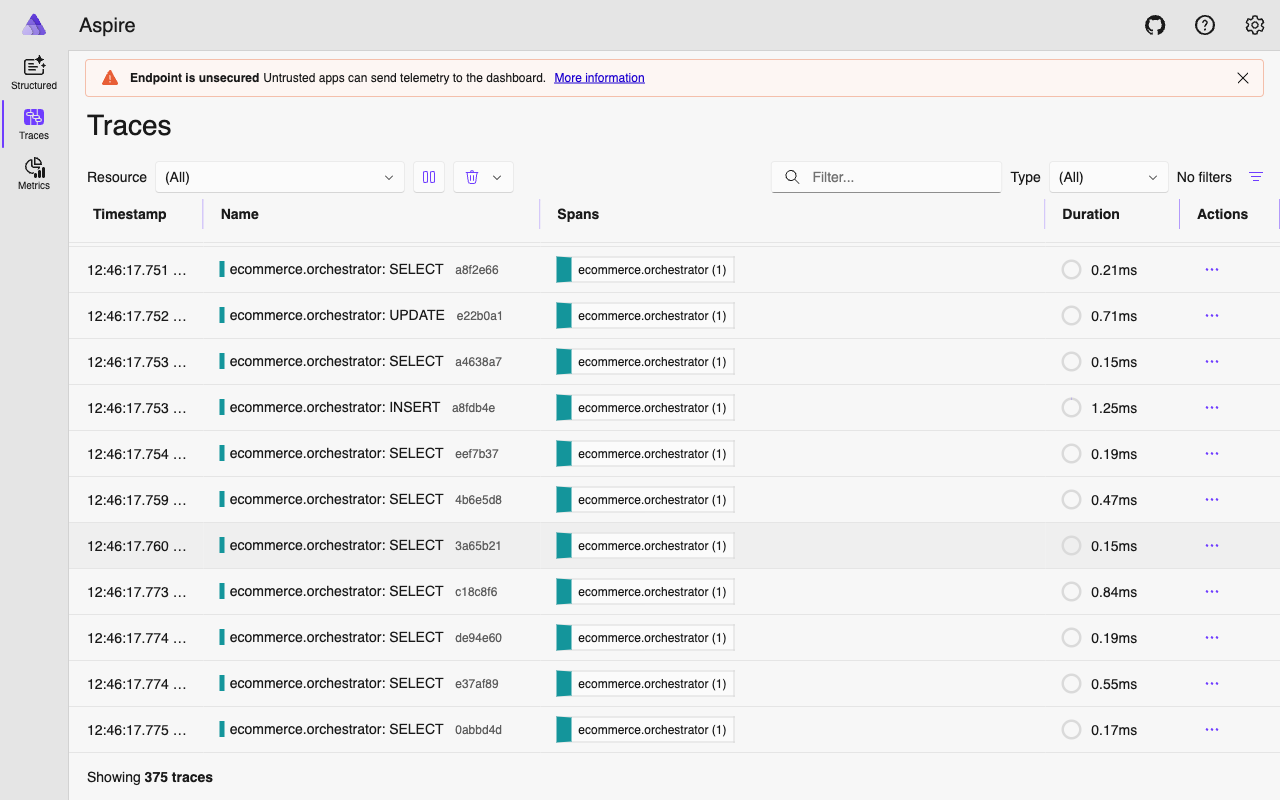
before_run – a sub-millisecond addition to the agent pipeline.
Privacy Considerations#
Storing user data across conversations raises immediate privacy questions. A few principles guide the ECommerce Agents implementation:
User-scoped isolation. Every memory is tied to a user_id with a foreign key constraint. The recall query always filters by the authenticated user’s email. There is no path – accidental or intentional – for one user’s memories to leak into another user’s context. The same ContextVar-based auth system that protects order data protects memory data.
Soft deletion. The is_active flag means memories can be deactivated without losing the audit trail. A future “forget me” feature can set is_active = FALSE on all of a user’s memories, and they immediately stop appearing in context and recall results.
Expiration. The expires_at column ensures time-sensitive memories do not persist indefinitely. An agent that stores “User is looking for a last-minute anniversary gift” can set an expiration of 48 hours, and the memory automatically drops out of recall after that window.
No cross-user learning. The current implementation does not use one user’s memories to inform another user’s experience. There is no collaborative filtering or aggregate preference modeling. Each user’s memory space is fully isolated. This is a deliberate simplicity choice – cross-user patterns are valuable but require a different consent model.
Transparency. The agent tells the user when it stores a memory (“I’ve noted your preference for…”). This is not enforced at the system level – it is a prompt instruction – but it keeps the user informed about what the system remembers. A production deployment should surface stored memories in the UI with explicit controls for the user to view, edit, and delete them.
For GDPR and similar regulations, the combination of soft deletion, expiration, and user-scoped isolation provides the technical foundation. A production system would add explicit consent flows, data export capabilities, and a proper right-to-erasure endpoint.
Performance Implications#
Adding a memory query to the ContextProvider means one additional database call per agent invocation. A few considerations:
Query cost. The memory recall query joins agent_memories with users on an indexed foreign key, filters by indexed columns (user_id, is_active), and limits to 10 rows. On PostgreSQL with a warm buffer pool, this is a sub-millisecond query. It runs in the same pool.acquire() block as the existing user profile and orders queries, so it does not add a new connection acquisition – just one more query on the same connection.
Context window budget. Each memory adds roughly 15-30 tokens to the system context. Ten memories add 150-300 tokens. For GPT-4.1 with a 1M token context window, this is negligible. For models with smaller context windows, you might reduce the limit from 10 to 5, or filter more aggressively by importance.
Storage growth. The main concern is unbounded memory accumulation. A user who interacts daily could accumulate hundreds of memories over months. The importance-based sorting ensures the most valuable memories always surface, but storage grows linearly. A production system should implement memory consolidation – periodically summarizing low-importance memories into higher-level observations and deactivating the originals.
Future Extensions#
The foundation we have built here supports several natural extensions:
Semantic recall with pgvector. The embedding column is already in the schema. The upgrade path: when storing a memory, generate an embedding via text-embedding-3-small and store it in the embedding column. When recalling, embed the current conversation context and use a cosine similarity search instead of (or in addition to) category filtering. This handles cases where the relevant memory does not fit neatly into a predefined category.
Memory consolidation. A background job that runs nightly, groups related low-importance memories, and replaces them with a single higher-importance summary. “User asked about running shoes three times” becomes “User is actively interested in running shoes” with an importance bump.
Cross-agent memory sharing. Currently, all agents share the same memory table. If different agents need different memory access levels – for example, the pricing agent should not see feedback memories intended for customer support – the category column provides a natural filtering mechanism.
User-facing memory management. A settings page where users can view their stored memories, delete individual ones, or opt out of memory entirely. The is_active flag and soft deletion make this straightforward.
What’s Next#
Memory gives agents continuity across conversations, but there is another dimension we have not addressed: how do you know if your agents are actually doing a good job? A user might tell the agent their preferences, the agent might store them, and the next conversation might still produce poor recommendations because the underlying tool logic is flawed.
In Part 9, we build an evaluation framework for ECommerce Agents – automated test suites that measure agent accuracy, tool-calling precision, and end-to-end task completion rates. Evaluation is what turns “it seems to work” into “we have data showing it works,” and it is the foundation for confident iteration on prompts, tools, and memory strategies.