
The infrastructure overhead in microservices projects is real. Setting up databases, wiring service discovery, getting distributed tracing working, managing connection strings across environments—this work hits before you’ve written a line of business logic. On more than one project, I’ve watched the first sprint disappear into Docker Compose files and appsettings drift.
.NET Aspire addresses this directly. It’s a cloud-ready stack that lets you define your entire application topology in C# code.
In this article, I’ll show how to add .NET Aspire to an existing Clean Architecture project with an Angular frontend, .NET backend API, and PostgreSQL database—no rewrite required.
Source Code: Clean Architecture with .NET Aspire
Note: This project demonstrates adding .NET Aspire to an existing application — not starting from scratch. The migration path is deliberately minimal: two new projects, one line in
Program.cs, and a project reference.
Adding Aspire to an Existing Project#
You don’t need to start from scratch. This project shows how to add Aspire to an existing Clean Architecture application. Here’s what I added:
Project Structure Changes#
aspire/                             # NEW - Aspire orchestration
├── AppHost/
│   ├── AppHost.cs                  # Service definitions
│   └── Contact.AppHost.csproj      # AppHost project file
└── ServiceDefaults/
    ├── Extensions.cs               # OpenTelemetry, health checks
    └── Contact.ServiceDefaults.csproj
Steps to Add Aspire to Your Existing Project#
Install the Aspire workload:
dotnet workload install aspireCreate the AppHost project:
dotnet new aspire-apphost -n YourApp.AppHostCreate the ServiceDefaults project:
dotnet new aspire-servicedefaults -n YourApp.ServiceDefaultsReference ServiceDefaults in your API project:
<ProjectReference Include="..\ServiceDefaults\YourApp.ServiceDefaults.csproj" />Add ServiceDefaults to your Program.cs:
var builder = WebApplication.CreateBuilder(args);
builder.AddServiceDefaults();  // Add this line

// ... your existing code ...

var app = builder.Build();
app.MapDefaultEndpoints();     // Add health check endpoints
app.Run();
Configure your AppHost to orchestrate services (see Deep Dive section below)
For detailed instructions, see Microsoft’s official guide: Add .NET Aspire to an existing .NET app
The Problem with Traditional Microservices Development#
Here’s a diagram of the pain points Aspire is designed to replace:
Common Challenges Include:#
| Challenge | Impact |
|---|---|
| Service Discovery | Manually managing URLs and ports across environments |
| Connection Strings | Duplicating database configs in multiple places |
| Observability | Setting up separate tools for logs, traces, and metrics |
| Container Management | Writing complex docker-compose files |
| Health Monitoring | Implementing custom health check endpoints |
| Environment Variables | Managing different configs for dev/staging/prod |
What is .NET Aspire?#
.NET Aspire is a cloud-ready stack for building observable, production-ready, distributed applications. At its core is the AppHost - a code-first orchestrator that defines your application’s services, resources, and connections.
Key Capabilities#
- AppHost Orchestration: Define services, dependencies, and configuration in code - no YAML required
- Rich Integrations: NuGet packages for popular services with standardized interfaces
- Built-in Observability: OpenTelemetry integration out of the box
- Developer Dashboard: Real-time visibility into all your services
- Consistent Tooling: Works with Visual Studio, VS Code, and CLI
Architecture Overview: This Project with Aspire#
Here’s how this Clean Architecture project is orchestrated with .NET Aspire:
(npm serve)"] API[".NET API
Clean Architecture
(contact-api)"] DB["PostgreSQL
Database
(contactsdb)"] PgAdmin["pgAdmin
DB Management"] end end User -->|"HTTP Requests"| Frontend Frontend -->|"API Calls
(Service Discovery)"| API API -->|"Data Access
(Auto Connection String)"| DB PgAdmin -->|"Management"| DB Services -.->|"Telemetry Data"| Dashboard style Aspire fill:#e6f3ff,stroke:#0066cc style Dashboard fill:#fff2cc,stroke:#cc9900 style Services fill:#e6ffe6,stroke:#009900
Service Flow Explained#
Deep Dive: The AppHost Configuration#
The heart of Aspire is the AppHost.cs file. Here’s our project’s configuration:
var builder = DistributedApplication.CreateBuilder(args);

// Database initialization scripts
var scriptsPath = Path.Combine(builder.AppHostDirectory, "..", "..", "scripts");

// PostgreSQL with pgAdmin and data persistence
var postgres = builder.AddPostgres("postgres")
    .WithDataVolume("postgres-data")
    .WithPgAdmin()
    .WithBindMount(scriptsPath, "/docker-entrypoint-initdb.d");

var contactsDb = postgres.AddDatabase("contactsdb", "contacts");

// Backend API - automatic database reference
var api = builder.AddProject<Projects.Contact_Api>("contact-api")
    .WithReference(contactsDb)
    .WaitFor(contactsDb)
    .WithEnvironment(context =>
    {
        context.EnvironmentVariables["AppSettings__ConnectionStrings__DefaultConnection"] =
            contactsDb.Resource.ConnectionStringExpression;
    });

// Angular Frontend - automatic API reference
var frontend = builder.AddNpmApp("frontend", "../../frontend", "serve")
    .WithReference(api)
    .WaitFor(api)
    .WithHttpEndpoint(targetPort: 4200, env: "PORT")
    .WithExternalHttpEndpoints()
    .PublishAsDockerFile();

builder.Build().Run();
What This Code Achieves#
| Feature | Traditional Approach | With Aspire |
|---|---|---|
| Database Connection | Manual connection string in appsettings.json | WithReference(contactsDb) - automatic injection |
| Service URLs | Hardcoded http://localhost:5217 | service://contact-api - automatic discovery |
| Container Startup | Manual docker-compose up | WaitFor() - automatic dependency ordering |
| Health Checks | Custom implementation | Built-in with /health and /alive endpoints |
Service Discovery: How It Works#
One of Aspire’s most useful features is automatic service discovery. No more hardcoded URLs.
How Service Discovery Works#
When you call WithReference(api) in the AppHost, Aspire:
- Registers the service in its internal service registry
- Generates environment variables with service endpoints
- Configures HttpClient to resolve service names automatically
- Handles port changes transparently
// In your Angular proxy or API calls, instead of:
// "http://localhost:5217/api/contacts"

// You use:
// "service://contact-api/api/contacts"

// Aspire resolves this at runtime!
OpenTelemetry: Built-in Observability#
Aspire ships OpenTelemetry support ready to go through the ServiceDefaults project:
public static TBuilder ConfigureOpenTelemetry<TBuilder>(this TBuilder builder)
    where TBuilder : IHostApplicationBuilder
{
    // Structured Logging
    builder.Logging.AddOpenTelemetry(logging =>
    {
        logging.IncludeFormattedMessage = true;
        logging.IncludeScopes = true;
    });

    // Metrics and Tracing
    builder.Services.AddOpenTelemetry()
        .WithMetrics(metrics =>
        {
            metrics.AddAspNetCoreInstrumentation()
                .AddHttpClientInstrumentation()
                .AddRuntimeInstrumentation();
        })
        .WithTracing(tracing =>
        {
            tracing.AddSource(builder.Environment.ApplicationName)
                .AddAspNetCoreInstrumentation()
                .AddHttpClientInstrumentation();
        });

    return builder;
}
What’s Included#
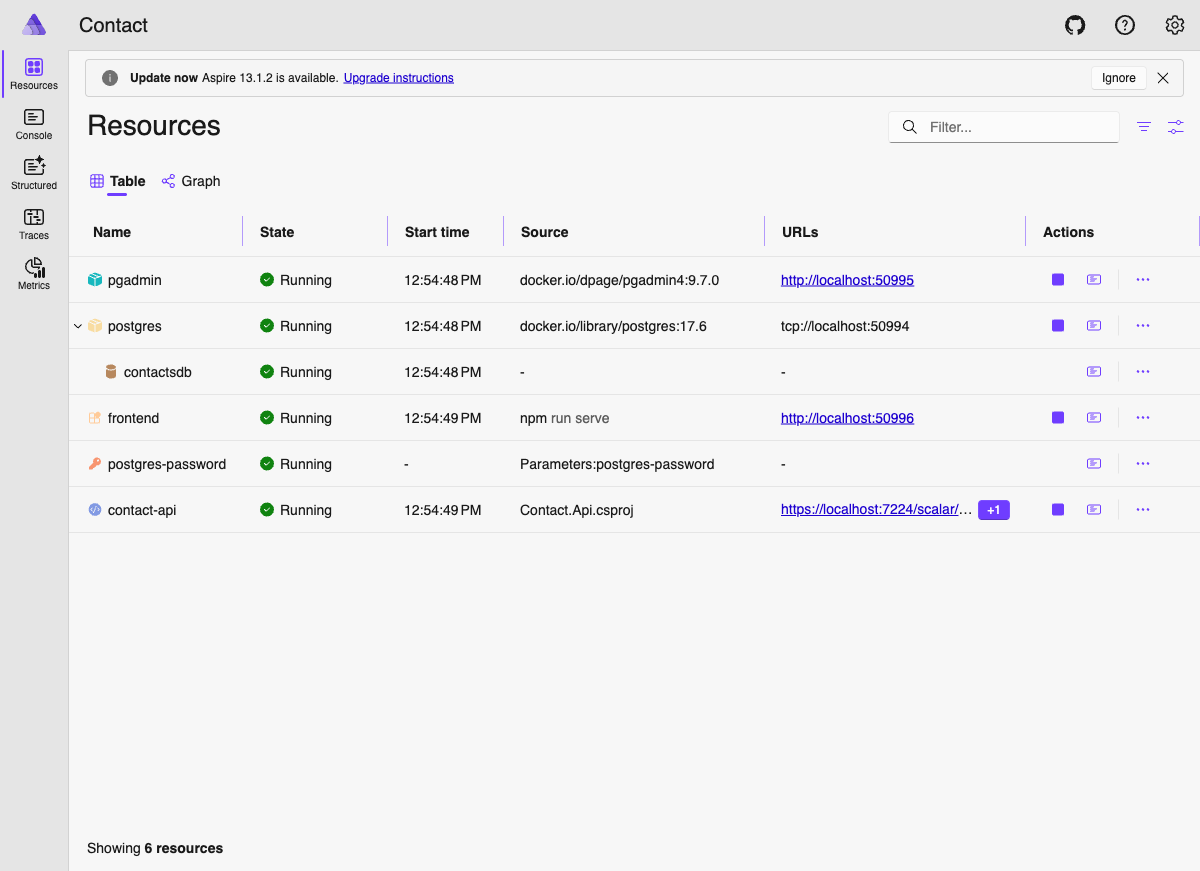
The Aspire Dashboard#
When you run your Aspire application, the dashboard launches automatically:
Dashboard Access#
After running dotnet run --project aspire/AppHost, the dashboard is available at:
| Environment | URL |
|---|---|
| Local Development | https://localhost:17178 |
Why Use Aspire for Microservices#
Comparison: Before and After Aspire#
| Aspect | Without Aspire | With Aspire |
|---|---|---|
| Setup Time | Hours/Days | Minutes |
| Configuration Files | Multiple (docker-compose, .env, etc.) | Single AppHost.cs |
| Service Discovery | Manual DNS/Environment vars | Automatic |
| Observability | Separate tool integration | Built-in |
| Health Checks | Custom implementation | Automatic |
| Local Development | Complex multi-terminal setup | Single F5/dotnet run |
| Debugging | Difficult across services | Native IDE support |
Getting Started with .NET Aspire#
Prerequisites#
| Requirement | Version | Download |
|---|---|---|
| .NET SDK | 10.0+ | Download |
| Node.js | 22 LTS | Download |
| Docker Desktop | Latest | Download |

npm run serve, discovered automatically by the .NET API through Aspire service references. Seeded contacts load from PostgreSQL on first run.
Quick Start Commands#
# Clone the repository
git clone https://github.com/nitin27may/clean-architecture-docker-dotnet-angular.git
cd clean-architecture-docker-dotnet-angular

# Install frontend dependencies
cd frontend && npm install && cd ..

# Run with Aspire
dotnet run --project aspire/AppHost
Creating a New Aspire Project from Scratch#
# Install Aspire workload
dotnet workload install aspire

# Create new Aspire starter app
dotnet new aspire-starter -n MyAspireApp

# Navigate and run
cd MyAspireApp
dotnet run --project MyAspireApp.AppHost
Using the Aspire CLI#
The Aspire CLI provides additional capabilities:
# Install Aspire CLI
dotnet tool install -g aspire.cli

# Create new project
aspire new starter --name MyApp

# Run project
aspire run

# Add integrations
aspire add postgres
aspire add redis
aspire add rabbitmq
Aspire Integrations Ecosystem#
Aspire provides ready-to-use integrations for popular services:
Adding Integrations#
// PostgreSQL with pgAdmin
var postgres = builder.AddPostgres("postgres")
    .WithPgAdmin()
    .WithDataVolume();

// Redis for caching
var redis = builder.AddRedis("cache");

// RabbitMQ for messaging
var rabbitmq = builder.AddRabbitMQ("messaging");

// Reference in your API
builder.AddProject<Projects.MyApi>("api")
    .WithReference(postgres)
    .WithReference(redis)
    .WithReference(rabbitmq);
From Development to Production#
The same AppHost topology that runs locally maps directly to production deployment targets:
defines topology"] end subgraph Deploy["Deployment Options"] DP1["Azure Container Apps"] DP2["Kubernetes"] DP3["AWS ECS"] DP4["Docker Compose"] end subgraph Prod["Production"] P1["Same service topology"] P2["Production resources"] P3["Scaled instances"] end Dev -->|"aspire deploy"| Deploy Deploy --> Prod style Dev fill:#fff2cc,stroke:#cc9900 style Deploy fill:#e6f3ff,stroke:#0066cc style Prod fill:#ccffcc,stroke:#009900
Deployment Example#
| Component | Local (Aspire) | Azure | AWS |
|---|---|---|---|
| Frontend | npm serve | Azure Container Apps | ECS |
| API | dotnet run | Azure Container Apps | Lambda |
| Database | Docker container | Azure PostgreSQL | RDS |
Best Practices#
1. Project Structure#
├── aspire/
│   ├── AppHost/              # Orchestration
│   │   └── AppHost.cs        # Service definitions
│   └── ServiceDefaults/      # Shared configurations
│       └── Extensions.cs     # OpenTelemetry, health checks
├── backend/
│   └── Contact.Api/          # Your API project
├── frontend/
│   └── src/                  # Angular application
└── scripts/
    └── seed-data.sql         # Database initialization
2. Always Use ServiceDefaults#
// In your API's Program.cs
var builder = WebApplication.CreateBuilder(args);
builder.AddServiceDefaults();  // Add this line!

var app = builder.Build();
app.MapDefaultEndpoints();     // Health check endpoints
app.Run();
3. Use WaitFor for Dependencies#
var api = builder.AddProject<Projects.Api>("api")
    .WithReference(database)
    .WaitFor(database)        // Ensures DB is ready
    .WithReference(cache)
    .WaitFor(cache);          // Ensures cache is ready
Troubleshooting Common Issues#
| Issue | Solution |
|---|---|
| Port already in use | Stop other services or change port in AppHost |
| Docker not running | Start Docker Desktop first |
| Node modules missing | Run npm install in frontend folder |
| Database not initializing | Check scripts folder path in WithBindMount |
| Services not discovering | Ensure WithReference is configured |
Conclusion#
The steps in this post are exactly what I followed to add Aspire to this existing Clean Architecture project. No rewrite, no restructuring of the application code—just two new projects (AppHost and ServiceDefaults), a one-line addition to Program.cs, and a reference added to the API project file.
The payoff is immediate: one command starts the Angular frontend, the .NET API, PostgreSQL, and pgAdmin. Service discovery is automatic. OpenTelemetry is wired. The dashboard shows you logs and traces across everything without any additional tooling.
If you’re running a similar stack—.NET API, Angular, PostgreSQL—clone the repo and run dotnet run --project aspire/AppHost. The migration path is low-risk and the observability improvements alone justify it.
Resources#
Official Documentation#
- .NET Aspire Overview
- Build Your First Aspire App
- Add Aspire to Existing App
- Aspire Dashboard Documentation
This Project#
Community#
Next Steps#
Related articles:
- Clean Architecture: Introduction to the Project Structure
- Dockerizing the .NET Core API, Angular and MS SQL Server
- Building Production-Ready Microservices with .NET Aspire